UGREEN 17-in-1 Maxidok Thunderbolt 5 Dock: Complete Architecture and Spec Breakdown
The UGREEN Maxidok Thunderbolt 5 Dock (model U716) represents an ambitious generational step forward in desktop peripheral consolidation, packaging seventeen discrete ports alongside an internal solid-state drive bay into a unified bronze aluminum enclosure.…
By Harold Blair

As Amazon Associates, we earn from qualifying purchases. This means we may receive a small commission at no extra cost to you if you click through and make a purchase.
The UGREEN Maxidok Thunderbolt 5 Dock (model U716) represents an ambitious generational step forward in desktop peripheral consolidation, packaging seventeen discrete ports alongside an internal solid-state drive bay into a unified bronze aluminum enclosure. Built to leverage Intel-certified Thunderbolt 5 controller architecture, this docking station breaks past the legacy bandwidth thresholds that have constrained high-end multi-display workstations for years. For hardware power users, creative professionals handling uncompressed media pipelines, and multi-monitor power users who demand unrelenting throughput across every interface, this hub acts as a high-capacity nerve center delivering exceptional peripheral stability.
This station specifically caters to users operating cutting-edge Thunderbolt 5 Windows workstations or modern Apple silicon computers running macOS 15 or later who require dual or triple high-resolution displays, high-speed networking, and multi-terabyte internal storage over a single cable. Conversely, everyday mobile laptop users who only need basic USB port expansion, owners of older machines limited to standard USB-C without DisplayPort Alt Mode or PCIe tunneling, or those demanding entirely fanless, zero-noise desktop environments should bypass this unit in favor of simpler alternatives.
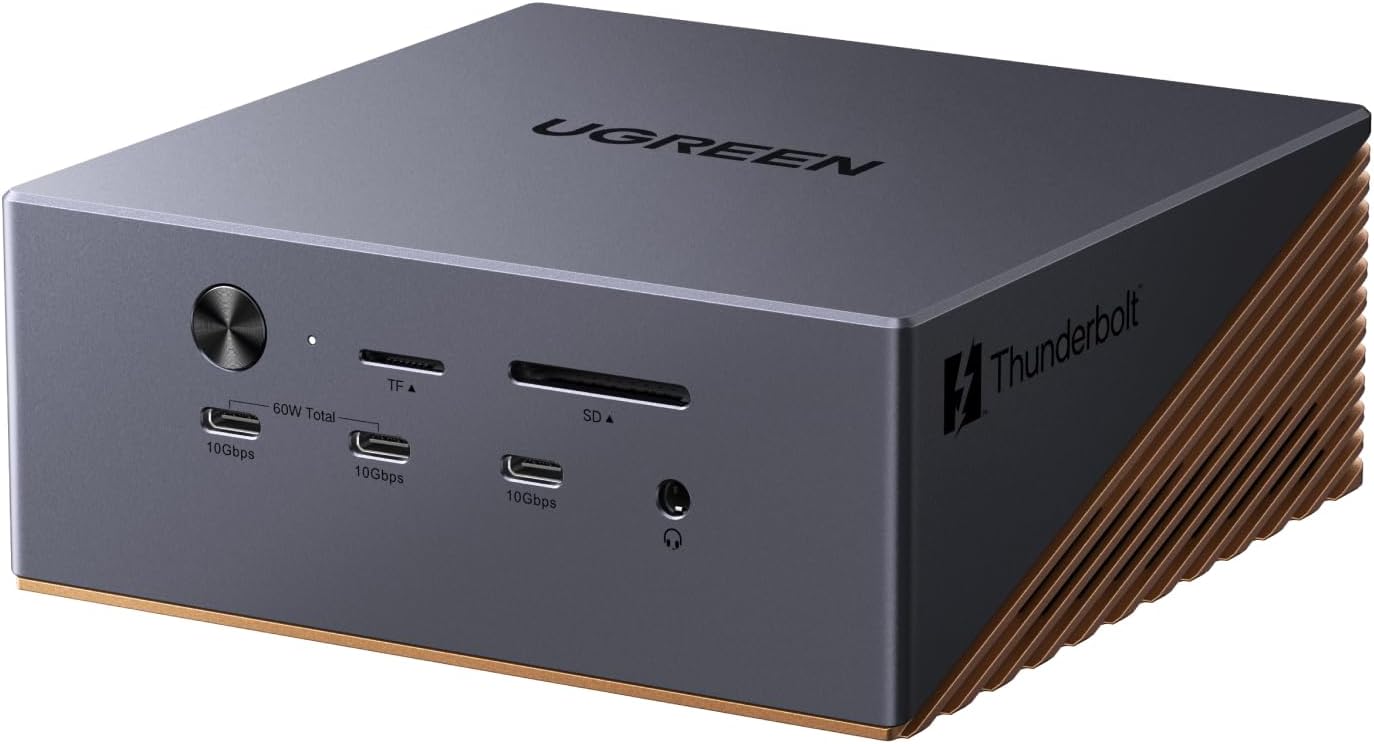
Spec sheet
UGREEN Maxidok Thunderbolt 5 Dock
- Model Identification
- Model U716 (Mfr Part Number 85590F)
- Host Connection Standard
- Intel-Certified Thunderbolt 5 (Up to 120Gbps bandwidth)
- Total Port Capacity
- 17 independent ports
- Internal Solid-State Storage
- PCIe Gen4x4 M.2 NVMe slot (2230, 2242, 2260, 2280 up to 8TB)
- Downstream Thunderbolt I/O
- 2x Thunderbolt 5 downstream ports
- Dedicated Video Connections
- 1x DisplayPort (DP1.4 / DP2.1 listed, non-DP++)
- Multi-Display Support
- Up to triple displays (Windows), dual displays (macOS)
- Maximum Resolution Modes
- Single or dual 8K at 60Hz; triple display support on Windows
- Power Delivery Capacity
- 240W total system power supply; up to 140W host laptop charging
- Wired Networking
- 2.5 Gigabit Ethernet (2.5GbE RJ45)
Figures as published by the manufacturer on the Amazon listing.
Thunderbolt 5 Bandwidth and PCIe Data Architecture
The foundation of this workstation centerpiece is its Intel-certified Thunderbolt 5 controller, engineered to deliver massive interface headroom compared to earlier interconnect standards. While previous-generation interfaces such as Thunderbolt 4 and USB4 were restricted to a 40Gbps bidirectional ceiling—frequently dividing bandwidth between video streams and peripheral data in ways that throttled storage drives—the UGREEN Maxidok 120Gbps bandwidth capability fundamentally alters throughput dynamics. Utilizing asymmetric Bandwidth Boost, the interface dynamically allocates up to 120Gbps for video-intensive display traffic while maintaining a 40Gbps return channel, or operates symmetrically at 80Gbps bidirectional throughput for heavy bidirectional transfers. This massive pipeline ensures that high-bandwidth data transfers never force a compromise in display refresh rates or peripheral responsiveness.
A closer look at the UGREEN 17-in-1 Maxidok Thunderbolt 5 dock specs reveals how this massive bandwidth ceiling translates into real-world bus stability. In older hardware configurations, such as those evaluated in our analysis of the caldigit ts4 dock, the underlying 32Gbps PCIe bandwidth limit meant that operating high-throughput external drives alongside multi-gigabit networking and 10Gbps USB peripherals could saturate the interconnect bus. In contrast, the Maxidok distributes PCIe resources generously across its internal PCIe Gen4x4 storage bay, its integrated 2.5GbE network controller, and its downstream Thunderbolt 5 ports. High-speed direct memory access channels operate simultaneously without the frame drops, storage stalls, or packet degradation typical of saturated 40Gbps channels.
This architecture is particularly critical for data pipelines that push continuous input and output streams across multiple channels. Video colorists, visual effects artists, and software engineers compiling large distributed codebases rely heavily on uninterrupted PCIe tunneling. By providing dedicated downstream Thunderbolt 5 ports operating at native bus speeds, the dock enables daisy-chaining secondary high-speed capture cards, external GPU chassis, or RAID storage enclosures without destabilizing the primary host connection. The overall system provides the physical bandwidth necessary to maintain workstation-tier throughput under extreme multitasking conditions.
Display Compatibility and Multi-Monitor Topology
Display performance represents one of the most critical evaluation metrics for prospective docking station buyers, and the UGREEN Maxidok display compatibility profile showcases both remarkable power and platform-specific constraints. For Windows environments running Windows 10 or later, the dock achieves triple independent monitor operation by leveraging its dedicated DisplayPort output alongside two downstream Thunderbolt 5 interfaces. Users can route single or dual 8K displays operating at 60Hz, or orchestrate high-refresh multi-screen command centers for financial analytics, CAD drafting, and complex 3D simulation. This multi-stream routing capability ensures that users running compatible graphics cards can configure extensive desktop real estate without resorting to compressed, latency-prone software display adapters.
However, configuring a UGREEN Thunderbolt 5 dock triple monitor workstation requires close attention to the specific signaling protocols built into the hardware. The physical DisplayPort on the rear panel is listed with DP1.4 and DP2.1 capabilities, but the listing explicitly notes that it does not support DP++ (Dual-Mode DisplayPort). In practical terms, this means passive DisplayPort-to-HDMI cables or adapters cannot negotiate HDMI clock signaling natively through the port; connecting an HDMI monitor requires a dedicated active DisplayPort adapter to perform signal conversion. System builders must account for this requirement when integrating legacy HDMI displays into their workflow to avoid black screens or signal handshake dropouts.
For Apple workstation users, UGREEN 17-in-1 Thunderbolt 5 MacBook support operates within the architectural rules dictated by Apple silicon and macOS. The listing specifies that Mac systems require macOS 15 or later and support up to dual independent external displays. Because macOS continues to forgo native DisplayPort Multi-Stream Transport (MST) support across a single display connection, driving multiple distinct displays requires two discrete hardware display tunnels routed through the Thunderbolt architecture. Users operating the Mac mini with M4 Pro, or MacBook models with M4 Standard, Pro, and Max, as well as M1, M2, and M3 Pro and Max processors, can successfully drive two high-resolution displays. Those who previously configured more modest setups around hardware like the owc thunderbolt hub for m1 mac will notice a substantial improvement in available monitor bandwidth and refresh stability when upgrading to this dual-stream configuration.
Internal M.2 NVMe Storage Integration and Thermal Management
A distinctive functional highlight of the hardware is the UGREEN Thunderbolt 5 dock M.2 NVMe expansion bay concealed within the chassis. Rather than forcing users to purchase an external portable drive enclosure that monopolizes a desktop USB or Thunderbolt port, the Maxidok integrates an internal PCIe Gen4x4 interface directly onto its main PCB. The slot natively supports standard M-Key solid-state drive form factors, accommodating 2230, 2242, 2260, and standard 2280 drive sizes up to an expansive 8TB capacity. Operating over dedicated Gen4x4 lanes, this onboard bay provides rapid read and write velocities ideal for secondary scratch disks, local project archives, virtual machine containers, and real-time 4K/8K video editing caches.
Physical clearance inside the storage chamber is engineered with precision, though it introduces specific dimensional limitations. The listing details note that the bay is compatible with M.2 NVMe SSDs equipped with heatsinks, provided the heatsink dimensions do not exceed 12 millimeters in height and 24 millimeters in width. Drives featuring tall, bulky finned coolers or oversized heatpipes designed for desktop motherboards will not clear the housing, making low-profile or bare drives paired with standard low-profile heat spreaders essential. Maintaining adherence to these physical boundaries ensures the enclosure closes securely while maintaining proper contact with thermal pads for heat conduction.
Because high-performance PCIe Gen4x4 solid-state drives generate substantial thermal output during extended read and write cycles, thermal management is paramount. UGREEN addresses this challenge by combining a heavy bronze aluminum unibody chassis with an internal AI smart cooling mechanism driven by an ultra-thin 60mm fan. The manufacturer listing notes that it is completely normal for the cooling fan to operate during system use. The aluminum shell acts as a structural heat radiator to passively absorb thermal energy, while the active 60mm fan circulates airflow across the internal controller chipsets and storage bay. This active cooling cycle prevents drive throttling and controller safety shutdowns during prolonged disk-to-disk transfers, although users operating in silent studio settings must anticipate subtle acoustic feedback when the fan spins up under heavy system loads.
Power Delivery Routing and Peripheral I/O Layout
Power management across seventeen concurrent ports requires an industrial-grade internal electrical architecture, which is underpinned by the UGREEN Maxidok 240W power delivery framework. The station draws power from an external 240W total system power supply, allowing it to distribute power simultaneously across host computing hardware, high-draw internal components, and connected mobile devices. The upstream host connection provides up to 140W of laptop charging via advanced USB Power Delivery protocols, easily servicing power-hungry desktop-replacement laptops and 16-inch MacBook Pro models under sustained processing stress without depleting the laptop battery.
The peripheral port distribution strikes a balanced ratio between legacy compatibility and high-throughput modern buses across its front and rear panels:
- Three USB-A ports rated for 10Gbps operation, ensuring legacy storage drives, peripherals, and card readers operate without interface bottlenecks.
- Three USB-C ports operating at 10Gbps, with two specific ports sharing an independent 60W power delivery pool for rapidly charging phones, tablets, or accessory battery packs.
- Dedicated SD and TF (microSD) 4.0 card reader slots capable of high-speed UHS-II transfers, enabling photographers and cinematographers to offload multi-gigabyte media cards rapidly.
- Three separate 3.5mm audio jacks providing dedicated connectivity options for headphones, microphones, and desktop analog speakers without requiring external audio splitters.
- An enterprise-grade 2.5GbE RJ45 Ethernet port delivering low-latency wired connectivity that outpaces standard gigabit networking for local NAS transfers and multi-gigabit internet tiers.
- Two downstream Thunderbolt 5 ports capable of daisy-chaining secondary high-speed hubs, displays, and external PCIe hardware at native interconnect speeds.
This layout ensures that power-hungry external accessories do not compromise the stability of connected video streams or drive arrays. Workstations considering high-end alternatives, such as the razer thunderbolt 5 dock, often encounter trade-offs regarding internal drive bays versus exterior port density. The Maxidok balances both by housing an internal SSD slot while simultaneously leaving six fast 10Gbps USB ports accessible for external peripheral arrays.
Workflow Value and Compatibility Considerations
When evaluating whether the hardware justifies its position on an advanced production desk, answering whether the UGREEN Maxidok Thunderbolt 5 dock is worth it comes down to individual peripheral bottlenecks and host machine specifications. If your daily workflow is restricted by the 40Gbps interface saturation of Thunderbolt 4 docks—such as when running multiple 4K high-refresh displays while concurrently pulling media from high-speed external storage—the expanded 120Gbps headroom offers palpable workflow fluidity. The elimination of peripheral bus contention, combined with the reduction of desk clutter achieved by nesting an 8TB NVMe drive directly inside the dock chassis, delivers measurable productivity gains for demanding technical users.
At the same time, potential buyers must perform a stringent compatibility audit prior to upgrading. The dock requires modern operating systems—specifically Windows 10 or later for PC platforms and macOS 15 or later for Mac workstations. Attempting to use this hardware on legacy operating systems or laptops lacking native Thunderbolt 4 or Thunderbolt 5 controllers will result in reduced interface speeds, disabled downstream ports, or failed display routing. Furthermore, the necessity of active adapters for HDMI monitors and the presence of an active cooling fan represent genuine operational factors that prospective owners must weigh against their acoustic tolerances and existing display cabling.
UGREEN Maxidok Thunderbolt 5 Dock Pros and Cons
What works
- Up to 120Gbps Thunderbolt 5 dynamic bandwidth
- Internal PCIe Gen4x4 M.2 NVMe storage slot
- High-wattage 140W host laptop charging
- Triple independent display output on Windows
- Comprehensive 17-port peripheral and network connectivity
What to weigh up
- DisplayPort requires active adapter for HDMI screens
- Integrated 60mm cooling fan creates ambient sound
- MacOS limited to dual external display outputs
Check UGREEN Maxidok Thunderbolt 5 Dock on Amazon
Who Should Buy the UGREEN Maxidok Thunderbolt 5 Dock
Buy It If
- You operate a Thunderbolt 5 Windows laptop or compatible Apple silicon Mac and require dual or triple high-resolution 8K displays without sacrificing peripheral bandwidth.
- You want to eliminate desk clutter by housing up to an 8TB high-speed PCIe Gen4x4 NVMe solid-state drive directly within your central connectivity dock.
- Your workstation demands high-wattage 140W host laptop charging alongside dedicated secondary 60W power delivery for external devices.
- Your daily file management workflows require concurrent multi-gigabit bandwidth across 2.5GbE networking, UHS-II SD cards, and six 10Gbps USB interfaces.
Skip It If
- You work in an audio-sensitive environment requiring completely silent, passive desk hardware, as the built-in 60mm cooling fan engages under load.
- You rely on standard HDMI monitors and do not wish to purchase separate active DisplayPort-to-HDMI adapters to overcome the non-DP++ limitation.
- Your host computer lacks Thunderbolt 4 or Thunderbolt 5 capabilities, which leaves the massive 120Gbps architecture largely underutilized.
Final Verdict
4.1 / 5Amazon buyer rating, 314 ratings
The UGREEN Maxidok Thunderbolt 5 Dock stands as a formidable flagship docking station that sets a high benchmark for next-generation peripheral expansion. By harnessing Intel-certified Thunderbolt 5 silicon, it provides the 120Gbps bandwidth headroom necessary to simultaneously support multi-monitor 8K pipelines, internal PCIe Gen4x4 NVMe solid-state storage up to 8TB, 2.5GbE networking, and high-wattage 140W power delivery over a single host cable. Its bronze aluminum chassis and internal 60mm AI cooling system provide the mechanical and thermal foundation needed to keep demanding workstation components running under sustained electrical and thermal loads.
While the non-DP++ DisplayPort output demands active adapter hardware for HDMI screens, and the active cooling fan introduces mild acoustic presence, these engineering decisions are direct compromises made to sustain unprecedented data throughput and multi-stream stability. For high-demand workstation users, content creators, and engineers seeking to future-proof their desk setup with cutting-edge interface bandwidth, the Maxidok U716 delivers an uncompromising, technically sound desktop integration solution.
FAQ
What are the primary UGREEN 17-in-1 Maxidok Thunderbolt 5 dock specs?
The dock features 17 total ports, including 2 downstream Thunderbolt 5 ports, 1 DisplayPort, 3 USB-A 10Gbps ports, 3 USB-C 10Gbps ports (with 2 sharing 60W charging), SD and TF 4.0 slots, 3 3.5mm audio jacks, and a 2.5GbE network port. Internally, it houses a PCIe Gen4x4 M.2 NVMe slot supporting drives up to 8TB, powered by a 240W total system power supply delivering up to 140W host charging.
Does the UGREEN Maxidok Thunderbolt 5 dock support triple monitors on macOS?
No, the dock supports up to dual independent displays on Mac systems running macOS 15 or later due to operating system architectural limits regarding DisplayPort Multi-Stream Transport. Triple independent display output is supported on compatible Windows systems running Windows 10 or later via the two downstream Thunderbolt 5 ports and the DisplayPort connector.
Which M.2 NVMe SSD sizes fit inside the UGREEN Maxidok dock?
The internal M.2 NVMe PCIe Gen4x4 drive bay accommodates four standard solid-state drive form factors: 2230, 2242, 2260, and 2280. It supports drive capacities up to 8TB, and can accommodate drives with attached heatsinks provided the total heatsink dimensions do not exceed 12mm in height and 24mm in width.
Can I plug an HDMI cable directly into the DisplayPort connection?
You cannot use a passive DisplayPort-to-HDMI cable because the dock’s DisplayPort output does not support DP++ (Dual-Mode DisplayPort). To connect an HDMI monitor to the DisplayPort socket, you must use an active DisplayPort-to-HDMI adapter that actively converts the video signal protocol.
Why does the UGREEN Maxidok feature an integrated cooling fan?
The dock incorporates an active 60mm AI smart cooling fan because managing 120Gbps Thunderbolt 5 controllers, an internal PCIe Gen4x4 NVMe SSD, 140W laptop power delivery, and multi-gigabit networking generates substantial thermal energy. The listing notes that fan operation is completely normal, ensuring internal components stay within safe operating temperatures and do not thermally throttle under heavy workstation use.
What are the operating system requirements for the UGREEN Maxidok?
The dock requires a minimum operating system version of Windows 10 for PC workstations and macOS 15 or later for Apple Mac systems. It is natively compatible with modern Thunderbolt 5 and Thunderbolt 4 Windows laptops, Mac mini models with M4 Pro, and MacBook models equipped with M4 Standard, Pro, and Max chips, as well as M1, M2, and M3 Pro and Max processors.
See this listing on Amazon We may earn a commission if you buy through this link.
More in Accessories & Peripherals


The weekly shortlist
Specs worth reading, once a week
New teardowns, spec sheets and buying notes from across the desk.
This demo form is not connected to a mailing service.