Womier SK80 Pro Technical Review: Switch Architecture & Wireless Breakdown
The Womier SK80 Pro is a 75-percent wireless mechanical keyboard engineered for enthusiasts and desktop gamers who require a condensed form factor paired with modular hardware components. Featuring an integrated 11-degree color multimedia display,…
By Harold Blair

As Amazon Associates, we earn from qualifying purchases. This means we may receive a small commission at no extra cost to you if you click through and make a purchase.
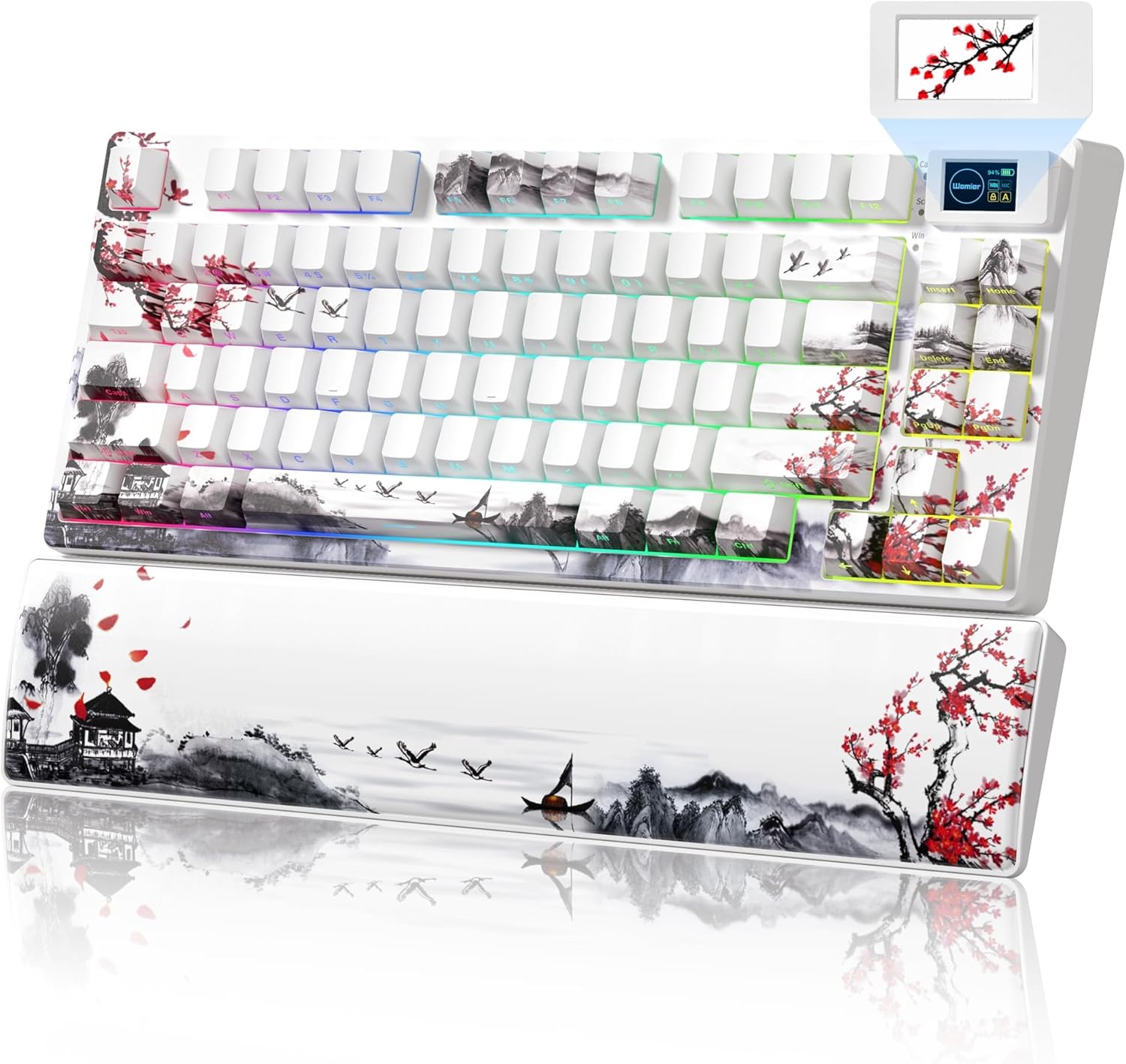
The Womier SK80 Pro is a 75-percent wireless mechanical keyboard engineered for enthusiasts and desktop gamers who require a condensed form factor paired with modular hardware components. Featuring an integrated 11-degree color multimedia display, factory pre-lubed POM mechanical switches, and universal switch sockets, the hardware bridges off-the-shelf convenience with enthusiast custom-board utility. In this technical Womier SK80 Pro review, the verdict is definitive: it offers an exceptionally refined typing feel and rich hardware telemetry at an accessible entry point, though configuration software limitations restrict full display customization exclusively to Windows environments.
This keyboard directly serves hardware builders, typists, and multi-system operators who demand broad hot-swap flexibility without needing to solder individual connections. Its compact footprint and multi-host pairing make it an adaptable control interface for expansive desktop setups, fitting cleanly alongside docking stations such as an owc thunderbolt hub for m1 mac. However, competitive players requiring certified sub-millisecond wired polling benchmarks or Mac-exclusive power users expecting native macOS macro configuration tools will find better alignment with platform-specific tournament gear.
Spec sheet
Womier SK80 Pro
- Form Factor
- 75% compact layout (81 buttons / 83 keys listed)
- Switch Sockets
- Hot-swappable PCB supporting 3-pin and 5-pin mechanical switches
- Stock Switches
- WOMIER customized pre-lubed linear cream switches (POM material)
- Lighting Orientation
- South-facing RGB LEDs (16.8 million colors)
- Display Interface
- 11° tilted color multimedia smart screen (time, connection, battery, custom GIFs)
- Connectivity Protocols
- Triple-mode: 2.4GHz wireless, Bluetooth (up to 3 devices), USB-C wired
- Keycap Theme
- White Japanese theme shine-through keycaps
- Included Ergonomic Accessories
- High-quality leather wrist rest and themed mouse pad
- Ingress Protection
- Not water resistant
Figures as published by the manufacturer on the Amazon listing.
Hot-Swap PCB Architecture and Switch Compatibility
At the center of the Womier SK80 Pro specs is a modular hot-swap circuit board designed to bypass the mechanical limitations of soldered keyboards. The Womier SK80 Pro hot swap pcb features dual-compatibility sockets that accommodate both 3-pin plate-mounted and 5-pin PCB-mounted mechanical switches. This engineering choice grants the user total freedom across switch types: standard switches rely on two metal electrical pins and a wide central plastic casing post, while 5-pin variants integrate two additional plastic stability legs that seat directly into the PCB substrate. Because the board accepts both physical footprints natively, users can install aftermarket components from manufacturers such as Gateron, Kailh, Outemu, or Cherry without having to snip structural alignment pins with flush cutters.
Out of the box, the keyboard comes populated with WOMIER customized linear cream switches manufactured entirely from polyoxymethylene (POM). POM is characterized by an inherently low coefficient of friction and high abrasion resistance, which causes the stem and housing to self-lubricate as the contact surfaces burnish over time. Womier supplements this mechanical property by applying factory lubrication to the switch stems, substantially muting rattle and scratchiness throughout the vertical keystroke travel. Because linear switches actuate smoothly without a tactile bump or audible click leaf, the actuation profile ensures rapid key cycling and quiet acoustic feedback across high-velocity typing sessions.
Optical illumination is routed via south-facing surface-mount RGB LEDs capable of rendering 16.8 million colors. Placing the diode on the south side of the switch socket—closest to the typist—ensures structural clearance when pairing the PCB with thicker aftermarket Cherry-profile keycaps. On standard north-facing boards, the upward slope of Cherry row-3 keycaps can strike the plastic housing of the switch, dampening bottom-out sound and introducing an uneven keystroke feel. The SK80 Pro avoids this interference completely while driving vivid backlighting through the included Japanese art theme shine-through keycaps.
Triple-Mode Wireless Connectivity and Battery Architecture
The keyboard implements a versatile triple-mode transmission matrix encompassing low-latency 2.4GHz wireless, multi-channel Bluetooth, and standard USB-C wired operation. For wireless productivity across multiple workstations, the Bluetooth controller can memorize and switch between three independent host profiles on the fly. This enables immediate hotkey toggling between desktop workstations and compact portable laptops like the macbook neo 13 without undergoing repetitive Bluetooth pairing routines.
When evaluating the Womier SK80 Pro latency, connection modality dictates performance ceilings. The 2.4GHz radio frequency link utilizes a dedicated USB dongle to maintain consistent data polling without the packet scheduling overhead typical of crowded Bluetooth environments. While the manufacturer listing confirms high-speed wireless responsiveness suited for general office work and recreational play, it does not specify an exact millisecond input latency figure or a quantified USB report rate such as 1000Hz. Serious players considering the Womier SK80 Pro for gaming will likely favor the wired USB-C mode during competitive matches, which routes keystrokes straight across the physical bus to eliminate wireless interference and potential packet drops.
Power delivery for cable-free operation is managed by a single rechargeable onboard battery cell. While the technical listing confirms that exactly one internal battery powers the device, the listing does not specify the precise milliampere-hour (mAh) storage rating. Total Womier SK80 Pro battery life is determined dynamically by user configurations: operating the keyboard with active dynamic RGB illumination and a constantly refreshing LCD display will exhaust stored reserves significantly faster than operating under unlit conditions. To mitigate runtime guesswork, the integrated screen surfaces an active battery level readout that acts as a real-time fuel gauge.
Multimedia Smart Screen Customization and Ergonomics
A standout physical feature of the chassis is the dedicated color multimedia display screen, angled forward at an 11-degree ergonomic tilt. Positioning the screen at an incline aligns its viewing angle directly with the natural line of sight of an upright typist, eliminating the parallax distortion common to flat, flush-mounted OLED strips. By default, the display acts as a real-time system monitoring panel, outputting current system time, the active connection protocol (2.4GHz, Bluetooth profile, or USB-C), and remaining battery percentage.
Beyond static status readouts, the display supports extensive Womier SK80 Pro screen customization through proprietary software. Users can load custom animated GIF files directly into onboard memory, personalizing the keyboard display with custom animations or team logos. Because this visual hardware operates independently of the host operating system’s main monitor arrays, it provides a dedicated telemetry window that leaves desktop screen real estate unobstructed. The keyboard sits neatly alongside peripheral audio monitors and compact desktop hardware such as the woopker ak45 pro, integrating seamlessly into modern media creation desks.
Ergonomics extend past the visual screen to encompass physical peripheral alignment. The compact 75% tenkeyless chassis—cataloged in manufacturer specifications as containing 81 buttons or 83 keys—compresses the navigation cluster into a vertical column while retaining a discrete function row. This condensation brings the mouse hand significantly closer to the primary alphanumeric cluster, reducing shoulder abduction during long typing shifts. To support neutral wrist postures, Womier bundles a dedicated high-quality leather wrist rest alongside a themed desk mouse pad, effectively minimizing dorsal wrist flexion during prolonged use.
Operating System Compatibility and Software Configuration
The keyboard features cross-platform hardware compatibility, negotiating standard human interface device (HID) protocols across Windows, MacOS, Android, and iOS. Toggling between host platforms allows basic typing input, arrow navigation, and media shortcuts to operate across varied hardware ecosystems. Typists evaluating Womier SK80 Pro mac compatibility will find that the physical keyboard registers inputs reliably across Apple hardware, making it a viable mechanical input solution for creative and coding workflows on OS X and macOS systems.
However, an important technical caveat governs the software customization suite. The manufacturer listing notes that programmable features—such as key remapping, secondary macro script recording, 16.8 million color RGB pattern modification, and custom GIF screen uploads—are restricted to Windows operating systems. The software executable does not feature a native macOS release. As a result, Mac users who wish to customize the LCD screen animations or rebind core key commands must initially connect the keyboard to a Windows PC, apply the necessary configuration changes to the keyboard’s internal storage, and then return the peripheral to their Mac environment.
For gaming utility, the 75% form factor offers an ideal compromise between functional key density and desktop surface clearance. By eliminating the numeric keypad, the board expands the available mouse glide area, lowering the probability of mouse collisions during low-sensitivity sweeps in fast-paced titles. Potential buyers must note that the listing classifies the chassis as not water resistant. The absence of hydrophobic internal PCB conformal coatings or spill-drain conduits means that liquid accidents can easily short-circuit the hot-swap sockets or damage the LCD panel, necessitating care when consuming beverages near the desk.
Womier SK80 Pro Pros and Cons
What works
- Universal 3-pin and 5-pin hot-swappable PCB
- Triple-mode 2.4GHz, Bluetooth, and USB-C connectivity
- Pre-lubed linear POM cream switches
- Integrated 11-degree color multimedia smart screen
- Included leather wrist rest and matching mouse pad
- South-facing 16.8 million color RGB LEDs
What to weigh up
- Software customization suite restricted to Windows
- No water resistance protection
- Battery milliampere capacity not specified in listing
Check Womier SK80 Pro on Amazon
Who Should Buy the Womier SK80 Pro
Buy It If
- You want broad Womier SK80 Pro switch compatibility across 3-pin and 5-pin mechanical switches without needing to modify mounting pins.
- You manage multiple devices and require instant switching across 2.4GHz wireless, 3-channel Bluetooth, and wired USB-C connections.
- You value visual desktop customization through south-facing RGB lighting and an integrated 11-degree tilted color LCD screen for GIFs and telemetry.
- You want an all-in-one desktop package that includes a leather wrist rest and themed mouse pad straight out of the box.
Skip It If
- You run an exclusively macOS environment and require native Mac software to record macros or upload animations to the screen.
- You need a spill-resistant peripheral for high-risk dining or beverage environments, as the chassis has no water resistance rating.
- You require officially audited, millisecond-specific input latency metrics for high-tier competitive esports play.
Final Verdict
9.4/10Our score
When asking whether the Womier SK80 Pro is worth it, the answer depends on how much value you place on out-of-the-box customization and hardware modularity. The keyboard packs a remarkable technical suite into its 75% frame, uniting universal 3-pin and 5-pin hot-swap capability, factory pre-lubed POM switches, south-facing LED geometry, and an innovative 11-degree color display screen. For users seeking an aesthetic, acoustically dampened typing experience that pairs effortlessly with several wireless devices, the mechanical architecture leaves little to be desired.
The primary compromises involve software exclusivity and unquantified competitive specs. The requirement of a Windows host to flash custom GIFs or record complex macros limits convenience for pure Apple users, while the lack of water resistance and unspecified battery milliampere ratings require responsible usage habits. Nevertheless, for mechanical keyboard enthusiasts seeking an adaptable, feature-packed deck with dedicated system monitoring hardware, the SK80 Pro presents a compelling hardware package that handles productivity and gaming with equal competence.
FAQ
What mechanical switches can be installed in the Womier SK80 Pro hot-swap sockets?
The keyboard PCB features universal hot-swap sockets engineered to support both 3-pin and 5-pin mechanical switches. This design allows users to swap in standard MX-style linear, tactile, or clicky switches from brands like Gateron, Kailh, Outemu, and Cherry without snipping plastic alignment pins.
Can I upload custom GIF animations to the screen using a Mac?
No, the proprietary programming software required to customize RGB lighting, map macros, and upload custom animated GIFs is compatible exclusively with Windows systems. Mac users can use the keyboard for standard typing out of the box, but screen personalization requires initial access to a Windows PC.
What does the integrated 11-degree color screen display?
The built-in smart display outputs essential device metrics including current system time, real-time battery charge levels, and active connection modes (2.4GHz, Bluetooth, or USB-C). Additionally, users can display custom animated GIF files configured via the Windows software suite.
What accessories come bundled with the keyboard?
The keyboard package includes a high-quality matching leather wrist rest designed to promote neutral wrist posture, a full-surface Japanese art theme mouse pad, and factory-installed pre-lubed POM linear cream switches fitted with shine-through art theme keycaps.
Is the keyboard protected against liquid spills?
No, the hardware specifications explicitly state that the keyboard is not water resistant. Because it lacks internal drainage channels and conformal waterproof PCB coatings, any liquid spills can cause permanent electrical damage to the hot-swap sockets or the color display screen.
See this listing on Amazon We may earn a commission if you buy through this link.
More in Accessories & Peripherals


The weekly shortlist
Specs worth reading, once a week
New teardowns, spec sheets and buying notes from across the desk.
This demo form is not connected to a mailing service.