HP 24mh FHD Monitor Spec Breakdown: Ergonomics, I/O, and IPS Performance
The HP 24mh is an enterprise-oriented 23.8-inch desktop computer monitor engineered for general office tasks, document processing, and multi-display workstation layouts. Built around a Full HD 1080p In-Plane Switching panel, this display pairs broad…

As Amazon Associates, we earn from qualifying purchases. This means we may receive a small commission at no extra cost to you if you click through and make a purchase.
The HP 24mh is an enterprise-oriented 23.8-inch desktop computer monitor engineered for general office tasks, document processing, and multi-display workstation layouts. Built around a Full HD 1080p In-Plane Switching panel, this display pairs broad 178-degree viewing angles with an integrated stand that delivers genuine height adjustability right out of the packaging. With its 75 Hz refresh rate, integrated audio drivers, and a versatile tri-input connector layout containing DisplayPort, HDMI, and legacy VGA, it eliminates common setup hurdles. For knowledge workers and remote professionals seeking an ergonomic display that handles daily productivity without requiring aftermarket desk arms or expensive interface adapters, it presents a balanced and practical workstation centerpiece.
This display directly suits spreadsheet specialists, remote administrative staff, programmers, and students who spend long hours reading text and require a display that can be raised or tilted to eye level to alleviate physical strain. It also serves office environments upgrading their computing hardware in phases, where legacy workstations relying on analog VGA must coexist alongside modern laptops that transmit video over DisplayPort or HDMI. Conversely, users who need professional wide-gamut color reproduction for print prepress, high-framerate competitive esports performance, or expansive 4K screen real estate for massive audio-video editing timelines will find the 1080p resolution and basic feature set insufficient for their high-precision workflows.
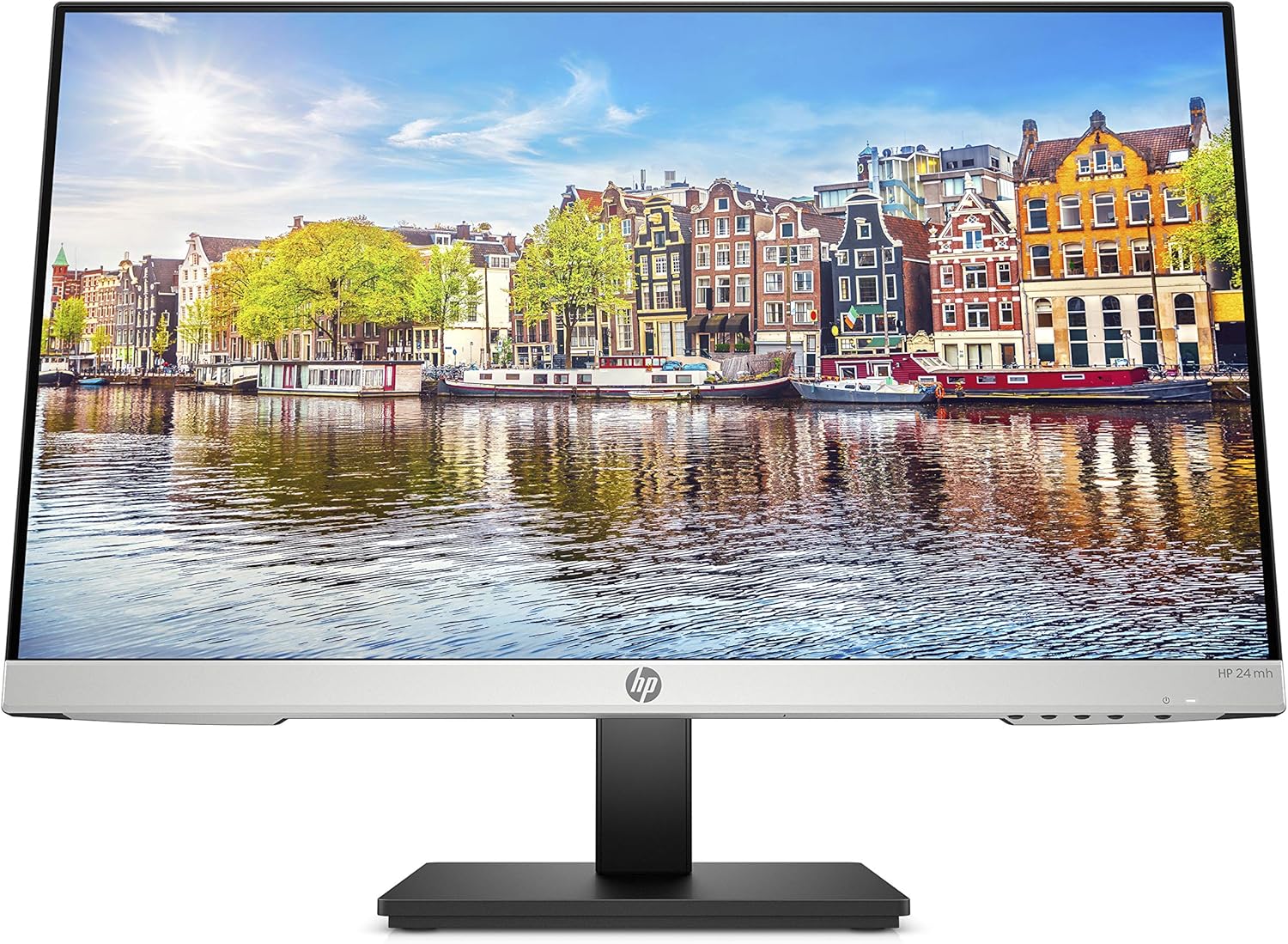
Spec sheet
HP 24mh
- Screen Size
- 23.8 inches (diagonal)
- Native Resolution
- 1920 x 1080 pixels (Full HD 1080p)
- Panel Technology
- In-Plane Switching (IPS) with LED backlighting
- Refresh Rate
- 75 Hz
- Pixel Pitch
- 0.27 mm
- Peak Brightness
- 250 cd/m²
- Video Inputs
- 1x DisplayPort, 1x HDMI, 1x VGA
- Audio Output
- Two built-in 2W stereo speakers
- Ergonomic Adjustability
- 100 mm height travel, -5° forward to +23° backward tilt
- Power Consumption
- 22 watts
Figures as published by the manufacturer on the Amazon listing.
Display Performance and IPS Panel Characteristics
Evaluating the visual architecture begins with a detailed hp 24mh ips panel analysis. The monitor utilizes In-Plane Switching liquid crystal technology across a 23.8-inch diagonal canvas, providing full 178-degree horizontal and vertical viewing angles. In practical office use, IPS technology ensures that chromatic fidelity and perceived contrast remain consistent whether you view the screen straight on or glance across the desk from an off-axis angle. The manufacturer notes a flat screen finish that controls intrusive environmental reflections from office windows and overhead fluorescent tubes, paired with an advertised high contrast ratio that maintains legibility across dark text and light software backgrounds.
Examining the core hp 24mh fhd monitor specs reveals a native resolution of 1920 x 1080 pixels paired with a 0.27 mm pixel pitch. On a 23.8-inch diagonal, this grid translates to roughly 92.6 pixels per inch, which hits a traditional sweet spot for desktop readability without requiring complex operating system interface scaling. Font curves remain crisp in Microsoft Word and Google Sheets, while interface icons retain sharp geometry at standard viewing distances of two to three feet. Users who frequently jump between panels of different sizes might compare this pixel density to a larger desktop unit such as the samsung 27 t35f series fhd 1080p computer monitor, 75hz, where the same 1080p resolution is spread over a 27-inch frame, resulting in larger individual pixels.
Prolonged workplace sessions often lead to eye strain, which this monitor addresses through its hardware and software tuning. The integrated Low Blue Light mode shifts the emitted color spectrum toward a warmer color profile, actively reducing harsher short-wavelength blue output and easing visual fatigue during late-night document drafting. Whites appear softer and less stark against office surroundings, which helps maintain ocular comfort across eight-hour shifts. While the panel does not target high dynamic range mastering or commercial photo grading, its stable color distribution across the entire 16:9 aspect ratio provides reliable daily visual rendering for administrative, corporate, and educational assignments.
Refresh Rate and Motion Clarity for Everyday Tasks
A notable technical attribute of this display is the hp 24mh refresh rate, which operates at a maximum of 75 Hz at 1920 x 1080 resolution. While traditional office monitors historically locked their display timing to 60 Hz, stepping up to 75 Hz delivers a twenty-five percent boost in frame output. This reduces the frame rendering interval from 16.67 milliseconds down to 13.33 milliseconds per frame, translating to noticeably smoother desktop movement. When rapidly scrolling through lengthy PDF documents, scrubbing database tables, or flicking the cursor across multiple open windows, the visual stutter common to basic panels is perceptibly minimized.
For users who alternate between daily business productivity and casual PC entertainment, the 75 Hz cadence introduces a welcome measure of fluid motion. Action sequences in video playback and entry-level gaming render with decreased micro-stuttering compared to standard baseline panels. However, dedicated gaming enthusiasts seeking ultra-fast responsiveness should keep hardware categories in mind. Dedicated high-velocity gaming screens like the pixio px248 wave pink 24 inch 200hz refresh rate fhd 1080p resolution fast ips panel 1ms gtg respons operate at 200 Hz with specialized overdrive profiles to eliminate ghosting during high-speed competitive play. The 75 Hz refresh ceiling on this business unit remains optimized for office fluidness rather than tournament twitch reactions.
Power efficiency remains intact despite the elevated operational frequency. The monitor maintains an average power consumption of 22 watts during regular operation, preserving a modest electrical footprint for home offices and commercial deployments alike. The underlying LED backlighting functions efficiently within this thermal and power envelope, generating minimal ambient heat along the chassis casing even when sustained at 75 Hz throughout full working days.
Input Versatility and Port Compatibility
Connectivity serves as one of the strongest practical selling points of this model. The hp 24mh ports compatibility stands out because it integrates three distinct display transmission protocols: DisplayPort, HDMI, and an analog VGA port. Modern computer monitors in this size tier often omit legacy analog connections entirely, leaving users with older desktop towers or legacy business thin-clients stranded without specialized active converters. By incorporating native hp 24mh displayport hdmi vga connectivity directly on the rear I/O plate, HP provides full backwards and forwards compatibility out of the box.
Users connecting a modern desktop tower can take immediate advantage of the DisplayPort connection, preserving high digital bandwidth and native 75 Hz communication without taxing secondary video channels. Concurrently, laptops, modern mini PCs, or contemporary streaming hardware can occupy the full-size HDMI port. Because the panel features internal input switching, shifting between a corporate laptop connected through HDMI and a dedicated desktop workstation tied to DisplayPort requires zero manual cable swapping. Users researching versatile compact desktop displays often compare connection arrays with models like the msi pro mp251w e14a 24.5-inch ips 1920 × 1080 (fhd) computer monitor, 144hz, amd freesync, hdr ready, noting how onboard legacy ports streamline hardware migrations in educational and corporate labs.
Audio transmission is seamlessly coupled with the digital video interfaces. The chassis houses hp 24mh built-in speakers consisting of two 2W internal drivers. These downward or rear-firing acoustic units receive audio carried over HDMI or DisplayPort, eliminating the absolute necessity of external desktop speakers for basic system sounds, video conferencing dialogue, and web tutorials. While two-watt drivers naturally lack deep sub-bass frequencies and are not intended to deliver cinema-grade soundscapes, they provide clear voice reproduction that saves substantial physical desk space in tight cubicles or minimalist study desks.
Ergonomic Adjustability and Physical Footprint
Physical adjustment is an area where budget-friendly monitors typically cut manufacturing corners by including rigid plastic stands that offer only minor forward tilt. In sharp contrast, the hp 24mh height adjustment mechanism provides a full 100 mm of smooth vertical travel along its heavy-duty support column. This 100 mm height range allows operators of varying physical heights to elevate the top third of the display directly to eye level, promoting healthy spinal alignment and minimizing neck fatigue during extended working hours.
Alongside vertical lift, the integrated hinge supports a tiltable screen range spanning from 5 degrees forward to 23 degrees backward. This wide backward tilt is particularly helpful when working at standing desks or elevated counter surfaces, allowing the user to angle the panel upward to match their line of sight. It is worth noting that the manufacturer listing does not specify side-to-side swivel or 90-degree portrait pivot adjustments on the stock stand. However, with total assembled dimensions of 8.33 inches deep, 23.54 inches wide, and 18.28 inches high, and an overall weight of 9.9 pounds, the unit rests solidly on flat desktop surfaces without intrusive wobble.
For environments requiring custom articulation or floating desk setups, the chassis provides full hp 24mh vesa mounting integration. By detaching the factory base assembly, users can fasten the monitor to standardized monitor arms, wall mounts, or multi-screen desktop grommets. While the listing notes VESA mounting compatibility without listing the exact hole spacing pattern in millimeters, standard bracket adapters easily interface with the chassis, giving buyers complete freedom to arrange their physical workstation according to spatial constraints.
Multi-Screen Efficiency for Dual Monitor Deployments
Configuring an hp 24mh for dual monitor setup is exceptionally straightforward thanks to the structural exterior design. The enclosure utilizes a micro-edge display border that eliminates bulky plastic framing on three sides of the screen perimeter. When placing two of these 23.8-inch units side by side in a horizontal panoramic orientation, the ultra-thin bezels leave only a minimal visual gap between adjacent image canvases. This structural design enables spreadsheets, timeline editors, and coding IDEs to span across both panels with minimal visual interruption.
The 178-degree viewing angles inherent to the IPS panel become doubly critical in multi-monitor workstation layouts. Because secondary displays sit angled toward the user at peripheral positions, inferior panel technologies like twisted nematic suffer from severe color washing and gamma shifts at those angles. The IPS panel on this unit maintains uniform saturation and luminance, ensuring that reference documentation on the auxiliary screen remains just as legible as active spreadsheets on the primary monitor.
Desk real estate is preserved through the slim chassis profile and compact stand base. By combining dual-screen setups with the 22W operational power rating per panel, a two-display workstation draws under 45 watts of total display energy, keeping operational overhead exceptionally low. With the ability to feed one screen via DisplayPort and the companion screen via HDMI from a single modern docking station, users can construct an efficient, clutter-free command center that drastically amplifies daily productivity.
HP 24mh Pros and Cons
What works
- 100mm height adjustment and wide tilt stand
- DisplayPort, HDMI, and legacy VGA connectivity
- Wide 178-degree viewing angles with IPS panel
- Smooth 75 Hz refresh rate for productivity
- Dual integrated 2W stereo speakers
What to weigh up
- No swivel or pivot rotation on stock stand
- Modest 250 cd/m² peak brightness limit
- Basic 1080p resolution for dense data workflows
Who Should Buy the HP 24mh
Buy It If
- You require genuine 100 mm height adjustment and broad tilt range straight out of the box without purchasing a third-party monitor arm.
- You manage a workstation connecting to multiple machine types and rely on DisplayPort, HDMI, and legacy VGA ports to avoid carrying dongles.
- You are assembling a seamless dual-screen desktop workstation that benefits from a three-sided micro-edge bezel and wide 178-degree IPS viewing angles.
- You want integrated 2W stereo speakers to handle basic system sounds, online meetings, and voice calls without cluttering your desk.
Skip It If
- You need competitive gaming refresh rates beyond 75 Hz or specialized motion blur reduction technologies for fast-paced shooters.
- You require wide-gamut professional color spaces like DCI-P3 or Adobe RGB for print-accurate photography or commercial video color correction.
- You demand higher resolution density like 1440p or 4K to manage vast spreadsheet grids without zooming out.
Final Verdict
4.7 / 5Amazon buyer rating, 25,442 ratings
When evaluating whether the question is hp 24mh worth it for modern office productivity, the technical specifications offer a resounding affirmative. While many displays in the competitive 24-inch category cut production costs by omitting height adjustment or stripping out legacy inputs, HP retains an exceptionally well-rounded feature set. The combination of a 100 mm height-adjustable stand, 178-degree IPS viewing angles, a 75 Hz refresh rate, and an input deck covering DisplayPort, HDMI, and VGA makes this display extraordinarily versatile across residential and corporate desktop setups.
It delivers exactly what practical workstation operators need: clean 1080p visual sharpness, ergonomic adaptability that protects posture throughout long workdays, and energy-efficient 22-watt power draw. For users building a productive single-display desk or outfitting a clean dual-monitor workstation on standard office hardware, the HP 24mh stands as an intelligent, highly functional, and dependable investment.
FAQ
What video ports are included on the HP 24mh?
The monitor features three distinct video input ports: one DisplayPort, one HDMI port, and one legacy VGA port. This combination allows straightforward connectivity to modern desktop graphics cards, current laptops, and legacy computing systems without requiring extra conversion dongles.
Does the HP 24mh support height adjustment?
Yes, the included factory stand features an integrated vertical lift column providing up to 100 mm of height travel. Additionally, the screen can be tilted from 5 degrees forward to 23 degrees backward to accommodate various eye levels and desk heights.
Can the HP 24mh be mounted on a monitor arm using VESA?
Yes, the listing confirms that the display supports VESA mounting. Users can detach the stock desk stand and secure the panel to compatible articulating monitor arms, dual-screen desk clamps, or wall brackets.
Does the HP 24mh have integrated speakers?
Yes, the monitor includes two built-in 2W stereo speakers. These speakers receive audio signals transmitted directly through the HDMI or DisplayPort video cables, providing sound for video calls, tutorials, and desktop notifications.
What is the refresh rate of the HP 24mh?
The display operates at a maximum native refresh rate of 75 Hz at Full HD 1920 x 1080 resolution. This provides a 25 percent increase in frame throughput compared to conventional 60 Hz panels, resulting in smoother cursor tracking and window motion.
What is the power consumption of this monitor?
According to manufacturer specifications, the display has an operational power consumption rating of 22 watts, making it an energy-efficient choice for daily enterprise or home office use.
See this listing on Amazon We may earn a commission if you buy through this link.
More in Monitors


The weekly shortlist
Specs worth reading, once a week
New teardowns, spec sheets and buying notes from across the desk.
This demo form is not connected to a mailing service.