ASUS Zenbook A16 Architectural Breakdown: Snapdragon Silicon and Hardware Metrics
The ASUS Zenbook A16 marks a structural pivot in large-format portable computing, pairing Qualcomm’s 18-core Snapdragon X2 Elite Extreme processor with an expansive 16-inch display chassis that weighs just 2.87 pounds. Operating as a…

As Amazon Associates, we earn from qualifying purchases. This means we may receive a small commission at no extra cost to you if you click through and make a purchase.
The ASUS Zenbook A16 marks a structural pivot in large-format portable computing, pairing Qualcomm’s 18-core Snapdragon X2 Elite Extreme processor with an expansive 16-inch display chassis that weighs just 2.87 pounds. Operating as a dedicated Copilot+ PC under Windows 11 Pro, this machine targets heavy productivity and computational workflows without the thermal penalties and mass typically associated with traditional x86 desktop-replacement notebooks. With 48GB of high-speed unified LPDDR5X memory and an integrated 80 TOPS neural processing unit, the hardware demonstrates how modern ARM-based system-on-chip architectures can reshape performance expectations in thin-and-light chassis designs.
This ultrabook is engineered specifically for software engineers, data analysts, technical creators, and enterprise professionals who prioritize massive memory headroom, silent operation, and high-resolution screen acreage for sustained mobile workflows. Those who require dedicated workstation graphics for CUDA-bound 3D rendering or users dependent on legacy x86 kernel-level drivers and anti-cheat engines should look toward conventional discrete GPU platforms instead. Buyers exploring more compact form factors might also evaluate standard 14-inch configurations like the zenbook 14 oled before committing to a 16-inch footprint.
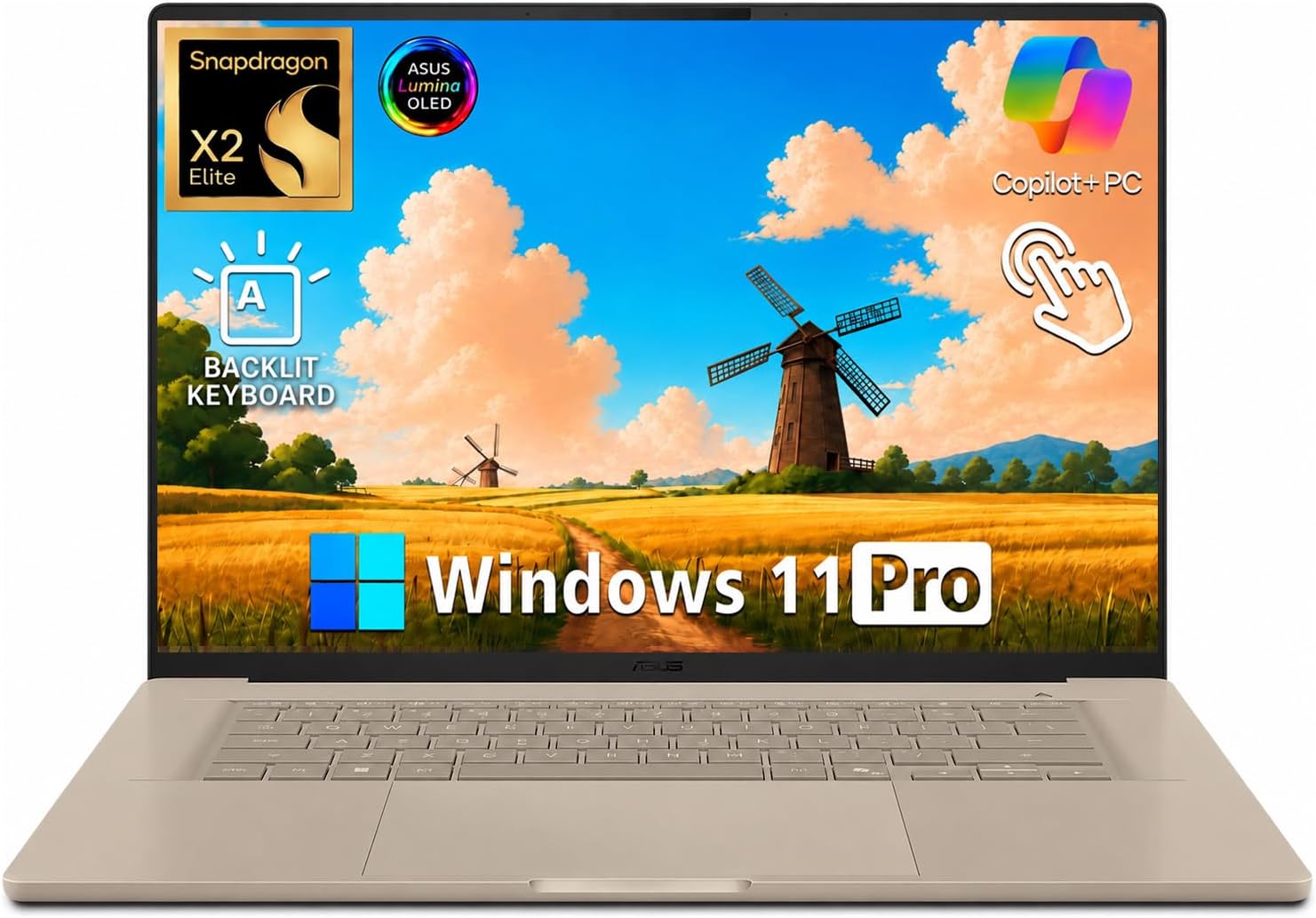
Spec sheet
ASUS Zenbook A16
- Processor
- Snapdragon X2 Elite Extreme X2E94100 (18 Cores, 18 Threads, Single-Core Boost up to 4.7GHz)
- Neural Processing Unit
- Qualcomm Hexagon NPU (Up to 80 TOPS)
- System Memory
- 48GB LPDDR5X-9600 Unified RAM
- Solid State Storage
- 512GB PCIe 4.0 NVMe SSD
- Display Panel
- 16.0-inch 3K ASUS Lumina OLED Touchscreen (2880 x 1800, 120Hz, 0.2ms)
- Display Brightness & Color
- 500 nits SDR, 1100 nits HDR Peak, 100% DCI-P3, VESA DisplayHDR True Black 1000
- Graphics Processor
- Qualcomm Adreno Integrated Graphics
- Chassis Material & Weight
- Zabriskie Beige Ceraluminum, 2.87 lb, 0.65-inch Thickness
- Battery & Charging
- 70Wh Lithium-Ion Battery with Fast Charging Support
- Wireless & Physical I/O
- Wi-Fi 7, Bluetooth 5.4, 2x USB 4.0 Type-C, USB-A 3.2, HDMI 2.1, SD Card Reader, Audio Jack
Figures as published by the manufacturer on the Amazon listing.
Snapdragon X2 Elite Extreme Architecture and Compute Throughput
At the core of the machine sits the Snapdragon X2 Elite Extreme X2E94100, a chip that scales ARM architecture to 18 physical cores and 18 concurrent execution threads. Delivering single-core burst frequencies up to 4.7GHz, the processor targets latency-sensitive single-threaded instructions while providing wide parallelism across all 18 cores for heavy code compilation and concurrent background jobs. When analyzing a snapdragon x2 elite extreme benchmark profile, the architectural focus centers on compute-per-watt efficiency, maintaining sustained throughput curves without triggering the abrupt thermal down-clocking seen on traditional high-wattage x86 processors.
Software execution on this silicon relies on modern ARM Windows engineering. The operating system provides native ARM64 instruction execution for compiled enterprise tools, browsers, and creative suites, while utilizing Microsoft Prism emulation for unported x86-64 binary applications. This architecture makes evaluating snapdragon x elite arm windows compatibility straightforward for standard workloads: native productivity suites and modern browsers run without translation overhead, executing directly on the 18-core pipeline. Developers considering the asus zenbook a16 for programming will find native toolchains compile code with low power draw, though specialized virtualization stacks and low-level kernel hooks require confirmation of ARM64 support.
Unlike traditional portable systems that divide tasks between a conventional CPU and small accelerator units, the platform incorporates an advanced Qualcomm Hexagon NPU rated for up to 80 TOPS. This compute layer runs generative machine learning models, on-device AI tasks, and Copilot+ processing routines entirely on silicon sub-blocks without loading the main CPU cores or drawing power from the integrated graphics. Users stepping up from lower-memory platforms like the asus zenbook 14 32gb ram will observe that offloading inference tasks directly to an 80 TOPS neural engine preserves system responsiveness during heavy multitasking.
Memory Subsystem and Storage Configuration
Memory throughput remains the primary bottleneck for wide multi-core processors, and the asus zenbook a16 48gb ram configuration directly addresses this with LPDDR5X memory clocked at 9600 MT/s. Configured as a unified memory pool, this 48GB capacity provides low-latency access across the 18 CPU cores, the Adreno graphics pipeline, and the 80 TOPS Hexagon NPU simultaneously. For heavy local data parsing, container orchestration, and multi-tier development stacks, this substantial memory ceiling eliminates the paging penalties common to 16GB and 32GB thin-and-light portables.
Storage is handled by a 512GB PCIe 4.0 SSD, providing high-bandwidth sequential and random read/write speeds for operating system boot sequences, instant software loading, and rapid project access. The manufacturer packaging notes that the original factory seal is opened for upgrade and inspection to reach these exact specifications, ensuring stability and hardware integrity prior to deployment. While 512GB provides adequate room for core system binaries and immediate local files, users working with extensive dataset collections may choose to offload archival assets through external storage arrays over the dual USB 4.0 ports.
The synergy between LPDDR5X-9600 memory speed and unified addressing proves critical when executing local large language models and real-time computer vision algorithms. Because neural network weights can reside directly in system RAM without redundant CPU-to-GPU data copies, the Zenbook A16 functions as a self-contained edge-inference machine. This architectural trait gives data scientists and technical evaluators a high-throughput mobile platform for running parameters locally, isolated from external cloud infrastructure.
Visual Performance and Display Engineering
Visual output is anchored by a 16-inch ASUS Lumina OLED touchscreen operating at a 2880 x 1800 resolution with a 16:10 aspect ratio. The asus zenbook 16 oled 120hz panel combines a dense pixel grid with a fast 0.2ms response time, eliminating display motion blur during rapid scrolling, video playback, and UI navigation. The panel achieves 500 nits under standard conditions and peaks up to 1100 nits in HDR workflows, earning VESA DisplayHDR True Black 1000 certification for deep black levels and wide dynamic contrast.
Color fidelity covers 100% of the DCI-P3 cinematic color space, making the screen suitable for precise color grading, digital photography, and creative design work. The addition of a touch-sensitive digitizer allows direct interface manipulation without introducing panel flex or compromising color uniformity across the 16-inch glass surface. For mobile professionals comparing panel technologies across ultra-thin form factors, such as the ultra-compact asus zenbook s13 oled, this 16-inch display provides substantially more layout real estate for multi-window side-by-side analysis.
Display driving duties are managed by the integrated Qualcomm Adreno graphics pipeline. As a qualcomm adreno graphics laptop, the machine easily powers the internal 3K 120Hz OLED screen alongside external multi-monitor setups over HDMI 2.1 and DisplayPort-capable USB 4.0 interfaces. While the Adreno coprocessor delivers modern hardware decoding, high-definition video processing, and responsive interface rendering, it is engineered primarily for power efficiency rather than high-frame-rate AAA gaming or compute-heavy 3D polygon synthesis.
Chassis Engineering, Thermal Design, and Battery Efficiency
ASUS constructed the Zenbook A16 chassis using an advanced Ceraluminum material finished in Zabriskie Beige. This proprietary manufacturing process fuses ceramic layers with an aluminum substrate, producing a rigid unibody that resists torsional bending while maintaining a low weight of 2.87 pounds and a thickness of 0.65 inches. Tested against MIL-STD 810H durability standards, the chassis withstands physical transit demands, while the subdued ceramic-infused texture repels fingerprints and surface abrasions during daily travel.
Energy management centers around a 70Wh lithium-ion battery. Because the 18-core Snapdragon silicon operates with low standby leakage and minimal idle power consumption, asus zenbook snapdragon battery life exceeds that of comparable x86 machines running high-density OLED panels. The efficiency curve allows users to maintain productivity away from mains power, and integrated fast-charging circuitry quickly replenishes battery capacity via USB Power Delivery over the Type-C interface when top-ups are required.
Despite its slim 0.65-inch profile, the Zenbook A16 provides comprehensive physical and wireless connectivity. The I/O complement includes two high-bandwidth USB 4.0 Type-C ports, a legacy USB-A 3.2 port, a full-size HDMI 2.1 video output, a dedicated SD card reader, and an analog 3.5mm combo audio jack. Wireless communications are driven by the latest Wi-Fi 7 and Bluetooth 5.4 protocols, ensuring high local networking throughput and low-latency peripheral connectivity. Multimedia hardware includes a 1080p camera with facial recognition for Windows Hello authentication and a six-speaker Dolby Atmos audio system powered by Smart Amp processing.
ASUS Zenbook A16 Pros and Cons
What works
- Snapdragon X2 Elite Extreme 18-core processor
- Qualcomm Hexagon NPU delivering 80 TOPS
- 48GB high-speed LPDDR5X-9600 unified memory
- 16-inch 3K 120Hz Lumina OLED touchscreen
- Ultra-light 2.87 lb Ceraluminum chassis
- Modern connectivity with Wi-Fi 7 and USB 4.0
What to weigh up
- Modest 512GB base SSD capacity
- No discrete GPU for intense 3D gaming
- ARM platform incompatible with legacy x86 drivers
Check ASUS Zenbook A16 on Amazon
Who Should Buy the ASUS Zenbook A16
Buy It If
- You need a massive 16-inch 3K OLED workspace in an ultra-light 2.87-pound chassis designed for mobile travel.
- Your computational workflows leverage 48GB of high-speed LPDDR5X-9600 RAM and an 80 TOPS NPU for edge AI tasks.
- You prioritize silent, cool operation alongside long battery runtimes powered by a 70Wh battery and ARM architecture.
- Your software stack consists of native Windows 11 ARM64 applications, modern web tools, and standard productivity software.
Skip It If
- Your primary workload requires discrete NVIDIA or AMD GPUs for high-end 3D rendering or dedicated PC gaming.
- You rely on specialized legacy peripherals that demand proprietary x86 kernel-mode drivers lacking ARM support.
- A 512GB internal SSD does not provide enough local solid-state storage without relying on external drives.
Final Verdict
10.0/10Our score
The ASUS Zenbook A16 represents an impressive convergence of industrial design, large-format OLED panel engineering, and modern ARM processing. By integrating Qualcomm’s 18-core Snapdragon X2 Elite Extreme X2E94100 with an 80 TOPS Hexagon NPU and 48GB of ultra-fast LPDDR5X-9600 memory, ASUS delivers a responsive Copilot+ PC capable of handling data-heavy workloads without thermal throttling or excessive chassis bulk. Its lightweight 2.87-pound Ceraluminum frame, 120Hz Lumina OLED touchscreen, and comprehensive I/O array make it a uniquely balanced workstation for mobile professionals.
When asking is asus zenbook snapdragon x elite worth it, the answer depends directly on your software stack and mobility requirements. For users operating primarily within native ARM64 environments, enterprise cloud systems, and modern creative platforms, the laptop offers high memory density, thermal efficiency, and display clarity. While users bound to legacy x86 drivers or dedicated graphics pipelines may look toward heavy dual-screen workstations like the asus zenbook pro duo 15 oled, the Zenbook A16 stands as a premier example of thin-and-light large-screen computing.
FAQ
What are the primary ASUS Zenbook A16 specs?
The ASUS Zenbook A16 features an 18-core Snapdragon X2 Elite Extreme X2E94100 processor, an 80 TOPS Qualcomm Hexagon NPU, integrated Adreno graphics, 48GB of LPDDR5X-9600 memory, and a 512GB PCIe 4.0 SSD. It incorporates a 16-inch 3K 120Hz Lumina OLED touchscreen, Wi-Fi 7, and a 70Wh battery inside a 2.87-pound Zabriskie Beige Ceraluminum chassis.
How does the Snapdragon X2 Elite Extreme handle ARM Windows compatibility?
Windows 11 Pro runs native ARM64 applications directly on the 18 hardware cores with zero performance translation penalty. For older x86 and x64 software, the operating system uses the built-in Microsoft Prism emulation layer, allowing standard desktop applications to run seamlessly, though kernel-level anti-cheat engines and proprietary x86 hardware drivers remain unsupported.
Is the ASUS Zenbook A16 suitable for programming and development workflows?
Yes, the asus zenbook a16 for programming is well suited for modern developers utilizing native ARM64 code editors, runtimes, and command-line toolchains. The 48GB LPDDR5X memory pool provides ample headroom for large data compilations, multiple browser profiles, and containerized microservices without taxing system resources.
What display specifications are featured on the 16-inch OLED panel?
The 16.0-inch ASUS Lumina OLED touchscreen provides a 2880 x 1800 resolution, a 120Hz refresh rate, and a 0.2ms response time. It delivers 100% DCI-P3 color coverage, 500 nits SDR brightness, up to 1100 nits HDR peak brightness, and holds VESA DisplayHDR True Black 1000 certification.
Can the Qualcomm Adreno graphics run demanding 3D games?
The integrated Qualcomm Adreno graphics coprocessor is built for display scaling, video playback, and casual rendering rather than high-end PC gaming. While it drives the 3K 120Hz display smoothly for creative productivity, demanding 3D titles and games relying on strict x86 anti-cheat software will face performance and compatibility limitations.
See this listing on Amazon We may earn a commission if you buy through this link.
More in Computers & Laptops


The weekly shortlist
Specs worth reading, once a week
New teardowns, spec sheets and buying notes from across the desk.
This demo form is not connected to a mailing service.