ASUS ZenBook Flip S 13 OLED: Hardware Architecture and Component Review
The ASUS ZenBook Flip S 13 OLED (model UX371EA-XH77T) is an ultra-slim 2-in-1 convertible laptop engineered around a 13.3-inch 4K UHD OLED touch panel, an 11th-generation Intel Core processor, and high-speed Thunderbolt 4 expansion.…

As Amazon Associates, we earn from qualifying purchases. This means we may receive a small commission at no extra cost to you if you click through and make a purchase.
The ASUS ZenBook Flip S 13 OLED (model UX371EA-XH77T) is an ultra-slim 2-in-1 convertible laptop engineered around a 13.3-inch 4K UHD OLED touch panel, an 11th-generation Intel Core processor, and high-speed Thunderbolt 4 expansion. Combining high display density with a 360-degree hinge and a sub-three-pound chassis, this machine serves as a portable executive workstation and multimedia production companion. If you require precise panel resolution, responsive touch input, and versatile convertible mechanics for productivity on the move, it delivers a high-tier feature set in an exceptionally compact form factor.
This convertible platform directly suits enterprise mobile professionals, content analysts, and visual creatives who prioritize color precision, sharp typography, and flexible presentation formats. Thanks to its preinstalled Windows 10 Pro operating system and integrated hardware security, the laptop adapts seamlessly to enterprise networks and traveling business environments. However, users seeking discrete graphics horsepower for heavy 3D rendering or expandable system memory beyond 16GB will find the hardware configuration restrictive and should examine specialized workstation platforms instead.
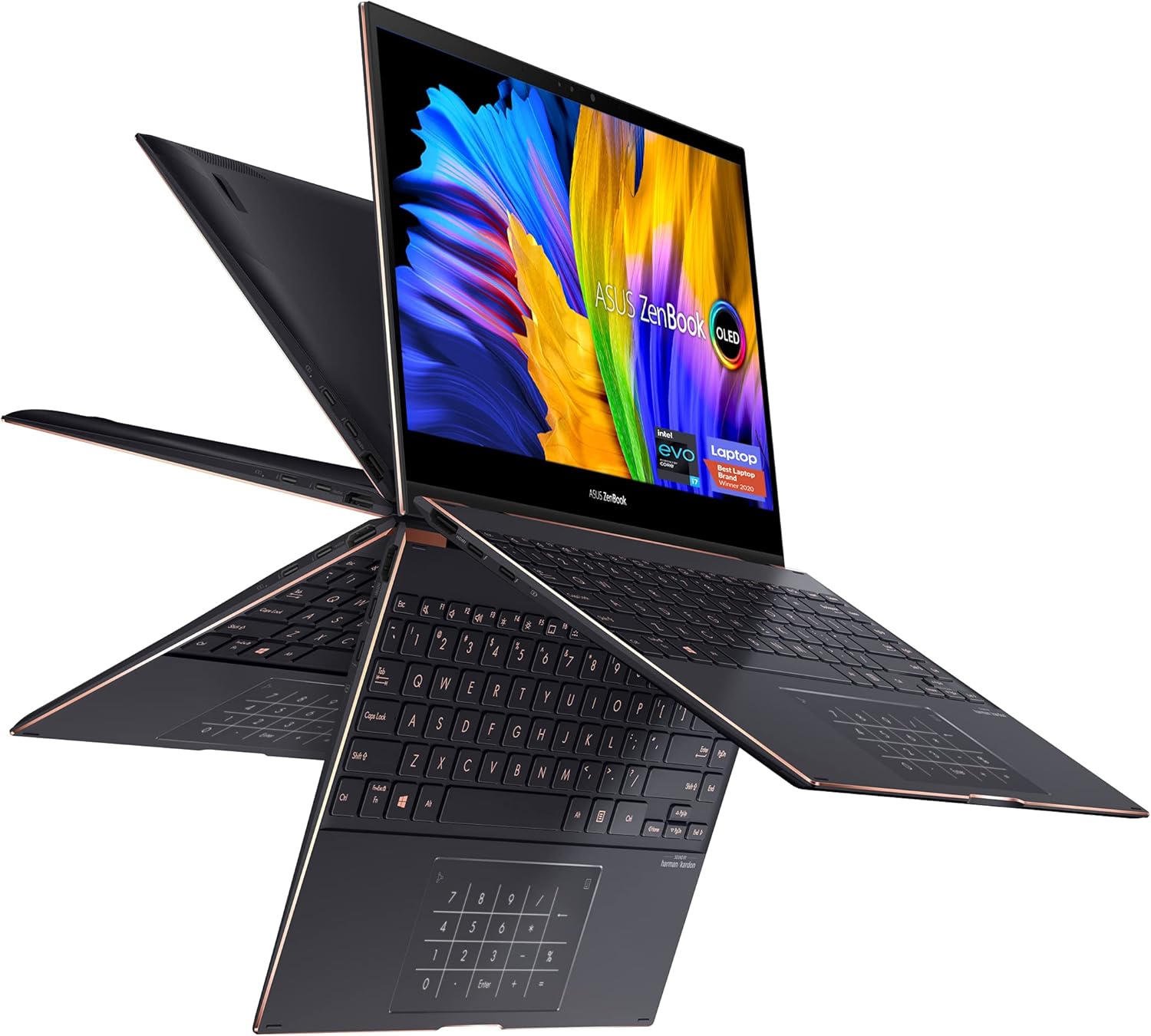
Spec sheet
ASUS ZenBook Flip S 13 OLED
- Display Panel
- 13.3-inch 4K UHD OLED Touch Screen, 400 nits HDR, NanoEdge bezels
- Processor
- Intel Core i7-1165G7 Quad-Core (12M Cache, up to 4.70 GHz, with IPU)
- Graphics Processing
- Integrated Intel Iris Xe Graphics (Shared System Memory)
- System Memory
- 16GB LPDDR4X RAM (Soldered Configuration)
- Internal Storage
- 1TB PCIe NVMe M.2 Solid-State Drive
- Chassis Form Factor
- Convertible 2-in-1 with 360° ErgoLift Hinge
- I/O and Connectivity
- Thunderbolt 4, USB-C Interface, External Display and Stylus Compatibility
- Chassis Finish & Weight
- Jade Black with Red Copper diamond-cut edges, 2.9 pounds
Figures as published by the manufacturer on the Amazon listing.
4K UHD OLED Touch Panel and Visual Performance
The centerpiece of the asus zenbook flip s 13 4k oled is its 13.3-inch Ultra High Definition panel. Delivering a resolution of 3840 by 2160 pixels within a compact diagonal, the screen achieves exceptional pixel density that completely eliminates jagged edges on text, vector designs, and high-resolution photographs. Because OLED panels utilize self-emissive organic diodes rather than a centralized LED backlight, each individual pixel switches off entirely to reproduce true absolute black. This architecture produces virtually infinite contrast ratios, allowing dark visual scenes, photographic shadows, and high-contrast business data to retain depth without backlight bleed.
Luminance performance is anchored by an asus zenbook s13 oled display brightness rating of 400 nits with HDR support. This output level ensures clear visibility across indoor office lighting, shared collaborative spaces, and moderate ambient daylight. Framing the panel are four-sided NanoEdge ultra-slim bezels, which maximize visual real estate while minimizing the physical footprint of the laptop. While the listing does not specify precise DCI-P3 percentage coverage or color calibration delta-E figures, OLED technology inherently delivers wide chromatic saturation and rich tonal transitions that outperform standard IPS displays, much like the panel technology explored in our zenbook 14 oled evaluation.
The display also integrates a multi-touch digitizer compatible with an active stylus, allowing direct screen interaction for note-taking, document sign-offs, and sketching. In tablet or tent orientation, touch responsiveness provides precise tracking for mobile workflows, making it practical for client-facing presentations and collaborative markups without requiring an external input peripheral.
Intel Core i7-1165G7 Compute Throughput and Graphics Architecture
Under the hood, processing operations are driven by the asus zenbook s13 oled i7 1165g7 processor. Built on Intel’s 11th-generation architecture, this quad-core, eight-thread CPU features 12MB of Intel Smart Cache and scales from its base frequency up to a peak boost clock of 4.70 GHz. The integrated Image Processing Unit (IPU) assists with video signal processing, enhancing webcam clarity for corporate video calls and digital conferencing. This processing tier handles concurrent office applications, heavy spreadsheet computations, web development stacks, and multi-tab browser sessions with sustained responsiveness.
Graphics computations rely on integrated Intel Iris Xe Graphics. Rather than utilizing dedicated VRAM, the graphics engine draws directly from the system’s high-speed memory pool, functioning with up to 16GB of shared memory allocation. For day-to-day business operations, dual-monitor visual output, 4K video playback, and lightweight media editing, Iris Xe provides ample throughput with minimal heat dissipation compared to power-hungry discrete GPUs.
However, mobile professionals should recognize the architectural limitations of integrated graphics. The Iris Xe processor handles multimedia streaming, presentation rendering, and basic photo adjustments effectively, but it lacks the parallel compute execution units necessary for demanding 3D rendering pipelines, large-scale animation, or heavy AAA gaming. It is engineered primarily for power efficiency, silent operation, and fluid general compute tasks inside a low-profile chassis.
Memory Subsystem and PCIe Storage Architecture
The internal architecture utilizes a balanced asus zenbook s13 oled ram configuration comprising 16GB of high-speed LPDDR4X memory. The LPDDR4X standard operates at low operating voltages, reducing overall system power consumption while delivering the high memory bandwidth essential for feeding both the quad-core CPU and the shared execution units of the Iris Xe graphics processor. This 16GB capacity is well-suited for compiling code, manipulating complex datasets, and managing extensive productivity workflows without triggering disk caching.
Because LPDDR4X memory is soldered directly to the motherboard to maintain a slim chassis profile and optimal power efficiency, it cannot be upgraded or expanded post-purchase. Users who routinely run resource-heavy virtual machines or process memory-dense raw media files requiring larger capacities, such as an asus zenbook 14 32gb ram configuration, must account for this fixed 16GB hardware ceiling when planning their workflow requirements.
Secondary storage is provided by a 1TB PCIe NVMe M.2 solid-state drive. This expansive solid-state capacity ensures rapid operating system boot sequences, instant application launches, and swift file read/write operations for local project libraries. The listing also highlights a USB-C hard disk interface protocol, facilitating fast data throughput when connecting high-speed external storage drives alongside the primary NVMe partition.
Thunderbolt 4 Connectivity and Peripheral Integration
External I/O capabilities are headlined by asus zenbook s13 oled thunderbolt 4 integration. Operating via universal USB-C ports, Thunderbolt 4 provides up to 40 Gbps of bidirectional data bandwidth, supporting PCIe peripheral tunneling, native DisplayPort video routing, and USB Power Delivery over a single cable interface. This allows users to transform the ultraportable laptop into a comprehensive desktop workstation via a single Thunderbolt dock connected to high-resolution external monitors, audio interfaces, and gigabit wired networks.
According to the product specifications, the system operates on a 19-volt power delivery standard and supports a broad array of external hardware devices:
- External high-resolution monitors and commercial projectors via direct digital output
- Precision external mice, mechanical keyboards, and desktop input controllers
- Standard and high-fidelity wired headphones
- High-speed external USB storage enclosures and flash drives
- Active input styluses for direct touch-screen navigation and digital drafting
This broad compatibility ensures that while the laptop maintains a minimalist profile, it retains universal connectivity for corporate and creative setups. Unlike dual-screen creator machines such as the asus zenbook pro duo 15 oled that prioritize extensive chassis-mounted display space, the ZenBook Flip S relies on high-speed Thunderbolt 4 expansion to scale its visual workspace across multiple external monitors at a stationary desk.
Chassis Ergonomics, 360-Degree Hinge, and Battery Run Time
Weighing just 2.9 pounds, the laptop is built inside an ultra-slim convertible chassis finished in sophisticated Jade Black. The dark metal surfacing is accentuated by subtle Red Copper diamond-cut chamfered edges, establishing a distinct, executive visual aesthetic that avoids generic laptop styling. Despite its lightweight form factor, the chassis houses a backlit keyboard that ensures typing accuracy across low-light conference rooms, overnight flights, and darkened office spaces.
The mechanical flexibility of the machine is enabled by the precision-engineered 360° ErgoLift hinge. In traditional laptop deployment, the hinge slightly elevates the rear of the keyboard deck as the lid opens, improving typing ergonomics and optimizing airflow beneath the base. Rotating the display fully backward allows the unit to transition instantly between four operating postures:
- Standard clamshell mode for intensive keyboard typing and document composition
- Tent mode for space-constrained environments such as airline tray tables
- Stand mode for hands-free multimedia viewing and client presentations
- Tablet mode for digital stylus writing, document signing, and hand-held reading
Battery endurance is supported by a high-capacity internal cell, with the listing citing an asus zenbook s13 oled battery life rating of up to 22 hours under optimal run conditions. Real-world battery consumption naturally fluctuates depending on workload intensity and display brightness, as powering an ultra-dense 4K OLED matrix requires more energy than driving lower-resolution 1080p panels. For business security, the platform incorporates a dedicated Trusted Platform Module (TPM) alongside Windows 10 Pro, providing hardware-enforced encryption keys and BitLocker data protection to safeguard corporate credentials in transit.
ASUS ZenBook Flip S 13 OLED Pros and Cons
What works
- Vibrant 13.3-inch 4K UHD OLED touch screen
- Responsive 360-degree ErgoLift convertible hinge
- Generous 1TB PCIe NVMe solid-state storage
- High-bandwidth Thunderbolt 4 expansion support
- Lightweight 2.9-pound Jade Black aluminum chassis
- Enterprise-ready Windows 10 Pro and TPM hardware
What to weigh up
- Non-upgradable 16GB soldered LPDDR4X memory
- Integrated Iris Xe graphics shares system RAM
- Demanding 4K resolution impacts overall battery runtime
Check ASUS ZenBook Flip S 13 OLED on Amazon
Who Should Buy the ASUS ZenBook Flip S 13 OLED
Buy It If
- You need a 13.3-inch 4K UHD OLED touch screen with 400 nits HDR luminance for pinpoint visual detail and infinite contrast ratios.
- You require a mobile 2-in-1 convertible weighing under 3 pounds that seamlessly transitions between laptop, tent, and tablet modes.
- Your computing workflow benefits from Windows 10 Pro features and hardware TPM enterprise security for encrypted data management.
- You depend on Thunderbolt 4 connectivity to run high-speed external docks, monitors, and peripherals over a 40 Gbps data pipeline.
Skip It If
- Your primary workloads involve intensive 3D CAD modeling or high-framerate gaming requiring a dedicated graphics card.
- You anticipate needing more than 16GB of system RAM, as the soldered LPDDR4X memory cannot be expanded after purchase.
- You operate primarily outdoors in direct sunlight where higher peak display brightness beyond 400 nits is mandatory.
Final Verdict
8.2/10Our score
Evaluating whether the asus zenbook s13 oled is worth it comes down to balancing panel fidelity against workload requirements. The combination of an ultra-sharp 4K UHD OLED touch display, a versatile 360° ErgoLift convertible hinge, and a lightweight 2.9-pound Jade Black chassis places this laptop among the most refined compact convertibles in its class. With an 11th-generation Intel Core i7 processor, 1TB NVMe solid-state storage, and Thunderbolt 4 connectivity, it offers complete computational versatility for day-to-day business productivity, executive travel, and multimedia consumption.
Its primary compromises lie in its non-upgradable 16GB memory architecture and integrated Iris Xe graphics. For power users who do not require workstation-class GPU acceleration or massive RAM capacities, the ASUS ZenBook Flip S 13 OLED represents an exceptionally polished hardware package that delivers vivid display quality, enterprise security, and flexible ergonomics in a premium ultraportable design.
FAQ
What display panel technology does the ASUS ZenBook Flip S 13 OLED use?
The laptop features a 13.3-inch 4K UHD OLED touch screen with a 400-nit HDR rating, ultra-slim 4-sided NanoEdge bezels, and self-emissive organic pixel technology that delivers infinite contrast ratios and deep black levels.
Can the system memory on this ZenBook Flip S 13 configuration be upgraded?
No, the listing specifies a fixed 16GB LPDDR4X RAM configuration. LPDDR4X memory is soldered directly to the motherboard to maintain power efficiency and a slim chassis profile, meaning it cannot be upgraded after purchase.
Does the ASUS ZenBook Flip S 13 OLED support external monitor connectivity?
Yes. The platform includes Thunderbolt 4 connectivity over USB-C, which provides up to 40 Gbps of bandwidth to drive external high-resolution displays, docking stations, and compatible desktop peripherals.
What operating system and business security features are included?
The laptop comes preloaded with Windows 10 Pro and includes an integrated Trusted Platform Module (TPM) to enable hardware-level data encryption, secure boot functions, and enterprise-grade network compatibility.
Is an active stylus compatible with this convertible laptop?
Yes, the listing confirms compatibility with styluses alongside external mice, keyboards, and displays, leveraging the 360-degree ErgoLift hinge for digital note-taking, sketching, and tablet use.
See this listing on Amazon We may earn a commission if you buy through this link.
More in Computers & Laptops


The weekly shortlist
Specs worth reading, once a week
New teardowns, spec sheets and buying notes from across the desk.
This demo form is not connected to a mailing service.