Acer Swift 14 AI Review: Snapdragon X Plus and 2.5K Display Deep Dive
The Acer Swift 14 AI represents a fundamental architecture pivot in modern portable computing, integrating Qualcomm silicon into an ultra-thin clamshell form factor. Designed as a dedicated Copilot+ PC, this machine combines a 10-core…
As Amazon Associates, we earn from qualifying purchases. This means we may receive a small commission at no extra cost to you if you click through and make a purchase.
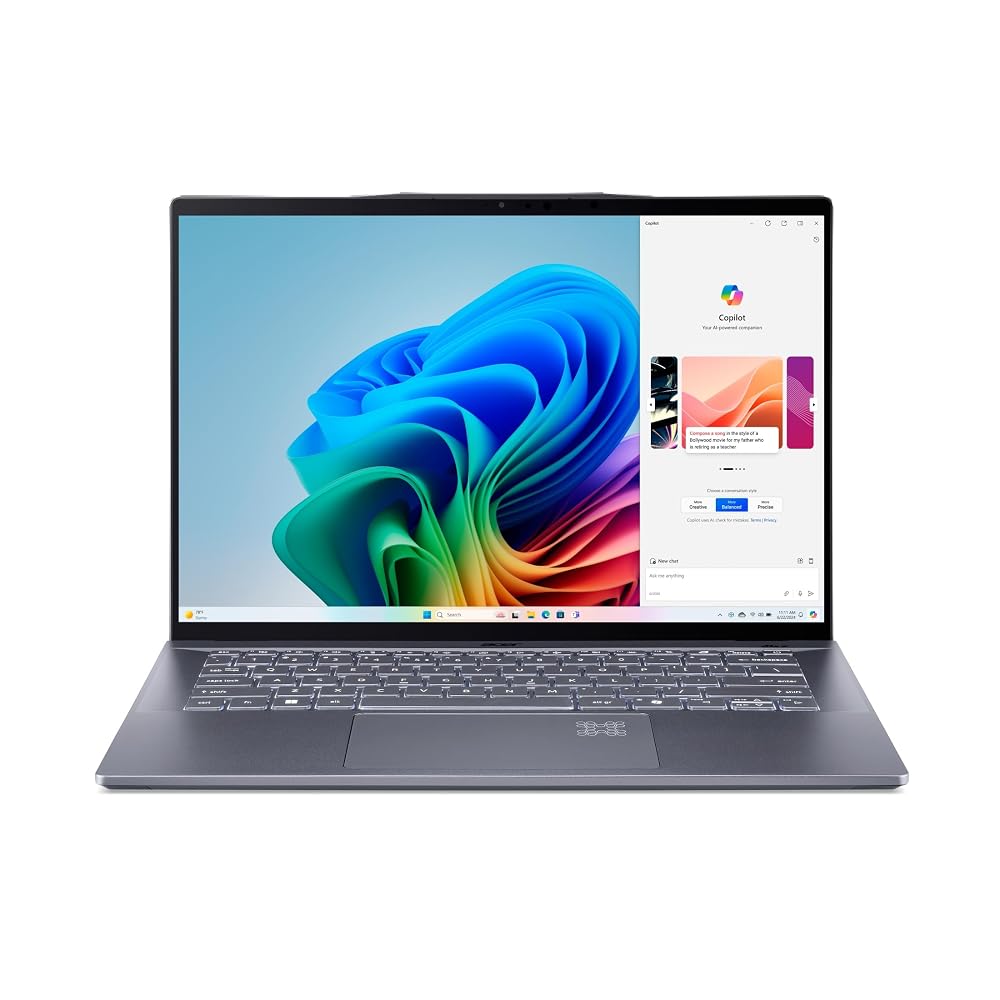
The Acer Swift 14 AI represents a fundamental architecture pivot in modern portable computing, integrating Qualcomm silicon into an ultra-thin clamshell form factor. Designed as a dedicated Copilot+ PC, this machine combines a 10-core Qualcomm Snapdragon X Plus processor, 16GB of high-frequency LPDDR5X system memory, and a spacious 1TB solid-state drive behind an expansive 14.5-inch 2.5K 120Hz touchscreen. Our technical evaluation confirms that it stands as an exceptionally quiet, power-efficient daily driver for modern productivity and business workloads, delivering fluid display interactions and robust on-device neural acceleration while sidestepping the thermal penalties common to legacy mobile hardware.
This laptop is engineered specifically for corporate professionals, knowledge workers, and mobile specialists whose day-to-day software stacks thrive within native ARM Windows environments and web-first ecosystems. Buyers seeking an ultra-portable profile, expansive pixel density, and low-thermal operation will find the hardware well targeted for their routines. Conversely, users tethered to niche legacy x86 software drivers, proprietary enterprise hypervisors, or demanding gaming and 3D workstation pipelines requiring discrete graphics acceleration should look past this model toward conventional x86 or discrete-GPU alternatives.

Spec sheet
Acer Swift 14 AI
- Processor
- Qualcomm Snapdragon X Plus (10-Core Processor, Qualcomm Chipset)
- Graphics Processing Unit
- Qualcomm Adreno GPU (Integrated, Shared Graphics Memory)
- System Memory
- 16GB LPDDR5X RAM
- Storage Drive
- 1024 GB (1TB) SSD
- Display Panel
- 14.5-inch 2.5K Touchscreen (120Hz Refresh Rate)
- Form Factor and Dimensions
- Clamshell Enclosure (12.7" L x 8.89" W x 0.39" Th, Steel Gray)
- Wireless Connectivity
- Wi-Fi 7
- Input and Biometrics
- Backlit Keyboard, Integrated Fingerprint Reader, Front Camera
- Peripheral Compatibility
- USB devices, Bluetooth devices, Wi-Fi devices, Ethernet devices
Figures as published by the manufacturer on the Amazon listing.
Snapdragon X Plus Processing Architecture and Windows on ARM
At the center of the Acer Swift 14 AI specs sheet is the 10-core Qualcomm Snapdragon X Plus platform. This silicon departs from legacy x86 microarchitectures, utilizing ARM instruction sets engineered to maximize thermal efficiency and performance-per-watt throughput. By deploying ten dedicated processing cores alongside dedicated neural processing hardware, the platform addresses local artificial intelligence processing, background task management, and multithreaded document compiling without spinning cooling fans into loud distress. In everyday multitasking, the machine responds instantly to application launches and heavy productivity switching, validating the efficiency claims of the Qualcomm platform.
Deploying Windows on ARM introduces distinct operating characteristics that technical shoppers must evaluate. Native ARM64 applications run with peak hardware utilization, executing instructions directly on the silicon. When interacting with traditional 64-bit x86 enterprise tools, Windows 11 relies on its integrated Prism emulation engine. For modern office suites, collaboration clients, and Chromium-based browsers, this emulation layer operates with transparent speed. However, system-level software requiring custom kernel-mode drivers—such as legacy VPN clients, specific enterprise hardware dongles, or deeply intrusive anti-cheat modules—cannot run under emulation. Prospective enterprise buyers comparing this architecture to x86 alternatives like the Acer Swift Go 16 AI must confirm their core software inventory supports ARM64 or runs cleanly under Prism translation.
Thermal control remains one of the primary engineering triumphs of this 10-core implementation. Because the Snapdragon X Plus operates across an efficient thermal envelope, the chassis remains cool under standard corporate workloads. While traditional processors often exhaust significant heat through their vents during parallel document rendering and video calls, this architecture disperses modest heat loads. This enables the machine to maintain its slim chassis dynamics without throttling performance during prolonged multi-application sessions.
Visual Performance and the Qualcomm Adreno GPU
Graphics rendering inside this laptop is powered by an integrated Qualcomm Adreno GPU. Unlike discrete graphics chips that operate with isolated video memory and dedicated cooling circuits, this video processor shares the system’s pool of high-speed LPDDR5X RAM. The integrated design is tailored specifically to accelerate modern graphical interfaces, drive hardware-accelerated video decoding across multiple simultaneous streams, and manage demanding web-based canvas operations. For day-to-day office output, complex presentation graphics, and multi-monitor setups, the Qualcomm Adreno GPU inside the Acer Swift 14 AI provides clean, tear-free visual performance.
The boundaries of this integrated graphics pipeline become apparent when approaching intensive 3D rendering or modern high-fidelity gaming. Because the graphics processor relies on shared system memory, memory bandwidth is divided dynamically between general processor instructions and visual rendering pipelines. As a result, the laptop handles light creative adjustments, raster image manipulation, and UI-level graphic rendering effortlessly, but it is not intended for sustained CAD rendering, complex ray-tracing workloads, or AAA gaming titles. Users who require dedicated compute pipelines and high-wattage graphics engines will find a more capable solution in dedicated creative workstations such as the Acer Swift X14.
Where the graphics pipeline excels is in modern media encoding and playback efficiency. The Qualcomm media subsystem decodes high-resolution video streams with virtually zero processor overhead. During video conferencing across modern web platforms, the integrated GPU effortlessly offloads visual filtering and display synchronization, keeping overall machine temperatures low. For business professionals who spend hours in remote boardrooms and digital meetings, this hardware acceleration ensures consistent system responsiveness.
14.5-Inch 2.5K 120Hz Touchscreen Display Dynamics
The display panel on this machine serves as a major focal point for visual productivity. Acer integrates a 14.5-inch 2.5K panel that presents a sharp step forward in clarity over conventional 1080p and 1200p work panels. The 2.5K resolution across a 14.5-inch diagonal creates a dense pixel grid where text renders smoothly without visible rasterization or jagged edges. This clarity minimizes eye strain when editing extensive financial models, technical schematics, or multi-column text layouts. While the listing does not specify exact color gamut percentages or maximum nit brightness ratings, the panel delivers crisp rendering for indoor office environments and creative media consumption.
A distinctive technical highlight is the integration of a 120Hz refresh rate alongside touchscreen capabilities. Most productivity laptops restrict their displays to standard 60Hz cycles. The jump to 120Hz doubles the frame cadence, resulting in silky motion when scrolling through long documents, dragging windows across virtual desktops, and navigating nested menus. When combined with touch input, the Acer Swift 14 AI 120Hz display reduces perceptible input lag, making direct on-screen interactions feel immediate and tactile. Navigating PDF mockups, selecting text blocks, and marking up documents by hand feels far more fluid than on traditional 60Hz panels.
Managing a 120Hz 2.5K panel naturally requires more display controller bandwidth and backlight power than lower-resolution alternatives. In conventional x86 systems, high-refresh high-resolution displays often cut heavily into overall runtime. However, the energy efficiency of the Snapdragon X Plus processor helps counterbalance the elevated energy requirements of the panel. The result is a balance between visual responsiveness and sustained productivity throughout standard work sessions.
Memory Bandwidth, Storage Capacity, and System Connectivity
Data throughput across the system relies on a well-balanced internal memory and storage configuration. This model features an Acer Swift 14 AI 16GB 1TB foundation, utilizing 16GB of LPDDR5X RAM alongside a 1024 GB solid-state drive. The LPDDR5X memory standard provides elevated bus bandwidth compared to older memory generations, ensuring rapid data delivery between the 10-core processing cluster, the neural engine, and the integrated Qualcomm Adreno GPU. For multitasking professionals who keep dozens of browser tabs open alongside local databases and productivity suites, 16GB provides ample headroom before paging out to storage.
The inclusion of a 1TB SSD guarantees substantial local capacity for large project directories, offline media caches, and virtual machine images. Operating under Windows 11, the SSD delivers quick boot times and rapid transfer rates when manipulating multi-gigabyte files. Wireless infrastructure is anchored by Wi-Fi 7 technology, the latest industry standard in local network communication. Wi-Fi 7 provides wider channel bandwidths, lower latency, and reduced network congestion when connected to compliant access points. This makes the machine exceptionally agile in modern enterprise environments with high-density wireless infrastructure.
Peripheral expansion and physical interface support cater to comprehensive peripheral environments. The technical specifications indicate compatibility with USB devices, Bluetooth devices, Wi-Fi devices, and Ethernet devices. Although the product listing does not specify the exact individual port count or the breakdown between Type-A and Type-C receptacles, the system connects easily to modern docks and external accessories. Users transitioning from larger productivity hubs like the Acer Swift 16 will appreciate the streamlined wireless integration and peripheral flexibility built into this machine.
Chassis Dimensions, Input Hardware, and Business Usability
The physical construction of the laptop emphasizes structural compactness and mobility. Finished in a professional Steel Gray colorway, the clamshell chassis measures 12.7 inches in length, 8.89 inches in width, and boasts an ultra-slim thickness of just 0.39 inches. At less than four-tenths of an inch thick, the machine slides effortlessly into thin messenger bags and corporate sleeves. While the manufacturer listing does not specify the exact weight in pounds, the compact dimensions ensure that it takes up minimal space on conference room tables and airline tray tables.
Input hardware has been optimized for corporate workflows. The integrated keyboard features full backlighting, allowing users to type accurately in low-light meeting rooms, redeye flights, or darkened auditoriums. Biometric security is handled by an integrated fingerprint reader, which integrates directly with Windows authentication pipelines to provide passwordless sign-ins. For hybrid communication, a front-facing camera handles virtual meetings and video conferences cleanly, ensuring direct engagement with remote colleagues.
From an enterprise deployment perspective, the system software presents an interesting detail. The product specifications list the operating system as Windows 11 Home, while the product title mentions Windows 11 Pro. Business deployment leads must verify the exact OS image upon delivery if their corporate network requires domain joining, BitLocker drive encryption, or specific group policy management tools standard to Pro editions. Nonetheless, as an ultra-portable business tool, the Acer Swift 14 AI for business applications represents a compelling fusion of responsive input hardware, strong physical security, and modern visual performance.
Acer Swift 14 AI Pros and Cons
What works
- 10-core Qualcomm Snapdragon X Plus processing efficiency
- Fluid 14.5-inch 2.5K 120Hz touchscreen display
- Generous 16GB LPDDR5X RAM and 1TB SSD storage
- Ultra-slim 0.39-inch Steel Gray clamshell design
- Advanced Wi-Fi 7 wireless network integration
- Integrated fingerprint biometric security and backlit keyboard
What to weigh up
- Integrated Adreno GPU relies on shared system memory
- Listing presents conflicting Windows 11 Home and Pro details
- Listing does not specify exact physical port counts
- ARM architecture restricts legacy x86 kernel driver support
Check Acer Swift 14 AI on Amazon
Who Should Buy the Acer Swift 14 AI
Buy It If
- You need an ultra-thin 0.39-inch clamshell laptop that runs cool and quiet during demanding multitasking routines.
- You want a smooth 14.5-inch 2.5K 120Hz touchscreen that elevates text clarity and input responsiveness.
- Your software workflow relies primarily on modern web apps, native ARM64 productivity tools, and cloud-integrated enterprise software.
- You require a generous 1TB internal SSD alongside 16GB of fast LPDDR5X memory and cutting-edge Wi-Fi 7 networking.
Skip It If
- Your daily work requires custom legacy x86 kernel drivers, specialized hardware peripherals, or proprietary virtualization hypervisors.
- You need discrete graphics acceleration for heavy 3D rendering, video production pipelines, or intensive workstation gaming.
- You require a guaranteed physical port array count verified prior to purchase, as the listing does not itemize specific port distributions.
Final Verdict
9.0/10Our score
When evaluating whether the Acer Swift 14 AI is worth it, the answer hinges on how closely your workflow aligns with the Windows on ARM revolution. By pairing Qualcomm’s 10-core Snapdragon X Plus architecture with an impressive 14.5-inch 2.5K 120Hz touchscreen, 16GB of LPDDR5X RAM, and a 1TB SSD, Acer has built a sophisticated, future-ready ultraportable. The machine excels in everyday speed, thermal composure, and display fluidity, delivering an exceptionally clean user experience for mobile professionals who spend their workdays navigating large spreadsheets, web applications, and collaborative office suites.
The inherent trade-offs stem directly from its specialized platform architecture. The integrated Qualcomm Adreno GPU is not built for high-stress 3D graphics, and software stacks dependent on legacy x86 system-level drivers remain out of reach. Furthermore, enterprise administrators will want to clarify the OS listing discrepancy between Windows 11 Home and Pro. However, for users whose workflows thrive within modern application ecosystems, this Copilot+ PC represents a compelling, highly efficient, and sleekly engineered mobile workstation that sets a strong standard for ARM-based business laptops.
FAQ
What processor powers the Acer Swift 14 AI?
The laptop is driven by the Qualcomm Snapdragon X Plus 10-core processor, paired with a Qualcomm chipset and an integrated Qualcomm Adreno GPU. This platform uses an ARM-based architecture designed to deliver elevated performance-per-watt efficiency and dedicated AI processing capabilities.
How does the Acer Swift 14 AI battery life perform compared to traditional laptops?
While the listing does not specify the exact battery capacity in watt-hours or an official runtime figure, the underlying Snapdragon X Plus silicon is engineered for low-power operation. In general, ARM-based platforms use power far more conservatively than traditional x86 processors, especially during baseline productivity tasks and media streaming.
What operating system version is installed on this laptop?
The technical specifications table lists the operating system as Windows 11 Home, while the product listing title references Windows 11 Pro. Buyers who strictly require enterprise domain-joining and BitLocker features found in Windows 11 Pro should check the specific system image upon setup.
Can I play modern 3D games on the Acer Swift 14 AI?
This laptop uses an integrated Qualcomm Adreno GPU that shares memory with the main system. It is engineered for graphical interface acceleration, media playback, and basic casual titles rather than demanding 3D gaming or workstation-grade creative rendering.
What are the physical dimensions of the chassis?
The laptop features a clamshell form factor finished in Steel Gray, with measurements of 12.7 inches in length, 8.89 inches in width, and an ultra-thin thickness of 0.39 inches. The listing does not specify the total weight of the unit.
See this listing on Amazon We may earn a commission if you buy through this link.
More in Computers & Laptops


The weekly shortlist
Specs worth reading, once a week
New teardowns, spec sheets and buying notes from across the desk.
This demo form is not connected to a mailing service.