ASUS ROG G700 Tower Architecture: Spec Analysis and Upgrade Headroom
The ASUS ROG G700 enters the gaming desktop space as a purpose-built mid-tower system engineered for intensive 1440p and entry-level 4K computational workloads. Configured under model designation G700TF-DS774, this desktop pairs the modern Intel…

As Amazon Associates, we earn from qualifying purchases. This means we may receive a small commission at no extra cost to you if you click through and make a purchase.
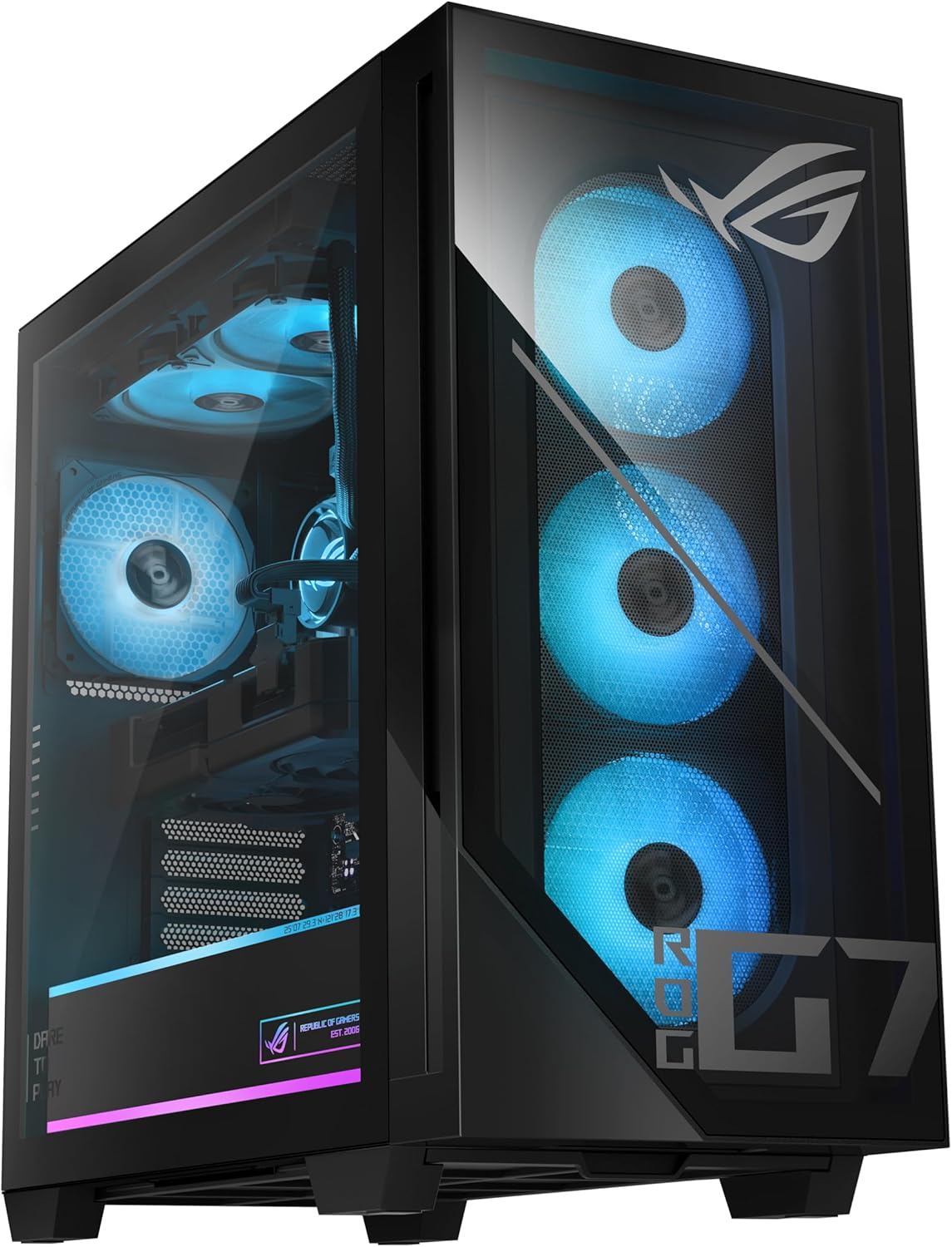
The ASUS ROG G700 enters the gaming desktop space as a purpose-built mid-tower system engineered for intensive 1440p and entry-level 4K computational workloads. Configured under model designation G700TF-DS774, this desktop pairs the modern Intel Core Ultra 7 265F processor with the NVIDIA GeForce RTX 5070 graphics card, supported by 16GB of DDR5 memory and a 1TB PCIe 4.0 NVMe solid-state drive. Housed within an expansive 58-liter dual-glass chassis featuring distinctive ROG Slash styling and Aura Sync illumination, the system delivers an uncompromising hardware baseline that merges modern silicon efficiency with substantial internal volume.
This pre-built desktop targets performance-focused gamers, digital content creators, and hardware enthusiasts who demand high rasterization throughput and hardware-accelerated ray tracing without building a system from scratch. Its generous chassis footprint and full-sized 850W power delivery provide the thermal headroom and electrical clearance necessary for long-term component upgrades. Buyers seeking a compact mini-ITX enclosure for space-restricted desks or those wanting factory liquid cooling should explore smaller footprints or custom options. Shoppers evaluating modern pre-built architectures will find that this build reflects design philosophies established across the wider asus rog desktop gaming pc lineup.
Spec sheet
ASUS ROG G700
- Processor
- Intel Core Ultra 7 265F
- Graphics Processing Unit
- NVIDIA GeForce RTX 5070
- System Memory
- 16GB DDR5 RAM
- Internal Storage
- 1TB M.2 NVMe PCIe 4.0 SSD
- Power Supply
- Full-sized 850W PSU
- Chassis Volume & Design
- 58L dual-glass chassis with tool-less access
- Cooling Architecture
- Air cooling with quad-fan array and dust filters
- Networking Interfaces
- 2.5Gbps Ethernet and Wi-Fi 6
- Expansion Headroom
- 4 total expansion slots, triple-slot GPU support
- Physical Dimensions & Weight
- 9.45 x 20.05 x 18.88 inches, 40.4 lbs
Figures as published by the manufacturer on the Amazon listing.
Processing Architecture and Graphics Performance
At the foundation of the asus rog g700 specs sits the Intel Core Ultra 7 265F, an architecture built to optimize instructions per cycle while balancing power consumption during demanding multi-threaded workloads. The 265F designation indicates a dedicated desktop CPU operating without integrated graphics, directing all rendering compute exclusively through the discrete GPU. By offloading graphics execution entirely to dedicated silicon, the processor channels its full power and thermal budget into physics calculations, frame pacing logic, game simulation threads, and background system tasks. In evaluating the asus rog g700 ultra 7 265f configuration, this architectural division ensures that frame delivery remains consistent even during heavy visual scenes filled with complex geometry and dense non-player characters.
Graphics rendering is anchored by the NVIDIA GeForce RTX 5070, providing cutting-edge rasterization and ray-tracing performance within the asus rog g700 rtx 5070 package. This GPU architecture introduces upgraded streaming multiprocessors, high-speed video memory, and advanced tensor execution cores capable of real-time AI frame generation and DLSS upscaling. For users testing the asus rog g700 for gaming across high-refresh 1440p displays or modern 4K panels, the RTX 5070 maintains fluid frame rates while mitigating latency spikes. The graphics card features dedicated high-bandwidth outputs, delivering native HDMI and DisplayPort connections directly to competitive esports monitors, high-resolution creative displays, or immersive living-room screens.
System memory and storage throughput complete the core compute triad. ASUS outfits the asus rog g700tf-ds774 with 16GB of high-speed DDR5 RAM alongside a 1TB M.2 NVMe PCIe 4.0 solid-state drive. The DDR5 standard yields substantial bandwidth gains over prior memory generations, accelerating high-resolution texture streaming and multi-application responsiveness. While the 1TB PCIe 4.0 storage drive ensures rapid operating system boot times and fast game loading intervals, the 16GB memory footprint serves as an entry-level capacity for heavy multitasking environments. Users engaged in video editing or running simultaneous background instances will appreciate that the motherboard layout allows for memory expansion down the road.
Chassis Volume and Thermal Management
The ASUS ROG G700 utilizes an expansive 58L dual-glass chassis measuring 9.45 inches in width, 20.05 inches in depth, and 18.88 inches in height, with a total weight of 40.4 pounds. This generous internal volume functions as a built-in thermal buffer, preventing hot exhaust from immediately re-circulating into internal intakes. The exterior presents the iconic ROG Slash accent alongside the Fearless Eye emblem, complemented by customizable Aura Sync RGB lighting zones visible through both tempered glass side panels. Builders familiar with dedicated enthusiast enclosures like the asus cronus pc case will recognize the aggressive geometric styling and emphasis on internal visibility that characterizes ASUS performance hardware.
Directing airflow through a dual-glass chassis demands an organized cooling path. ASUS implements an integrated air-cooling setup powered by a quad-fan array supported by integrated dust filtration. The factory fans draw ambient air across system components, exhausting warmed air out of the enclosure to prevent heat pockets around the motherboard and storage slots. When assessing asus rog g700 thermals, the inclusion of removable dust filters represents an important reliability feature, preventing ambient debris and dust accumulation from coating heat sink fins and degrading cooling efficiency over multi-year operational cycles.
Because the G700 uses an air-cooling methodology, acoustic output is closely tied to operational workloads. During routine office productivity, web navigation, and video playback, fan curves remain conservative, keeping acoustic levels low. Under heavy gaming or multi-threaded CPU stress tests, the quad-fan array scales up rotational velocity to maintain safe operating temperatures across the Core Ultra 7 processor and RTX 5070 GPU. The spatial separation provided by the 58L enclosure ensures that heat generated by the graphics card does not directly saturate the CPU cooler intake, helping the system sustain maximum clock frequencies.
Power Delivery and Component Upgradeability
Power delivery is a critical metric when evaluating desktop longevity, and the ASUS ROG G700 includes a full-sized 850W power supply unit. Providing 850 watts of continuous electrical capacity leaves generous operational headroom above the combined load requirements of the stock Core Ultra 7 265F processor and RTX 5070 graphics card. This additional wattage buffer absorbs transient power spikes common in modern gaming GPUs during abrupt rendering load transitions. Furthermore, the 850W capacity ensures that users can upgrade internal components without being forced to replace the power supply unit immediately.
Chassis engineering strongly influences accessibility, and this tower incorporates tool-less side panels designed for straightforward hardware maintenance and component swaps. The interior layout offers 4 total expansion slots and physical clearance designed to support full-length, triple-slot graphics cards. This physical clearance is a major advantage for asus rog g700 upgradeability, as high-tier modern graphics cards regularly exceed standard dual-slot brackets. Enthusiasts can open the chassis without screwdrivers to blow out dust, inspect cabling, or access PCIe retention clips for hardware swaps.
Beyond the graphics card bracket, the internal architecture provides clear pathways for secondary storage drives, expansion cards, and system memory upgrades. While some factory pre-builts employ proprietary board dimensions or restrictive layouts, the G700 maintains a spacious layout that accommodates standard modular hardware upgrades. Users who eventually consider custom motherboards such as an asus rog x870e platform will find that this 58L case provides the physical volume and mounting flexibility required to support comprehensive component evolutions over time.
I/O Connectivity and Audio Processing
Modern gaming desktops demand versatile connectivity, and the G700 includes both wired and wireless networking hardware designed for low-latency operation. Network traffic is routed through an integrated 2.5Gbps Ethernet port alongside onboard Wi-Fi 6 wireless connectivity. The 2.5G LAN interface provides more than double the bandwidth of standard gigabit connections, ensuring local network transfers and high-speed broadband connections operate without bottlenecks. For users relying on wireless setups, pairing this system with a high-bandwidth router like the asus rog strix gs-be18000 delivers low packet jitter and stable signal delivery during competitive multiplayer matches.
Peripheral interfacing across the front and rear panels accommodates a broad ecosystem of accessories. The system listing confirms versatile high-speed USB ports alongside dedicated HDMI and DisplayPort outputs driven by the RTX 5070 GPU. System compatibility extends across monitors, keyboards, mice, speakers, headphones, printers, smartphones, and projectors. ASUS also bundles a matching RGB keyboard and mouse in the box, giving buyers the essential input hardware required to get the system operational immediately without sourcing secondary accessories.
Audio management is handled through integrated Dolby Atmos spatial audio processing accompanied by two-way AI noise cancellation software. Dolby Atmos provides multidimensional sound virtualization, enabling gamers using standard stereo headsets to detect directional sound cues and positional footsteps with enhanced precision. Simultaneously, the onboard AI noise cancellation actively filters out mechanical keyboard clicks, desk vibrations, and background room noise from microphone streams, ensuring crisp voice communication during team gameplay or streaming sessions.
ASUS ROG G700 Pros and Cons
What works
- Spacious 58L chassis with tool-less component access
- Full-sized 850W power supply supports hardware expansion
- Accommodates triple-slot graphics cards effortlessly
- Quad-fan cooling system with built-in dust filters
- High-speed 2.5Gbps Ethernet and Wi-Fi 6 networking
What to weigh up
- Substantial 40.4-pound weight requires sturdy desk setup
- Stock 16GB DDR5 memory limits intense multitasking headroom
- Single 1TB storage drive constrains large modern game libraries
Who Should Buy the ASUS ROG G700
Determining whether this desktop fits your setup requires weighing its raw performance against its physical footprint and factory configuration balance.
Buy It If
- You want out-of-the-box 1440p and 4K performance: The pairing of the Intel Core Ultra 7 265F and RTX 5070 delivers high framerates across modern titles without requiring manual tuning or component assembly.
- You plan to upgrade components over time: An 850W power supply, 4 expansion slots, tool-less chassis access, and clearance for triple-slot graphics cards provide a robust upgrade path.
- You require high-bandwidth networking: Built-in 2.5Gbps Ethernet and Wi-Fi 6 hardware provide rapid local transfer speeds and stable connections for competitive gaming.
- You want a complete setup immediately: The system includes a dual-glass chassis with Aura Sync RGB alongside an included RGB keyboard and mouse right in the box.
Skip It If
- You have limited desktop surface space: At 40.4 pounds and 58 liters in volume, this full-sized tower requires a dedicated, sturdy desk or floor placement.
- You need massive memory capacity immediately: The factory 16GB DDR5 memory capacity is sufficient for gaming but may require an immediate upgrade for heavy 4K video editing or multi-track production workflows.
- You need a compact portable rig: The substantial dual-glass construction and heavy steel frame make this desktop ill-suited for frequent transport to LAN events.
Final Verdict
8.0/10Our score
An objective asus rog g700 review reveals a gaming desktop built with thoughtful balance between performance hardware and chassis engineering. Pairing Intel’s Core Ultra 7 265F with NVIDIA’s GeForce RTX 5070 establishes a capable computing foundation capable of powering modern gaming titles with ray tracing and AI frame generation fully engaged. Supported by a full-sized 850W power supply, a quad-fan cooling array with integrated dust filtration, and versatile 2.5Gbps networking, the desktop avoids the restrictive thermal bottlenecks and proprietary power limits common in mass-market pre-built PCs.
Shoppers asking is asus rog g700 worth it will find that its true value lies in its physical expansion headroom and balanced thermal architecture. While the stock 16GB of RAM and 1TB storage drive may warrant expansion as game installation footprints grow, the 58L tool-less chassis makes future upgrades straightforward. For gamers seeking a powerful pre-built system that combines modern styling with long-term hardware flexibility, the ASUS ROG G700 stands out as a well-engineered desktop platform.
FAQ
Does the ASUS ROG G700 support triple-slot graphics cards?
Yes. The ASUS ROG G700 features an expansive 58-liter chassis specifically engineered with physical clearance to house full-sized triple-slot graphics cards, supported by 4 expansion slots and a standard 850W power supply.
What processor powers the ASUS ROG G700TF-DS774 configuration?
The G700TF-DS774 configuration is equipped with the Intel Core Ultra 7 265F processor, a modern desktop CPU operating without integrated graphics to maximize computational efficiency alongside the discrete RTX 5070 GPU.
How does the thermal management system work in the dual-glass chassis?
Thermal regulation is managed by an air-cooling system utilizing a quad-fan array designed to establish direct airflow through the chassis. Removable dust filters are included to prevent particulate accumulation on internal heat sinks.
What accessories are included with the ASUS ROG G700?
Along with the tower and power cable, the ASUS ROG G700 package includes a dedicated RGB gaming keyboard and mouse, providing the essential input peripherals required for setup right out of the box.
Can the system memory and storage be upgraded later?
Yes. The desktop features tool-less side panel access and standard motherboard slots, enabling owners to easily upgrade the stock 16GB DDR5 memory and add additional M.2 PCIe solid-state storage as their needs expand.
What operating system comes pre-installed on the desktop?
The ASUS ROG G700 comes with Windows 11 Home pre-installed, providing native support for modern gaming features, DirectX 12 Ultimate, and standard Windows security protections.
See this listing on Amazon We may earn a commission if you buy through this link.
More in Computers & Laptops


The weekly shortlist
Specs worth reading, once a week
New teardowns, spec sheets and buying notes from across the desk.
This demo form is not connected to a mailing service.