Alienware 16 Area-51 Architecture Analysis: Silicon Specs & Thermals
The Alienware 16 Area-51 marks a decisive return to uncompromising desktop replacement engineering, prioritizing sustained computing power and high thermal envelopes over razor-thin portability. Anchored by an Intel Core Ultra 9 275HX processor and…

As Amazon Associates, we earn from qualifying purchases. This means we may receive a small commission at no extra cost to you if you click through and make a purchase.
The Alienware 16 Area-51 marks a decisive return to uncompromising desktop replacement engineering, prioritizing sustained computing power and high thermal envelopes over razor-thin portability. Anchored by an Intel Core Ultra 9 275HX processor and the NVIDIA GeForce RTX 5070 Ti graphics coprocessor, this machine serves as a heavy-duty platform designed to maintain top-tier processing limits during intensive computational loads. Encased in a striking Liquid Teal clamshell chassis featuring a proprietary raised thermal base, the system establishes an assertive technical benchmark for enthusiasts who evaluate performance strictly through silicon throughput, hardware stability, and component headroom.
This powerhouse directly caters to competitive players, rendering specialists, and hardware analysts seeking an alienware area 51 laptop for gaming that provides desktop-class hardware profiles alongside comprehensive expansion capabilities. However, users prioritizing ultra-light mobility, silent low-profile travel operation, or prolonged unwired battery stamina will find the machine’s 7.5-pound mass and substantial power demands counterproductive to their daily transit routines.
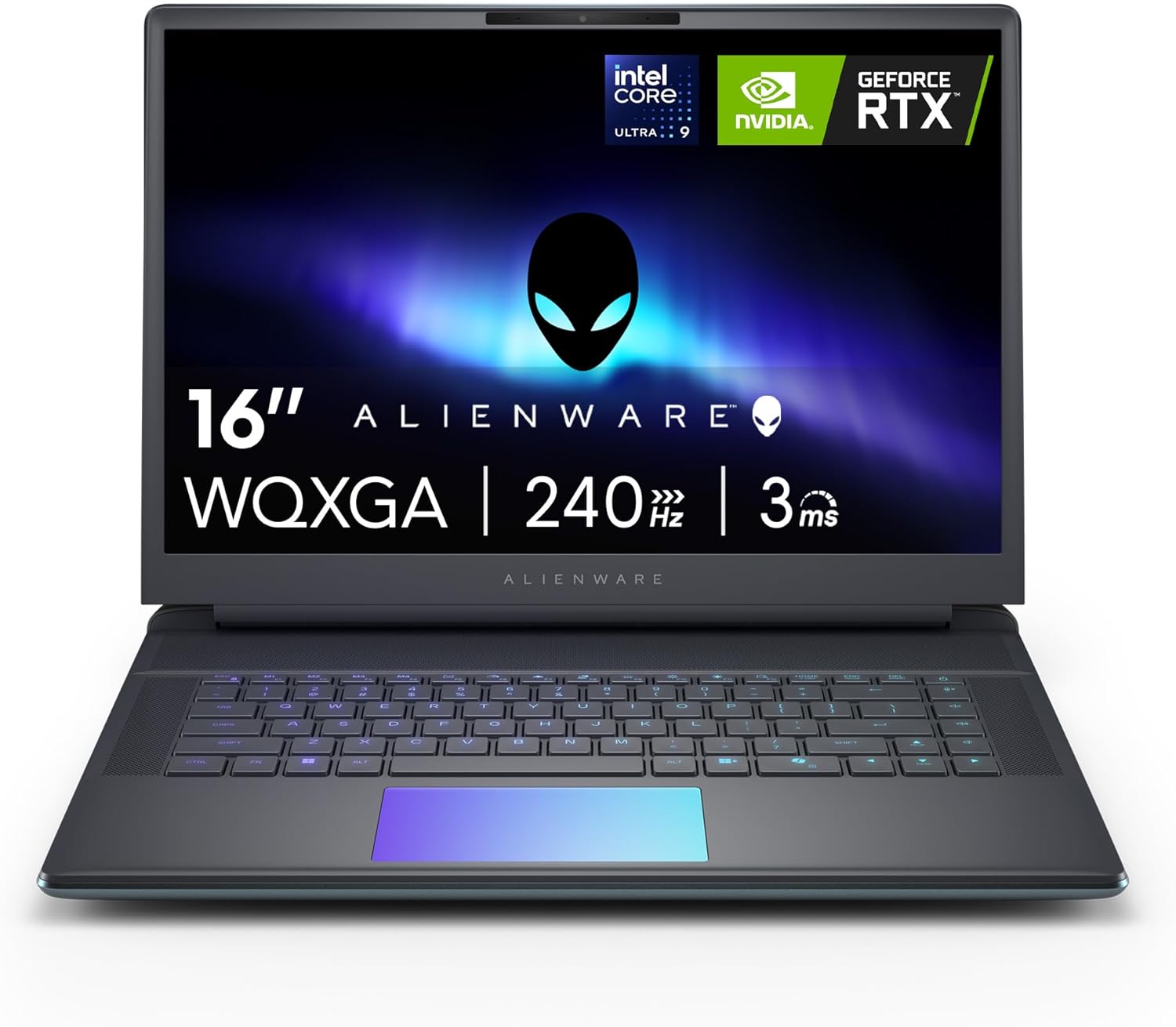
Spec sheet
Alienware 16 Area-51
- Central Processing Unit
- Intel Core Ultra 9 275HX (Integrated CPU, built-in GPU, and NPU)
- Graphics Processing Unit
- NVIDIA GeForce RTX 5070 Ti Dedicated (NVIDIA Max-Q Optimizations)
- Video Memory
- 12 GB GDDR7
- Chassis Form Factor and Color
- Clamshell in Liquid Teal
- Thermal Engineering
- Cryo-Chamber with Gorilla Glass AlienFX viewport
- Dimensions and Weight
- 11.41" L x 14.37" W x 1.12" Th; 7.5 pounds
- Operating System
- Windows 11 Home
- Input and Audio Features
- Backlit Keyboard with Numeric Keypad, HD Audio
- Integrated Security and Camera
- Front Camera; No Fingerprint Reader
- Storage Expansion and Media
- Memory Card Slot; No Optical Drive
- Warranty and Onsite Support
- 1 Year Onsite Service with remote triage fallback
Figures as published by the manufacturer on the Amazon listing.
Silicon Architecture and Graphics Processing
At the architectural core of the system sits an advanced multi-tile silicon layout powered by the intel core ultra 9 275hx laptop platform. Intel’s Core Ultra HX design consolidates traditional compute cores, an energy-efficient onboard graphics tile, and a specialized Neural Processing Unit directly onto a unified silicon package. This hybrid distribution allows background operating system tasks and artificial intelligence acceleration passes to offload seamlessly to dedicated silicon blocks, keeping the primary compute cores clear for sustained instruction pipelines during complex simulations, compiling routines, and heavy 3D rendering jobs. While the product listing does not specify total system RAM capacity or solid-state drive volume, the primary compute architecture provides an uncompromising operational foundation.
Graphics rendering duties are driven by dedicated alienware area-51 gddr7 graphics via the NVIDIA GeForce RTX 5070 Ti. Furnished with 12 GB of high-speed GDDR7 video memory, this graphics coprocessor leverages next-generation memory bandwidth to handle dense geometry assets, high-resolution textures, and modern lighting models. The implementation integrates NVIDIA Max-Q architectural features to balance total board power, thermals, and performance output within portable system limits. Compared to traditional portable units such as an aspire 5 laptop, the dedicated graphics power allocated inside this platform targets sustained workloads without artificial performance throttling.
Evaluating these core area 51 laptop specs underscores Alienware’s focus on maintaining maximum graphics wattage. The 12 GB GDDR7 configuration provides a substantial operational buffer against VRAM bottlenecks in contemporary gaming engines, accommodating higher texture streaming budgets. Paired with the multi-tiered Core Ultra 9 275HX, the alienware 16 area-51 rtx 5070 ti configuration ensures balance between central processing execution and visual rasterization throughput, driving steady frame generation across demanding interactive simulations.
Cryo-Chamber Thermal Solution and Sustained Airflow
Managing heat generation from high-wattage computing hardware requires aggressive structural thermodynamics, which Alienware executes through the area 51 laptop cryo-chamber cooling design. The Cryo-Chamber mechanically elevates the bottom plane of the machine above flat surfaces, directly addressing the intake starvation issues common in thin portable designs. By physically propping up the chassis, this elevated base structure creates an enlarged air plenum, drastically expanding lower intake volume so ambient air can circulate efficiently through the interior cooling fin arrays before being evacuated.
A distinctive functional and aesthetic highlight of this thermal assembly is the inclusion of an integrated, clear Gorilla Glass viewport situated along the chassis base. This transparent barrier provides a direct view of the high-velocity AlienFX internal cooling fans while preserving structural rigidity along the intake perimeter. The architectural benefit extends directly into real-world alienware area 51 thermal performance, as the enlarged intake channel minimizes flow resistance, allowing internal fan blades to pull higher cubic feet per minute of air without demanding disruptive fan pitch adjustments during high-stress compute spikes.
Operating on standard alternating current up to 240 volts via its high-output external charging adapter, the system’s thermal envelope is engineered to maintain component performance stability under long operational sessions. While competing high-tier designs like the acer – predator helios neo 16s ai gaming laptop – 16 oled 240hz – intel core ultra 9 – nvidia geforc adopt thin-and-light silhouettes that require conservative thermal throttling curves, the Alienware 16 chassis uses its mass and elevated intake architecture to sustain power delivery without premature thermal clipping.
Chassis Mass, Physical Footprint, and Port Compatibility
Physical construction reinforces this machine’s status as a pure desktop substitute rather than a daily commuter companion. Official alienware area 51 weight and dimensions register at 7.5 pounds with external measurements of 11.41 inches in length, 14.37 inches in width, and a thickness of 1.12 inches. Finished in a specialized Liquid Teal coating, the clamshell chassis presents a dense, rigid profile that minimizes deck flex, housing substantial copper thermal heat spreaders, cooling fans, and high-wattage platform electronics within an assertive frame.
System input and output routing demonstrates expansive peripheral expandability, backed by broad alienware 16 area 51 ports compatibility. The system interfaces natively with high-bandwidth standards, supporting external devices across Thunderbolt, standard USB, and HDMI interfaces alongside wireless networking protocols including Wi-Fi and Bluetooth. These physical and wireless conduits allow direct connections to complex multi-monitor arrays, external mechanical input surfaces, high-speed external storage drives, network switches, and desktop printers. Users anchoring their workstation around an advanced multi-display array like a triple aero 15.6 pro max 3 screen monitor can drive multiple display pipelines simultaneously without supplemental dock adapters.
Additionally, physical expansion includes an integrated memory card slot, enabling immediate media ingest for photographers and videographers working directly from high-capacity external flash storage cards. The chassis deliberately omits an internal optical storage drive, utilizing that internal volumetric space to prioritize cooling chambers, thermal routing paths, and onboard component shielding. While the listing does not specify precise internal M.2 slot distributions or display panel specifications such as resolution or refresh frequency, the external physical connectivity ensures that desktop workstation peripherals mount without mechanical or bandwidth compromises.
Control Surfaces, Ergonomics, and Operating Environment
User interactions are anchored by a full-format input deck featuring a fully backlit keyboard accompanied by a dedicated numeric keypad. The inclusion of the numeric keypad provides tangible ergonomic efficiency for productivity tasks, data logging, simulation controls, and macro execution, distinguishing this chassis from narrower tenkeyless gaming laptops. Typing tactile response remains stable across the broad 14.37-inch chassis width, supported internally by structural chassis bracing that absorbs forceful key depressions during competitive gaming.
Visual presentation is augmented by advanced dynamic ambient lighting powered by AlienFX, drawing thematic inspiration from the chromatic shifts of the aurora borealis. The illumination system projects light patterns across adjacent surfaces, providing customizable accent hues that sync with active gaming environments or ambient workspace aesthetics. Complementing the visual array is an integrated HD audio sound system, which supplies clear directional acoustic imaging for communication and gaming environments without requiring dedicated external headphone amplifiers for basic desktop playback.
The integrated workspace includes a front-facing camera for direct streaming, remote conferencing, and telework communication pipelines. For security hardware, the listing confirms that no fingerprint reader is integrated into the chassis deck or power toggle, requiring traditional alphanumeric or visual PIN authentication within the preloaded Windows 11 Home environment. Dell reinforces system reliability with an included 1 Year Onsite Service plan under their Limited Hardware Warranty, providing localized diagnostic technicians directly to homes or office workspaces whenever hardware anomalies cannot be remedied through remote diagnostic utilities.
Alienware 16 Area-51 Pros and Cons
What works
- Intel Core Ultra 9 275HX processing
- NVIDIA RTX 5070 Ti 12GB GDDR7
- Cryo-Chamber elevated airflow design
- Gorilla Glass viewport for AlienFX fans
- Full keyboard with numeric keypad
- 1 Year Onsite Service included
What to weigh up
- Substantial 7.5-pound chassis mass
- No integrated fingerprint reader
- Chunky 1.12-inch desktop profile
Check Alienware 16 Area-51 on Amazon
Who Should Buy the Alienware 16 Area-51
Buy It If
- You demand desktop-class gaming throughput fueled by an Intel Core Ultra 9 275HX processor and an NVIDIA GeForce RTX 5070 Ti with modern 12 GB GDDR7 video memory.
- Your computational workflow benefits from an elevated chassis design like the Cryo-Chamber, which optimizes lower thermal airflow clearance for extended operational reliability.
- You need expansive desktop connectivity encompassing Thunderbolt, HDMI, USB, and an integrated memory card slot to connect multiple accessories, displays, and storage banks.
- You value included 1 Year Onsite Service support that dispatches technicians directly to your physical workstation if hardware issues cannot be resolved over the phone.
Skip It If
- You need a lightweight, ultra-portable machine for daily mobile transit, as this 7.5-pound chassis and 1.12-inch thickness are engineered as a stationary desktop replacement.
- You depend on biometric fingerprint authentication for swift operating system sign-ins, an interface element omitted from this hardware build.
- You want a lightweight alternative like the alienware 16x aurora gaming laptop designed for casual transport rather than maximum thermal intake and physical footprint.
Final Verdict
Answering whether is alienware area 51 laptop worth it depends entirely on how much value you place on uncompromising sustained hardware wattage versus physical mobility. By combining Intel’s multi-tile Core Ultra 9 275HX with 12 GB of high-speed GDDR7 VRAM on the NVIDIA GeForce RTX 5070 Ti, this platform directly addresses the thermal and computational bottlenecks common in slim chassis designs. The Cryo-Chamber thermal structure physically resolves airflow constraints, ensuring that internal processors and high-velocity cooling fans maintain consistent performance throughout grueling processing workloads.
The trade-offs remain transparent: at 7.5 pounds and over an inch thick, this machine functions as a transportable desktop rig rather than an agile backpack companion. The lack of an integrated fingerprint reader and the absence of an internal optical drive emphasize its singular focus on modern, heavy-duty processing tasks. For enthusiasts, simulation runners, and power users who evaluate hardware through thermal stability, architectural balance, and graphics capabilities, the Alienware 16 Area-51 stands as an engineered powerhouse built for sustained computational supremacy.
FAQ
What graphics hardware is installed in the Alienware 16 Area-51?
The machine is equipped with a dedicated NVIDIA GeForce RTX 5070 Ti Laptop GPU featuring 12 GB of high-speed GDDR7 video memory. The graphics system incorporates NVIDIA Max-Q architectural optimizations to fine-tune graphics performance, power consumption, and thermal output during demanding visual computations.
How does the Cryo-Chamber cooling system work?
The Cryo-Chamber acts as a structural prop that elevates the laptop chassis above desk surfaces, opening up a substantially larger intake zone for airflow beneath the system. It features a transparent Gorilla Glass panel along the underside that offers a direct view of the internal AlienFX fans while guiding cold air across the primary cooling fins.
What operating system and biometric options come on this laptop?
The laptop comes preloaded with Windows 11 Home. In terms of biometric security hardware, the listing confirms there is no fingerprint reader installed on the chassis, though a front-facing camera is integrated into the upper display bezel for standard video communication.
What are the exact physical dimensions and weight of this machine?
The Alienware 16 Area-51 measures 11.41 inches in length, 14.37 inches in width, and 1.12 inches in thickness. The complete system registers an item weight of 7.5 pounds, placing it firmly within the desktop replacement hardware class.
What warranty and support services are included with the purchase?
The system includes Dell’s 1 Year Onsite Service alongside a Limited Hardware Warranty. If any operational or hardware issue covered under the warranty cannot be resolved through remote software diagnostics, Dell provides an onsite technician directly to your home, office, or selected work location.
See this listing on Amazon We may earn a commission if you buy through this link.
More in Computers & Laptops



The weekly shortlist
Specs worth reading, once a week
New teardowns, spec sheets and buying notes from across the desk.
This demo form is not connected to a mailing service.