Lenovo ThinkPad P14s Gen 6 Architecture & Spec Evaluation
The Lenovo ThinkPad P14s Gen 6 establishes a distinct hardware profile within the entry-level mobile workstation tier, combining AMD Ryzen AI PRO 300 series processing with a compact 14-inch enterprise chassis. Configured with the…

As Amazon Associates, we earn from qualifying purchases. This means we may receive a small commission at no extra cost to you if you click through and make a purchase.
The Lenovo ThinkPad P14s Gen 6 establishes a distinct hardware profile within the entry-level mobile workstation tier, combining AMD Ryzen AI PRO 300 series processing with a compact 14-inch enterprise chassis. Configured with the AMD Ryzen AI 7 PRO 350 processor, 32GB of DDR5 memory, and a high-luminance WUXGA panel, this device represents a strategic pivot toward AI-accelerated compute pipelines and high-efficiency x86 performance. For technical professionals, systems engineers, and power users seeking workstation reliability without excessive chassis bulk, it delivers a potent processing engine supported by contemporary connectivity standards like Wi-Fi 7 and USB4 40Gbps.
This workstation directly serves corporate power users, software developers, data practitioners, and mobile professionals who prioritize multi-threaded throughput, local neural network processing, and daylight-readable screen brightness. Conversely, 3D visualization artists and deep learning researchers running CUDA-dependent model training will find its reliance on integrated AMD Radeon graphics limiting, pointing them instead toward discrete GPU platforms like the lenovo thinkpad p16 for raw rendering acceleration.
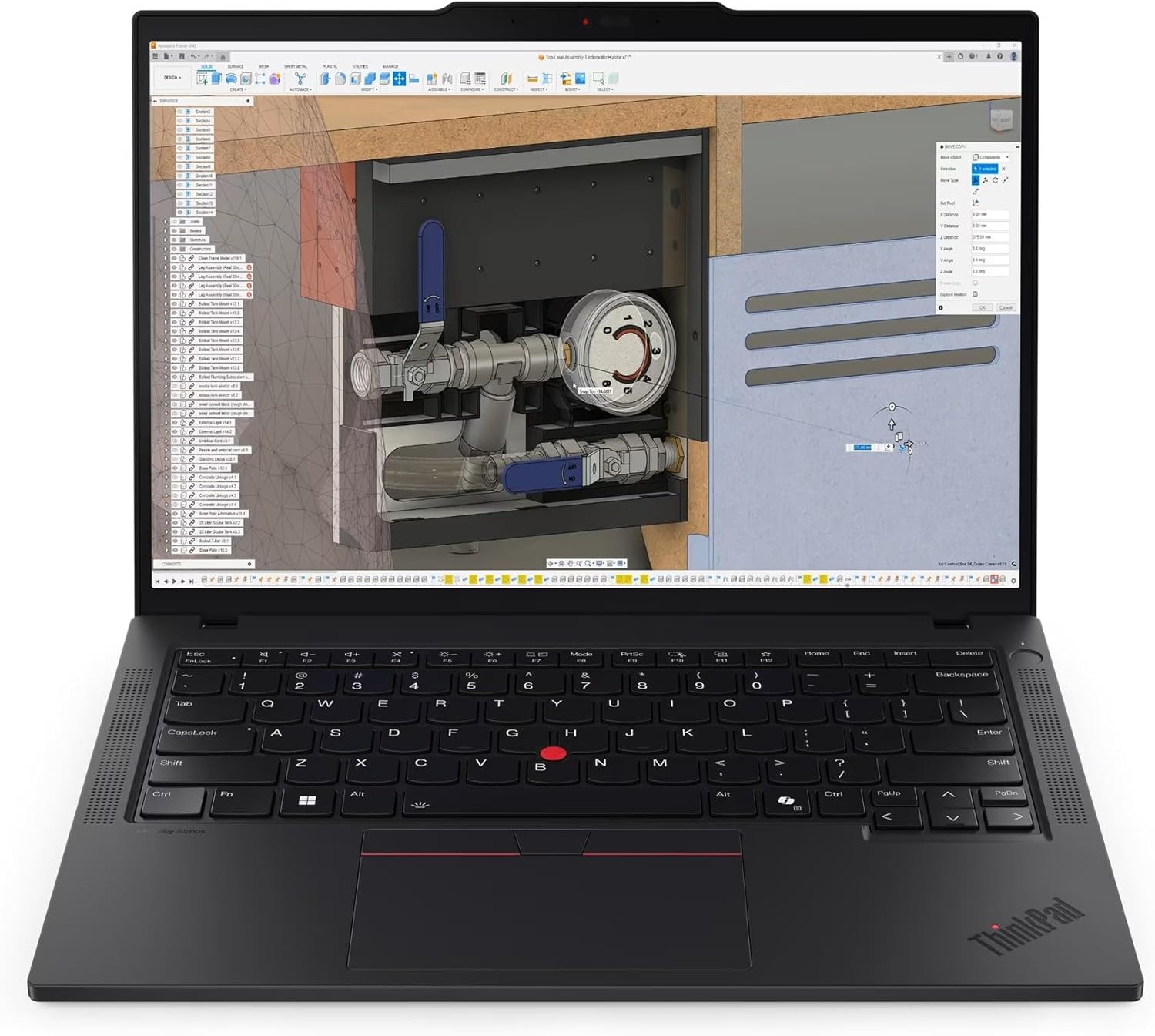
Spec sheet
Lenovo ThinkPad P14s Gen 6
- Central Processing Unit
- AMD Ryzen AI 7 PRO 350 Processor
- Graphics Processing Architecture
- Integrated AMD Radeon Graphics
- System Memory
- 32GB DDR5 SDRAM
- Storage Drive
- 1TB Solid State Drive (SSD)
- Display Panel
- 14-inch WUXGA (1920×1200), 500 nits, 100% sRGB, Non-Touch
- AI Platform Classification
- Copilot+ PC with Integrated Neural Processing Unit (NPU)
- Networking Infrastructure
- Wi-Fi 7 Wireless Interface and Gigabit RJ-45 Ethernet
- High-Speed Expansion I/O
- 2x USB-C (USB4 40Gbps, Thunderbolt 4 compliant, PD 3.0, DP 1.4)
- Physical Dimensions
- 12.44 inches (L) x 8.81 inches (W) x 0.64 inches (H)
- Base Warranty Coverage
- One Year Courier or Carry In / On Site (Upgradable to 5 Years)
Figures as published by the manufacturer on the Amazon listing.
Processing Architecture and Compute Boundaries
The core computational engine driving the thinkpad p14s gen 6 ryzen ai 7 pro 350 marks a generational transition in lightweight mobile workstation design. The AMD Ryzen AI 7 PRO 350 is built to execute mixed enterprise workloads, featuring advanced Zen compute cores alongside a dedicated neural processing unit. This dedicated NPU provides the hardware baseline required to meet Microsoft Copilot+ PC parameters, offloading continuous machine learning tasks such as audio isolation, background blur matrix computations, and real-time inferencing from the x86 execution units. This structural division preserves the primary processor threads for data compilation, virtualization, and computational analysis without causing systemic micro-stutter.
Complementing the compute cores is an integrated AMD Radeon graphics subsystem that relies entirely on shared system memory. In terms of thinkpad p14s gen 6 specs, having 32GB of DDR5 SDRAM guarantees that large datasets, extensive browser workloads, and integrated graphics framebuffers do not instantly encounter memory paging bottlenecks. However, because memory bandwidth is distributed between the CPU cores and the Radeon graphics execution units, graphics-intensive CAD assemblies and complex 3D viewports operate under different bandwidth constraints than systems equipped with dedicated VRAM. The integration of high-bandwidth DDR5 mitigates memory starvation, yet users must account for this unified memory architecture when estimating peak multi-stream vector processing throughput.
For fleet managers analyzing the thinkpad p14s gen 6 vs gen 5, this architecture delivers meaningful leaps in thermal efficiency, instruction throughput, and specialized NPU acceleration. While previous iterations leveraged earlier APU generations, the thinkpad p14s gen 6 amd implementation optimizes instruction-per-clock execution while reducing passive power draw during continuous productivity. When planning long-term deployment viability and potential thinkpad p14s gen 6 ram upgrade paths, the listing confirms this unit is configured with 32GB of factory-installed DDR5, though the retailer specifications do not explicitly outline internal SODIMM slot topology versus soldered configurations. Businesses running memory-dense virtual machine environments must balance this factory 32GB capacity against their projected workload scaling over a multi-year refresh cycle.
Display Precision and Panel Characteristics
Display performance on the thinkpad p14s gen 6 display 500 nits configuration addresses a chronic operational complaint in corporate environments: insufficient luminance under direct ambient light. Delivering an authentic 500-nit luminance ceiling across its 14-inch non-touch surface, this WUXGA screen ensures consistent visibility in illuminated boardrooms, transit stations, and outdoor settings where lower-tier 250-nit or 300-nit panels wash out. The non-touch anti-glare coating actively diffuses harsh specular reflections, preserving text edge sharpness and reducing ocular fatigue over prolonged programming or data review sessions.
Beyond raw luminance, the panel provides 100% sRGB color gamut saturation, delivering accurate color rendition for digital asset production, user interface design, and multimedia presentation workflows. The WUXGA resolution renders a 16:10 aspect ratio, providing expanded vertical desktop space compared to conventional 16:9 widescreen formats. This vertical expansion permits software developers and spreadsheet analysts to view extra lines of source code and tabular data without excessive scrolling. While it does not offer the ultra-dense pixel structure of a 4K OLED matrix, the balance of WUXGA resolution, 500-nit peak output, and standard refresh tuning preserves system battery reserves while serving professional visualization needs.
Bus Bandwidth and Physical Interface Topography
Modern mobile workstations frequently sacrifice peripheral connectivity in pursuit of chassis thinness, but the thinkpad p14s gen 6 port selection preserves essential enterprise interfaces without mandatory port adapters. The device integrates two USB-C ports operating on the USB4 40Gbps specification with full backward compatibility for Thunderbolt 4 protocols. These high-speed lanes support Power Delivery 3.0 alongside DisplayPort 1.4 alternate mode, allowing single-cable connection to modern workstation docks, dual external display matrices, and high-speed NVMe external storage arrays. This ensures seamless integration into dual-monitor corporate docking stations while delivering upstream chassis charging over a universal standard.
Legacy and mission-critical connectivity remains well-represented across the chassis perimeter:
- 1x USB-A (USB 5Gbps / USB 3.2 Gen 1): Standard external device connection for input hardware and legacy flash drives.
- 1x USB-A (USB 5Gbps / USB 3.2 Gen 1), Always On: Provides continuous external charging power to connected accessories even when the main host system resides in standby or power-off states.
- 1x HDMI 2.1: Direct display output supporting up to 4K resolution at 60Hz for legacy conference room projectors and fixed external monitors.
- 1x RJ-45 Ethernet: Native gigabit network interface providing secure, deterministic physical LAN connectivity without USB conversion latencies.
- 1x Headphone / Microphone Combo (3.5mm): Direct analog audio routing for secure enterprise communication headsets.
- 1x Security Keyhole: Physical chassis anchoring interface for anti-theft workstation locking within unsecured work environments.
The networking topography is augmented by an integrated Wi-Fi 7 wireless controller, positioning the machine for deployment alongside next-generation enterprise access points. Wi-Fi 7 enables multi-link operation and expanded channel spectrum utilization, reducing latency and avoiding frequency congestion within high-density office environments. Users comparing this ultra-portable chassis to heavier enterprise machines like the older thinkpad p15 gen 2 will appreciate that physical RJ-45 Ethernet retention eliminates the common docking compromises seen across consumer-grade ultraportables.
Enterprise Deployment and Operating System Integration
Configured specifically as a thinkpad p14s gen 6 for business machine, the unit incorporates full hardware support for Windows 11 Pro, integrating BitLocker encryption, Windows Hello biometric access framework compliance, and advanced virtualization-based security (VBS). The underlying AMD Ryzen AI PRO architecture provides hardware-enforced memory encryption and continuous threat detection, enabling system administrators to deploy this platform within strict corporate zero-trust environments. The included one-year courier/carry-in and on-site warranty coverage can be expanded up to five years upon official Lenovo registry, satisfying standard corporate procurement lifecycles.
Chassis engineering achieves a slim 0.64-inch profile across a 12.44-inch by 8.81-inch footprint, though the listing records an item weight of 2 kg. This structural density houses robust internal heat spreading and cooling assemblies tasked with maintaining sustained clock rates under sustained compute loads. Compared to wider desktop replacements like the lenovo thinkpad p16s gen 4, the P14s platform isolates thermals to a 14-inch footprint, prioritizing thermal equilibrium over absolute peak cooling area.
Software environments outside the default Windows ecosystem represent an essential evaluation criterion for technical teams. While the machine ships with Windows 11 Pro, thinkpad p14s gen 6 linux compatibility benefits from Lenovo’s traditional Linux enablement initiatives alongside modern upstream kernel integration for AMD Zen architectures. Modern Linux kernels (version 6.8 and newer) provide native controller drivers for USB4 40Gbps buses, Wi-Fi 7 wireless chipsets, and AMD Radeon graphics acceleration. However, system administrators deploying custom Linux distributions should note that full neural processing unit utilization and specific Copilot+ microarchitectural features currently maintain tighter operational integration inside Windows 11 Pro environments until upstream open-source AI acceleration stacks mature fully.
Lenovo ThinkPad P14s Gen 6 Pros and Cons
What works
- AMD Ryzen AI 7 PRO 350 with Copilot+ NPU
- High-luminance 500-nit 100% sRGB anti-glare display
- Dual 40Gbps USB4 and modern Wi-Fi 7 support
- Native RJ-45 gigabit Ethernet connectivity
- Generous 32GB DDR5 memory and 1TB SSD
What to weigh up
- Relies solely on integrated AMD Radeon graphics
- Chassis item weight listed at 2 kg
- HDMI 2.1 video output capped at 4K/60Hz
Check Lenovo ThinkPad P14s Gen 6 on Amazon
Who Should Buy the Lenovo ThinkPad P14s Gen 6
Buy It If
- You require an agile mobile workstation with high physical I/O density: Users who demand native RJ-45 Ethernet, USB4 40Gbps, HDMI 2.1, and legacy USB-A ports without carrying external dongles will find the chassis layout exceptional.
- Your workflows prioritize high-visibility text rendering: Mobile field workers, programmers, and finance specialists working near direct sunlight will benefit significantly from the 500-nit, 100% sRGB anti-glare WUXGA display panel.
- You deploy AI-assisted workflows within Windows 11 Pro: Organizations leveraging local neural processing routines, background media acceleration, and Microsoft Copilot+ enterprise ecosystems can utilize the specialized NPU built into the Ryzen AI 7 PRO 350.
- You manage modern wireless corporate infrastructure: Deployments shifting toward high-bandwidth, low-congestion Wi-Fi 7 environments will leverage the cutting-edge wireless controller natively integrated into this chassis.
Skip It If
- You require dedicated discrete GPU compute: Engineers working heavily with complex CUDA-accelerated datasets, ray-traced rendering, or intensive 3D CAD modeling require discrete workstation GPUs rather than integrated AMD Radeon graphics.
- You need absolute featherweight ultra-light mobility: Shoppers seeking ultra-light sub-1.3 kg travel laptops may find this 2 kg workstation footprint comparatively dense for standard commuter bag configurations.
- Your projects require 4K pixel precision: Creative professionals requiring native 3840×2160 resolution or wide AdobeRGB/DCI-P3 color gamuts will find the 1920×1200 WUXGA panel limiting for precision color grading.
Final Verdict
8.6/10Our score
Evaluating whether the is thinkpad p14s gen 6 worth it comes down to matching its specific hardware topology with operational requirements. Lenovo has delivered a machine that bridges the gap between conventional business notebooks and heavy desktop-replacement workstations. By combining the AMD Ryzen AI 7 PRO 350 processor, a daylight-capable 500-nit WUXGA display, 32GB of rapid DDR5 memory, and high-tier peripheral bandwidth through dual USB4 40Gbps channels and Wi-Fi 7, it provides an uncompromised mobile platform for data analysis, software engineering, and corporate operations.
The primary compromise remains its reliance on integrated AMD Radeon graphics. While the shared DDR5 architecture handles general workstation productivity, light visual design, and multi-display outputs with ease, it inherently lacks the compute ceilings provided by discrete workstation-class GPUs. If your computational footprint revolves around CPU-intensive processing, secure enterprise management, expansive peripheral support, and modern AI acceleration in a compact form factor, the Lenovo ThinkPad P14s Gen 6 stands as an exceptionally capable and durable mobile investment.
FAQ
What makes the Ryzen AI 7 PRO 350 processor different from standard mobile chips?
The AMD Ryzen AI 7 PRO 350 integrates high-efficiency Zen CPU cores, an AMD Radeon graphics processor, and an advanced dedicated Neural Processing Unit (NPU). This tri-compute architecture meets Microsoft Copilot+ PC criteria, allowing the system to run localized artificial intelligence algorithms and background processes continuously on the NPU without drawing heavy power or reducing main CPU execution bandwidth.
Can the external display outputs run multiple 4K monitors simultaneously?
Yes. The system incorporates two USB-C ports operating on the USB4 40Gbps standard with DisplayPort 1.4 support, alongside a dedicated HDMI 2.1 port capable of driving 4K resolution at up to 60Hz. Through appropriate docking hardware or direct cabling, users can operate multi-monitor workstation setups utilizing the integrated AMD Radeon display engine.
Does the 500-nit WUXGA display support touch input?
No, the listing specifies that this 14-inch WUXGA (1920×1200) 500-nit panel is a non-touch display. It features an anti-glare finish designed to disperse reflections and maximize visual clarity across bright office environments, paired with 100% sRGB color gamut fidelity.
What physical ports are included for peripheral devices?
The chassis features two USB-C (USB4 40Gbps / Thunderbolt 4 compliant) ports with Power Delivery 3.0 and DisplayPort 1.4, two USB-A 5Gbps ports (one featuring Always On charging), one HDMI 2.1 port, one RJ-45 gigabit Ethernet interface, a 3.5mm headphone/microphone audio jack, and a physical security keyhole.
What warranty coverage is included with this configuration?
The product includes an initial One Year Courier or Carry In / On Site warranty coverage directly from Lenovo. In addition, the listing indicates that users can expand system protection for up to 5 years of coverage when registering the computer through Lenovo’s support portal.
Is the 32GB DDR5 memory sufficient for professional development tasks?
Yes, 32GB of DDR5 memory provides ample capacity for running multiple localized container environments, database instances, and intensive multitasking alongside Windows 11 Pro. Because the integrated Radeon graphics dynamically shares system RAM, having 32GB ensures that allocating framebuffers to graphical rendering does not degrade overall system responsiveness.
See this listing on Amazon We may earn a commission if you buy through this link.
More in Computers & Laptops


The weekly shortlist
Specs worth reading, once a week
New teardowns, spec sheets and buying notes from across the desk.
This demo form is not connected to a mailing service.