HP Reverb G2 V2 Technical Analysis: Specs, Tracking, and Panel Performance
The HP Reverb G2 V2 is a high-resolution tethered virtual reality headset built for personal computer users who demand maximum visual clarity and acoustic immersion, driven by dual mura-free 2160 x 2160 LCD panels…

As Amazon Associates, we earn from qualifying purchases. This means we may receive a small commission at no extra cost to you if you click through and make a purchase.
The HP Reverb G2 V2 is a high-resolution tethered virtual reality headset built for personal computer users who demand maximum visual clarity and acoustic immersion, driven by dual mura-free 2160 x 2160 LCD panels and off-ear spatial audio drivers developed with Valve. As a dedicated revision of the original platform, this hardware iteration sharpens its focus on expanded optical camera coverage, enhanced facial ergonomics, and direct video signal integrity. For simulation pilots, digital motorsport competitors, and precision visual analysts, it represents one of the clearest and most legible head-mounted display options available for consumer graphics hardware.
This headset is engineered primarily for flight sim operators, virtual racers, and simulation-based enterprise professionals using Windows 10 who require legible cockpit gauges and crisp subpixel typography. Conversely, casual users seeking wireless freedom, room-scale tracking free of physical cables, or compatibility with non-Windows operating systems should look elsewhere, as this headset relies strictly on dedicated PC graphics power, wall outlet power, and direct video tethering.
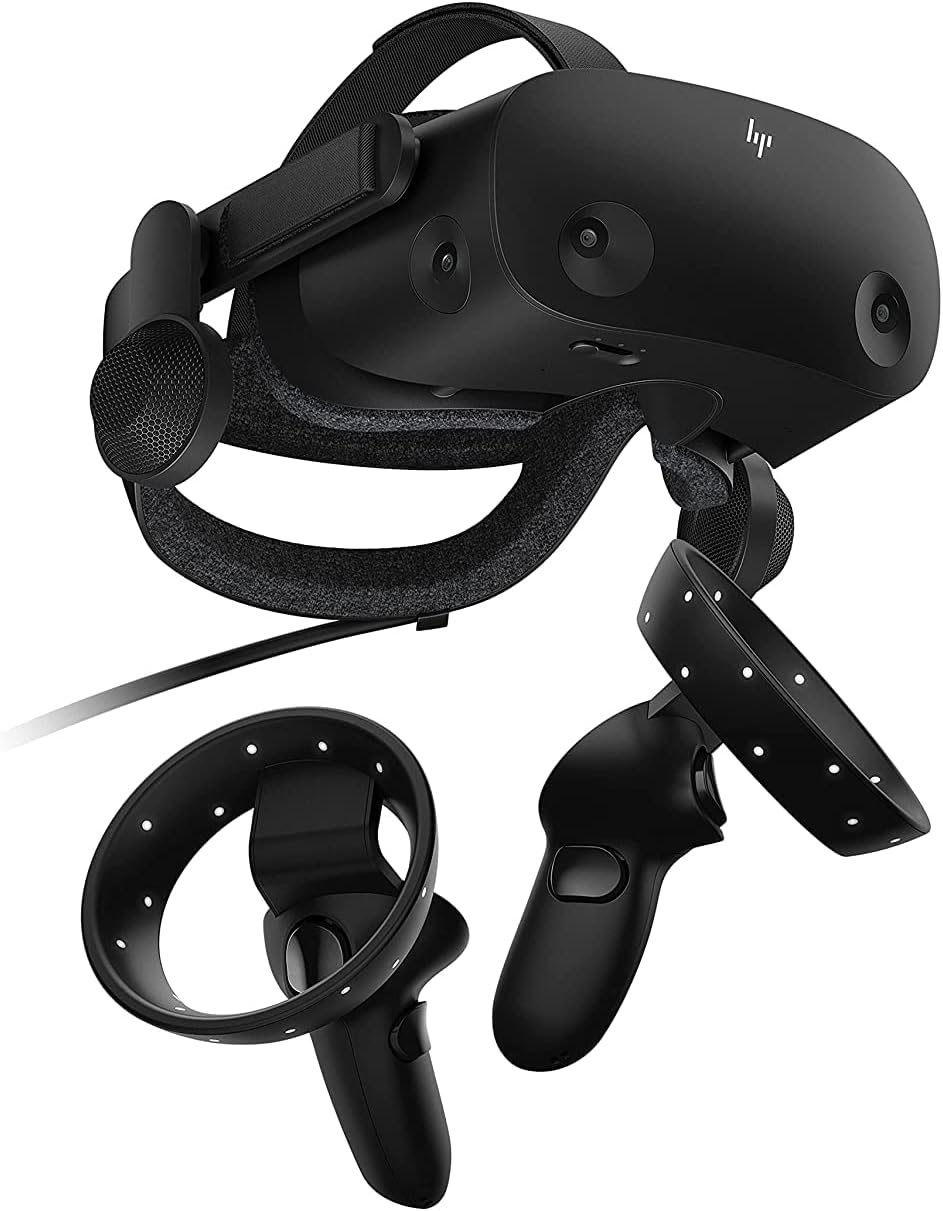
Spec sheet
HP Reverb G2 V2
- Display Resolution
- 2160 x 2160 pixels per eye (4320 x 2160 combined maximum)
- Panel Technology
- Dual mura-free LCD panels
- Field of View
- 110 degrees
- Tracking Architecture
- Windows Mixed Reality Inside/Out 6 DoF Motion Tracking
- Integrated Sensor Suite
- 4 built-in cameras, Gyroscope, Accelerometer, Magnetometer
- Audio Solution
- Off-ear spatial audio speakers engineered with Valve
- Tether Cable
- 6m headset cable for desktop and mobile PCs
- Video Interconnect
- DisplayPort (includes 1 DisplayPort to mini-DisplayPort adapter)
- Software Compatibility
- SteamVR and Windows Mixed Reality
Figures as published by the manufacturer on the Amazon listing.
Display Fidelity and Panel Resolution Analysis
The primary draw of the HP Reverb G2 V2 specs centers on its display configuration. Outfitted with dual mura-free 2160 x 2160 LCD panels per eye, the headset generates an aggregate maximum resolution of 4320 x 2160 pixels. Across an 110-degree field of view, this pixel density dramatically mitigates the screen-door effect that obscures fine detail on lower-resolution headsets. Minute avionics displays, distant track markers, and cockpit telemetry remain legible without requiring digital zoom or unnatural head repositioning.
Panel quality benefits directly from the mura-free specification. In head-mounted displays, mura manifests as irregular pixel-to-pixel luminance and color inconsistency, often creating a faint film or dirty-window effect across uniform backgrounds. HP utilizes mura-free LCD panels to ensure that expansive, solid-color scenes—such as open skies or uniform road surfaces—remain pristine and visually clean. While the listing does not specify the exact display refresh rate, the panel architecture delivers sharp motion clarity without ghosting artifacts during rapid head movements.
Optical calibration is supported by integrated lens distance adjustments. Because human inter-pupillary distances vary, fixed-lens systems can force eyes outside the optical sweet spot, inducing chromatic aberration and edge distortion. The headset includes lenses that adjust to suit different eye distances, allowing users to physically align the optics with their pupils. Combined with the generous 110-degree field of view, this physical adjustability preserves edge-to-edge optical sharpness across the entire visual frame.
Tracking Architecture and Camera Coverage
Tracking performance represents the most meaningful technical evolution when evaluating the HP Reverb G2 V2 vs original hardware. The original model utilized a 4-camera array that could encounter blind spots when controllers were held low near the waist. In this V2 revision, HP implemented tracking improvements by optimizing its 4 built-in cameras to capture an expanded optical tracking volume. This broader optical coverage tracks low and wide hand positions more reliably, smoothing out controller interactions during complex cockpit procedures and tactical gaming.
Beneath the optical camera layer lies an onboard sensor suite containing a gyroscope, accelerometer, and magnetometer. These inertial measurement units operate in direct coordination with optical data to execute Windows Mixed Reality inside/out six degrees of freedom (6 DoF) motion tracking. By fusing camera vector feeds with high-frequency inertial polling, the tracking system calculates physical translation and rotational shifts accurately. Subtle head adjustments, such as leaning forward to inspect an altimeter or checking a side mirror, register smoothly without noticeable drift.
Input is handled by two ergonomically designed motion controllers included in the box. The controllers feature curved handgrips and standard controller inputs mapped for seamless operation across both Windows Mixed Reality and SteamVR environments. Although dedicated simulator cockpits frequently prioritize physical throttles, joysticks, and steering wheels, having paired motion-sensing PC controllers out of the box guarantees native support for standalone room-scale experiences, VR meetings, and spatial training simulations.
Hardware Connectivity and System Demands
Driving 4320 x 2160 combined pixels requires substantial rendering throughput, making the HP Reverb G2 V2 DisplayPort requirements and cable hardware fundamental setup considerations. The system features a 6-meter headset cable engineered for desktop and mobile PCs, providing generous tether slack for seated or standing configurations. Video data transfers across a native DisplayPort interface, and HP includes a DisplayPort to mini-DisplayPort adapter in the packaging to facilitate connections to high-performance gaming laptops and compact machines.
Electrical power is supplied via an external power adapter rather than drawing exclusively through PC bus power, ensuring stable energy delivery to the twin LCDs, tracking cameras, and high-output audio drivers. The listing also notes fast charging capabilities and sweatproof construction, protecting internal components during demanding operation. System requirements demand a Windows 10 personal computer. Operating systems outside the Windows ecosystem cannot interface with the headset; for example, high-performance creative machines like the macbook pro 16 inch cannot operate the Windows Mixed Reality framework or process the necessary DisplayPort signaling.
Users targeting mobile configurations can look to enterprise-grade portable workstations like the lenovo thinkpad p16, which demonstrates the level of dedicated GPU power and direct DisplayPort routing required to drive uncompressed high-resolution VR feeds. Because the DisplayPort stream feeds raw visual data to the LCD panels, maintaining full resolution without downscaling depends entirely on the host machine’s graphical capacity.
Cockpit Ergonomics and Simulation Utility
For flight enthusiasts and racers considering the HP Reverb G2 V2 for sim racing, physical ergonomics and thermal dissipation are critical. Long-distance endurance runs require hours of continuous headset wear, where front-heavy balance can induce neck fatigue. HP addresses this with flexible materials and an increased cushion size that distributes pressure evenly across the facial interface and brow. The sweatproof build prevents moisture intrusion into the foam cushions, maintaining hygiene during intensive racing stints.
Audio integration is delivered through off-ear spatial audio speakers engineered in collaboration with Valve. Unlike conventional headsets that press headphones against the ears or require in-ear monitors, these suspended speakers float just off the ear canal. This approach creates an expansive, three-dimensional acoustic soundstage while preventing heat accumulation and ear discomfort. Drivers can pinpoint engine revs, tire scrub, and transmission whine with natural spatial positioning without feeling physically isolated from their immediate environment.
Within a dedicated simulator cockpit, pairing the headset’s optical clarity with an ergonomic cockpit seat like the akracing k7 gaming chair establishes a stable, fatigue-resistant driving station. The combination of a generous 6-meter tether, lightweight facial interface, off-ear acoustic immersion, and exceptional subpixel clarity makes the headset an industry-standard visual display unit for serious seated simulator rigs.
HP Reverb G2 V2 Pros and Cons
What works
- High-density 2160 x 2160 per-eye LCD panels
- Off-ear spatial audio engineered with Valve
- Broad 110-degree field of view
- Native SteamVR and Windows Mixed Reality support
- Generous six-meter tether cable included
- Adjustable lenses accommodate varying eye distances
What to weigh up
- Tethered operation requires DisplayPort and wall power
- Incompatible with macOS environments
- Missing stated panel refresh rate in listing
Check HP Reverb G2 V2 on Amazon
Who Should Buy the HP Reverb G2 V2
Buy It If
- You focus on seated racing or flight simulators where reading distant track markers, fine dials, and digital avionics requires class-leading 2160 x 2160 per-eye resolution.
- You prefer suspended, off-ear Valve spatial audio that eliminates temporal pressure and ear fatigue during long gaming sessions.
- You operate a Windows 10 personal computer equipped with dedicated DisplayPort or mini-DisplayPort video outputs.
- You want inside-out 4-camera tracking convenience without mounting external tracking base stations around your room.
Skip It If
- You want a standalone, completely wireless VR device that operates without a physical tether cable or wall power connection.
- You run non-Windows operating systems such as macOS or Linux where Windows Mixed Reality software is unsupported.
- Your personal computer lacks dedicated DisplayPort connectivity or sufficient GPU rendering capability to drive high-density panels.
Final Verdict
7.6/10Our score
The HP Reverb G2 V2 delivers a highly targeted VR experience built around class-leading visual resolution and refined audio engineering. By combining dual mura-free 2160 x 2160 LCD panels with off-ear Valve sound hardware, an updated 4-camera tracking setup, and adjustable lens spacing, HP engineered a display system tailored specifically for visual fidelity. The bundled 6-meter cable, mini-DisplayPort adapter, and generous facial cushion ensure that PC enthusiasts can configure their workstations with minimal physical strain.
When asking if the HP Reverb G2 V2 is worth it, the answer centers on your intended simulation environment. For casual players demanding room-scale wireless mobility, a tethered PC setup with dedicated wall power may prove cumbersome. However, for sim racers, flight simulation pilots, and technical enterprise users operating on Windows 10, the exceptional subpixel sharpness, off-ear audio immersion, and dependable inside-out tracking make it a premier display solution for high-fidelity PC simulation.
FAQ
What are the primary HP Reverb G2 V2 specs?
The HP Reverb G2 V2 features dual mura-free LCD panels providing 2160 x 2160 pixels per eye for a combined maximum display resolution of 4320 x 2160 pixels. It offers a 110-degree field of view, an integrated sensor suite comprising 4 built-in cameras, a gyroscope, an accelerometer, and a magnetometer, along with Valve-engineered spatial audio speakers. The listing does not specify the exact display refresh rate.
What are the HP Reverb G2 V2 tracking improvements over the original version?
The V2 hardware iteration features refined camera tracking architecture that utilizes its 4 built-in cameras to capture an expanded tracking volume. This modification improves controller tracking performance when holding hands lower near the waist or moving outside the central optical cone, reducing tracking dropouts during complex gaming and simulator tasks.
What are the HP Reverb G2 V2 DisplayPort requirements?
The headset connects directly to your personal computer via a DisplayPort interface on the included 6-meter cable. For laptops and compact workstations, HP includes a DisplayPort to mini-DisplayPort adapter in the packaging. The system also requires an external power adapter connection and a compatible Windows 10 operating system.
How does the HP Reverb G2 V2 perform for sim racing?
The HP Reverb G2 V2 is widely regarded as an outstanding display choice for sim racing due to its high pixel density of 2160 x 2160 per eye, which makes digital dashboard readouts, braking points, and track textures crystal clear. Furthermore, the sweatproof construction, increased cushion size, and off-ear Valve speakers keep drivers cool and comfortable during long endurance sessions.
Is the HP Reverb G2 V2 compatible with both SteamVR and Windows Mixed Reality?
Yes, the headset natively integrates with Windows Mixed Reality on Windows 10 and maintains full compatibility with SteamVR. This dual-platform support allows users to seamlessly access simulation titles, tactical VR games, and productivity applications across both software ecosystems without compatibility friction.
See this listing on Amazon We may earn a commission if you buy through this link.
More in Audio


The weekly shortlist
Specs worth reading, once a week
New teardowns, spec sheets and buying notes from across the desk.
This demo form is not connected to a mailing service.