HP OfficeJet 250 Technical Review: Portable Print and Scan Specifications
The HP OfficeJet 250 is a self-contained, battery-powered color inkjet all-in-one printer engineered to handle printing, scanning, and copying demands outside conventional office walls. Designed with an integrated 10-page automatic document feeder and a…
By Harold Blair

As Amazon Associates, we earn from qualifying purchases. This means we may receive a small commission at no extra cost to you if you click through and make a purchase.
The HP OfficeJet 250 is a self-contained, battery-powered color inkjet all-in-one printer engineered to handle printing, scanning, and copying demands outside conventional office walls. Designed with an integrated 10-page automatic document feeder and a dedicated rechargeable battery, it serves as a fully independent mobile production hub that does not force you to search for an AC outlet or connect to an established local network. For users who must generate contracts, duplicate forms, or digitize hard copies on location, the hardware offers a rare balance of true standalone capability and comprehensive document handling in a compact chassis.
This unit suits field service professionals, legal adjusters, mobile real estate agents, and technicians who operate out of vehicles, temporary work sites, or client locations. However, teams that handle multi-ream batch runs or need rapid double-sided archival scanning should look toward full-size desktop multifunction peripherals, as the physical limitations of a portable single-tray mechanism cannot replace high-volume enterprise hardware.
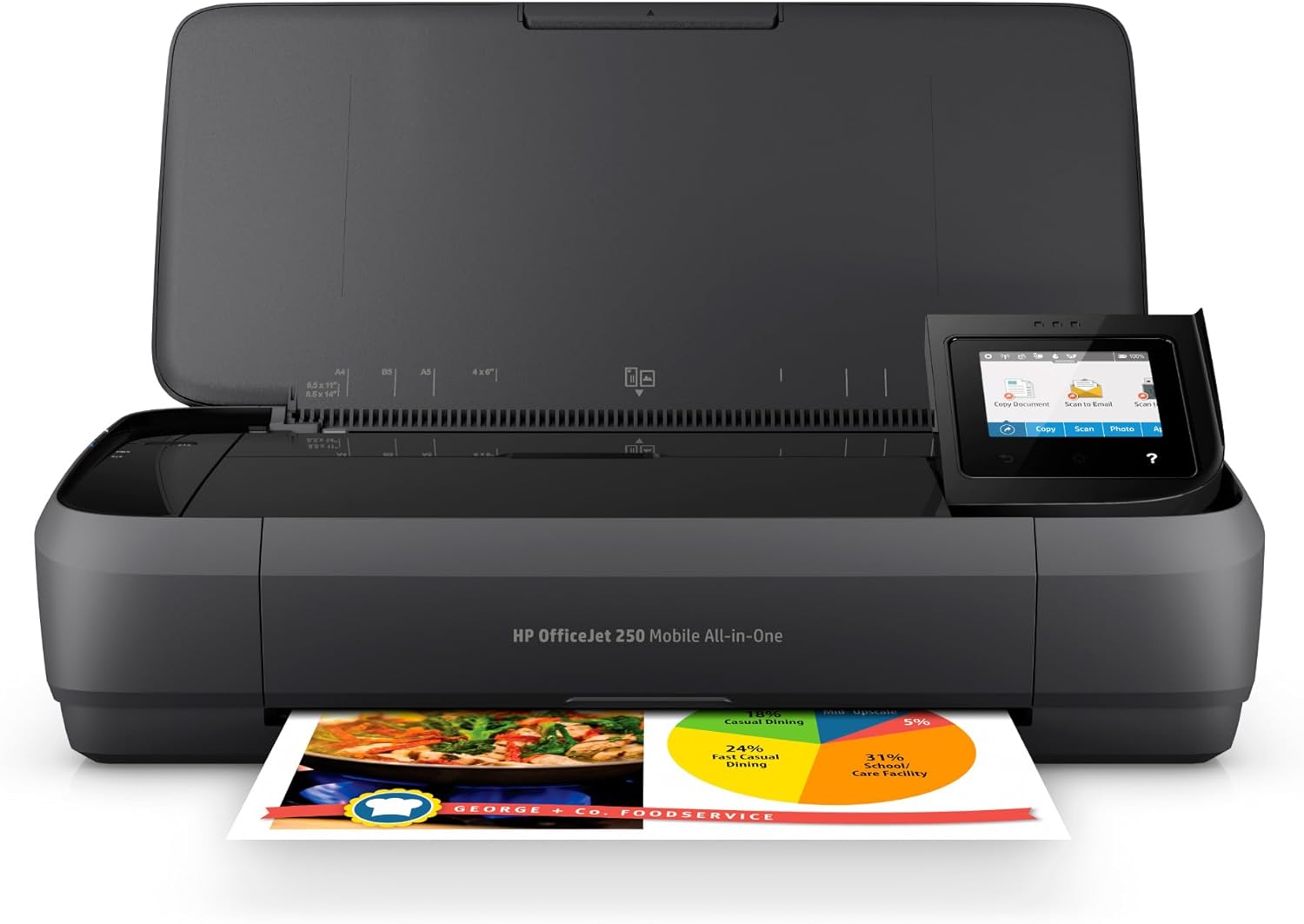
Spec sheet
HP OfficeJet 250
- Device Model Code
- CZ992A
- Print Technology
- Inkjet (Color and Monochrome)
- Display Interface
- 2.65-inch Color Graphic Display (CGD) touchscreen
- B&W Copy Speed
- Up to 20 pages per minute
- Physical Dimensions
- 14.96 inches wide by 7.8 inches deep by 3.6 inches high
- Weight
- 6.5 pounds (with battery installed)
- Document Ingestion
- 10-page automatic document feeder (ADF)
- Power Architecture
- HP Fast Charge (charges to 90% in 90 minutes when powered down)
- Cartridge Standard
- Original HP 62 series (standard and optional high-yield)
- Paper Input Handling
- 1 input tray supporting plain paper, envelopes, and card stock
Figures as published by the manufacturer on the Amazon listing.
Form Factor, Physical Footprint, and Portability Metrics
Evaluating an untethered workstation component begins with its spatial footprint. The HP OfficeJet 250 dimensions weight profile measures exactly 14.96 inches in width, 7.8 inches in depth, and 3.6 inches in height, bringing the total scaled mass to 6.5 pounds with the battery pack seated inside the unit. These measurements represent an intentional engineering balance: it is large enough to maintain a straight, jam-resistant path for full-size standard legal and letter sheets, yet slim enough to slide into a commuter backpack, travel briefcase, or car floorboard organizer without monopolizing luggage volume.
When deployed on a temporary staging surface, such as the compact shw mission 40-inch home office computer desk, black, the printer requires minimal clearance beyond its base dimensions to operate smoothly. The top cover flips upward to serve as the document input guide, angling outward to support incoming stacks without forcing the user to reposition surrounding equipment. Because the unit maintains a single internal processor architecture to regulate paper timing and printhead positioning, the moving elements remain contained within the structural shell during operation.
Interface management on the chassis relies on a 2.65-inch Color Graphic Display (CGD) touchscreen. This screen lets users manage copy jobs, monitor cartridge depletion levels, adjust network modes, and alter system preferences directly from the device. By isolating navigation to an interactive color panel, users avoid the common headache of decoding flashing LED indicator sequences or relying exclusively on a connected laptop to clear feed warnings or change paper formats.
Power Architecture and Battery Performance Analysis
The operational core of the HP OfficeJet 250 mobile printer is its detachable, modular battery system, which eliminates reliance on constant utility power. Field teams working in storage depots, job trailers, or transit terminals regularly operate without wall outlets nearby. HP integrates its proprietary HP Fast Charge protocol into the charging circuitry, allowing a depleted battery to reach up to a 90 percent charge state within 90 minutes, provided the printer remains powered down during the charging window.
Power input flexibility extends beyond standard wall outlets. The system accepts charging current from standard AC supplies encountered at home, in corporate environments, or through vehicle power inverters while commuting between job sites. The printer also maintains Energy Star certification, ensuring that current draw drops into an optimized idle state when the unit sits active between intermittent field printing requests. Real-world HP OfficeJet 250 battery life depends directly on the ratio of print jobs to scanning operations, mechanical feed demands, and ambient operating temperatures.
The battery attaches securely without protruding outward or altering the smooth geometric lines of the housing. This flush integration means users can pack the printer immediately after a job without removing the power cell or packing loose peripheral battery connectors. For mobile professionals who track equipment down to the gram, having the power pack contained within the 6.5-pound total operating mass prevents gear clutter and safeguards connector terminals from bent pins during transit.
Document Scanning and Copying Capabilities
Unlike basic mobile units that restrict hardware function solely to outputting text, this model incorporates a full-service HP OfficeJet 250 portable scanner and copier assembly. The standout engineering feature is the built-in 10-page automatic document feeder (ADF) positioned along the ingestion pathway. Most mobile scanners require users to feed individual sheets by hand, a tedious process when digitizing multipage contracts, rental agreements, or inspection reports. The motorized ADF mechanism pulls sequential pages systematically, enabling hands-free digitization on the road.
Duplication throughput is surprisingly brisk for this product category. The listing rates the hardware for maximum copy speeds of up to 20 pages per minute in black and white. While actual throughput varies depending on text density and source document contrast, the internal drive rollers cycle standard business text rapidly enough to prevent administrative bottlenecks during field consultations. Users can initiate black-and-white or full-color duplicates straight from the 2.65-inch touchscreen interface without interfacing with an external computer.
Workflow integration expands further through mobile software compatibility. Using the companion HP Smart app, operators can execute capture tasks using their smartphone cameras, direct scanned imagery to mobile local storage, or upload digital copies straight to cloud directories. By keeping digital imaging, mechanical scanning, and xerographic copying inside a single portable chassis, the unit replaces multiple discrete accessories that field workers historically had to transport separately.
Ink Yields, Paper Handling, and Mobile Workflow Setup
Media flexibility is essential for field documentation, and the HP OfficeJet 250 specs show wide support across various cut-sheet formats. The single paper tray accepts plain document paper, card stock, and postal envelopes without requiring supplemental feeder attachments. Supported media sizes cover standard business formats and specialty stocks:
- Standard business documentation: Letter (8.5 x 11 inches), Legal (8.5 x 14 inches), Executive, and Statement formats.
- Heavyweight media and index systems: Card stock cuts sized at 3 x 5 inches, 4 x 6 inches, and 5 x 8 inches.
- Photographic media: Dedicated photo paper measuring 3.5 x 5 inches, 4 x 6 inches, 5 x 7 inches, and 8 x 10 inches.
- Mailing supplies: Commercial envelopes encompassing No. 10, Monarch, and 6 3/4 designations.
Consumable management centers on the Original HP 62 series cartridge ecosystem, which includes both standard black and tri-color units alongside optional high-yield configurations. While the listing does not specify exact ISO page yield numbers, it notes that the HP 62 series provides the highest page yields in its hardware class. Utilizing optional high-yield tanks reduces the operational frequency of manual supply changes, which is a key logistical advantage when working out of hotel rooms or client sites where replacement cartridges cannot be quickly sourced.
Physical desk setups can be optimized around mobile peripherals when working from home or a remote hub. Pairing this portable printer with an ergonomic workstation configuration, such as a supportive sihoo s100 ergonomic office chair, allows remote operators to maintain a streamlined layout that transitions smoothly between travel and home office duty. Output quality supports borderless photo printing alongside crisp monocentric text, providing professional-grade paperwork regardless of the physical work environment.
Mobile Connectivity and Wireless Setup Protocols
Connecting to peripheral devices in changing field locations can easily derail productivity if network security parameters or missing routers interfere with communications. The HP OfficeJet 250 wireless setup resolves these hurdles via HP Auto Wireless Connect. This protocol enables out-of-the-box communication with laptops, tablets, and smartphones wirelessly, functioning reliably with or without an active internet router. Through direct ad-hoc peer-to-peer wireless linking, field teams can send critical print instructions from their client device straight to the printer without joining an unsecured public network.
Cloud integration remains accessible whenever the host mobile device maintains an active data link. Using the HP Smart app platform, mobile operators can access, route, and print remote files stored across major repositories such as Google Drive, Dropbox, and iCloud. For operators managing home automation or smart corporate offices, the firmware is also compatible with voice controllers including Amazon Alexa and Vera, offering flexible print execution across varied platforms.
Setting up your workflow in a dedicated home office requires balancing mobile gear with long-term seating comfort, such as using an adjustable hbada e3 pro ergonomic office chair 2026 edition to maintain posture during administrative tasks. For PC users, the device registers cleanly through standard system driver packages, while mobile platforms communicate over native print services without requiring supplementary cords. These versatile network modes make the printer equally effective in a client vehicle, an off-grid cabin, or an urban corporate workspace.
HP OfficeJet 250 Pros and Cons
What works
- Integrated 10-page automatic document feeder
- Charges to 90% in 90 minutes powered off
- Direct wireless printing without external router
- Interactive 2.65-inch color graphic touchscreen
- Handles card stock, envelopes, and legal sizes
What to weigh up
- Weighs 6.5 pounds with battery installed
- Document feeder limited to 10 pages
- Single input paper tray capacity
Check HP OfficeJet 250 on Amazon
Who Should Buy the HP OfficeJet 250
Evaluating whether the hardware fits your daily workflow requires looking honestly at operating volume, mobility demands, and physical output requirements. The HP OfficeJet 250 for mobile professionals provides unmatched field utility, but it is built specifically for distributed, low-to-medium-volume duty cycles rather than intensive desktop production.
Buy It If
- You need an all-in-one printer, scanner, and copier that runs entirely on battery power without requiring access to electrical wall outlets.
- You regularly process multipage contracts or documents in the field and require the hands-free convenience of a 10-page automatic document feeder.
- Your operating environment lacks stable local Wi-Fi, making direct, router-free peer-to-peer mobile printing a necessity.
- You need the versatility to print across diverse media types, including envelopes, card stock, legal documents, and borderless photos, from a single unit.
Skip It If
- Your typical daily printing volume exceeds hundreds of pages, which requires large multi-ream input trays and continuous bulk ink delivery.
- You need an ultra-lightweight travel printer under three pounds that sacrifices scanning and copying hardware to minimize pack weight.
- Your scanning workflow centers on bound books, delicate historical paper, or thick receipts that require a flatbed glass platen rather than a motorized feeder.
Final Verdict
8.6/10Our score
When asking is HP OfficeJet 250 worth it, the answer depends entirely on how much value you place on autonomous, untethered document management. As a mobile all-in-one printer, it successfully incorporates an automatic document feeder, a high-contrast 2.65-inch color touchscreen, and an internal fast-charging battery into an exceptionally compact 6.5-pound frame. Instead of piecing together separate scanners and single-function output devices, traveling professionals gain an integrated, highly capable mobile office hub.
While high-volume print shops and static desktop environments will find its single input tray and 10-sheet feeder restrictive, those physical trade-offs are standard across portable hardware. For insurance adjusters, roving legal practitioners, mobile medical staff, and independent consultants who cannot let a lack of AC outlets or Wi-Fi networks delay client operations, the HP OfficeJet 250 remains an outstanding technical choice for mobile productivity.
FAQ
How long does the battery take to recharge using HP Fast Charge?
The integrated battery reaches up to a 90 percent charge within 90 minutes when connected to an AC power source while the printer is completely powered off. Charging speeds can vary if the system remains actively powered on or is processing tasks during the recharge cycle.
Can the HP OfficeJet 250 print wirelessly without an internet router?
Yes. The printer features direct wireless transmission capabilities, enabling laptops, tablets, and smartphones to connect directly to the printer without passing through an external local area network, Wi-Fi router, or internet access point.
What is the maximum sheet capacity of the automatic document feeder?
The integrated automatic document feeder holds up to 10 sheets of standard paper at once, allowing users to execute hands-free, multipage scanning and copying runs without manually feeding individual sheets into the mechanism.
What varieties of print media and paper sizes does this printer accept?
The single input tray accommodates plain paper, card stock, and envelopes across various dimensions. Supported formats include Letter, Legal, Statement, Executive, index cards (3×5, 4×6, and 5×8 inches), photo paper (up to 8×10 inches), and common commercial envelopes such as No. 10 and Monarch sizes.
Does the HP OfficeJet 250 feature voice command controls?
Yes. The hardware is compatible with Amazon Alexa and Vera smart control environments, allowing users to direct select operational routines through supported voice assistant commands.
See this listing on Amazon We may earn a commission if you buy through this link.
More in Accessories & Peripherals


The weekly shortlist
Specs worth reading, once a week
New teardowns, spec sheets and buying notes from across the desk.
This demo form is not connected to a mailing service.