Google Nest Cam Indoor vs Google Nest Cam Outdoor or: Spec Comparison
Compare Google Nest Cam Indoor vs Nest Cam Outdoor specs. We analyze power, video, and weather resistance for 2 models to help you pick the right camera.

Warning: Undefined array key "caption" in /www/wwwroot/keenlist.net/wp-content/themes/site-tastemaker/single.php on line 63
Google Nest Cam Indoor vs Google Nest Cam Outdoor or: Spec Comparison Photo: Amazon product listing
As Amazon Associates, we earn from qualifying purchases. This means we may receive a small commission at no extra cost to you if you click through and make a purchase.
As an Amazon Associate we earn from qualifying purchases. Links on this page are affiliate links.
When comparing the google nest cam indoor vs nest cam outdoor, you are looking at two distinct approaches to home security. Both devices offer 1080p HD video and two-way audio through the Nest app. They also share Wi-Fi connectivity and intelligent activity alerts. The main difference lies in their power and placement. One is a wired unit designed for permanent indoor use, while the other is a battery-powered option built for flexible outdoor or indoor installation.
Power Source
Wired
Battery
Intended Use
Indoor
Outdoor or Indoor
Weight
7.2 ounces
1.84 pounds
Included Accessories
Magnet base
Wall anchors, screws, charge cable, and power adapter
Video Resolution
1080p
not listed
Night Vision
Infrared
not listed
Choose the first if
- You need a camera with a fixed power source for permanent indoor monitoring.
- You prefer a lightweight device that weighs only 7.2 ounces.
- You want clear specifications for infrared night vision capabilities.
Choose the second if
- You need a weather-resistant camera for outdoor installation.
- You want a wire-free setup that does not require an outlet.
- You need wall anchors and screws included for mounting.
Verdict
Choose the Nest Cam Indoor if you require a reliable, wired solution for a fixed indoor location. Select the Nest Cam Battery if you need flexibility to mount a camera outdoors without running power cables.
Nest Cam Indoor vs Outdoor Specs
Power Source
Edge: Tie
The Google Nest Cam Indoor 1st Gen relies on a wired power source. You must plug it into a wall outlet, which ensures continuous operation without battery concerns. In contrast, the Google Nest Cam Battery 2nd Gen is battery-powered. This wire-free design allows for flexible placement without needing an electrical outlet nearby. The battery model includes a charge cable and power adapter in the box for convenient recharging. You choose between constant wired power or portable battery flexibility depending on your installation location.
Video Resolution
Edge: Tie
Both cameras deliver full 1080p HD video resolution. The Google Nest Cam Indoor streams live video in 1920×1080 resolution, allowing you to check in from anywhere. The Google Nest Cam Battery 2nd Gen also captures video in 1080p HD. This shared specification means you get clear, detailed footage from either device. Whether you monitor your living room or your driveway, the image quality remains consistent. You do not need to sacrifice clarity for the wireless convenience of the battery model.
Night Vision
Edge: Google Nest Cam Indoor 1st Gen
The Google Nest Cam Indoor 1st Gen features eight high-power infrared LEDs. These provide light for clear video in the darkest conditions, ensuring reliable night monitoring. The Google Nest Cam Battery 2nd Gen does not list specific night vision hardware details in its published specifications. While it likely includes night vision capabilities, the exact LED count or type is not confirmed in the data provided. For known infrared performance, the indoor wired model offers documented specifications.
Weather Resistance
Edge: Google Nest Cam Battery 2nd Gen Single
The Google Nest Cam Indoor 1st Gen is designed specifically for indoor use. It is not rated for outdoor exposure to rain or extreme temperatures. The Google Nest Cam Battery 2nd Gen is weather-resistant and suitable for both indoor and outdoor environments. This durability allows you to mount it on exterior walls without protection from the elements. If you need a camera for a porch or garden, the battery model is the practical choice due to its weather-resistant build.
Included Accessories
Edge: Google Nest Cam Battery 2nd Gen Single
The Google Nest Cam Indoor 1st Gen comes with a magnet base and flexible mounting options. It also includes a shelf mount for placement on flat surfaces. The Google Nest Cam Battery 2nd Gen includes a more comprehensive bundle. This kit features wall anchors, screws, a charge cable, and a power adapter. The inclusion of mounting hardware makes the battery model ready for immediate wall installation without purchasing extra parts. You get more physical accessories with the second-generation battery camera.
Warranty Coverage
Edge: Google Nest Cam Indoor 1st Gen
The Google Nest Cam Indoor 1st Gen is backed by a two-year limited warranty. This provides a defined period of coverage for manufacturing defects. The Google Nest Cam Battery 2nd Gen does not list its warranty terms in the provided data. Without explicit information, you cannot confirm if the battery model offers the same two-year coverage. The indoor model provides clear warranty assurance, which may be a deciding factor for long-term reliability confidence.
Connectivity Protocol
Edge: Tie
Both devices connect to your home network via Wi-Fi. The Google Nest Cam Indoor 1st Gen uses Wi-Fi for its 24/7 live stream and mobile alerts. The Google Nest Cam Battery 2nd Gen also utilizes Wi-Fi for wireless communication. Both cameras allow you to view feeds and receive notifications on your smartphone. There is no difference in the connectivity protocol between the two models. You get the same wireless integration regardless of which camera you select.
Which Google Nest Cam fits your home
Users needing continuous power without outlets
Our pick: Google Nest Cam Battery 2nd Gen Single
The Google Nest Cam Battery 2nd Gen uses a battery power source. This allows installation anywhere without a wall outlet. Its weather-resistant design supports outdoor use. The magnetic mount simplifies setup. You get flexible placement for areas lacking nearby electrical access, ensuring reliable coverage without wiring constraints.
Renters wanting easy indoor placement
Our pick: Google Nest Cam Indoor 1st Gen
The Google Nest Cam Indoor 1st Gen plugs into a standard wall outlet. It includes a magnet base for quick shelf mounting. This wired connection ensures constant video streaming in full 1080p HD. You avoid battery recharging needs. The compact size fits neatly on indoor surfaces without permanent installation tools.
Those prioritizing night vision clarity
Our pick: Google Nest Cam Indoor 1st Gen
The Google Nest Cam Indoor 1st Gen features eight high-power infrared LEDs. This specific night vision type provides clear video in dark conditions. You get consistent illumination for monitoring rooms at night. The wired power supports this continuous operation. This setup ensures reliable low-light performance for indoor security monitoring tasks.
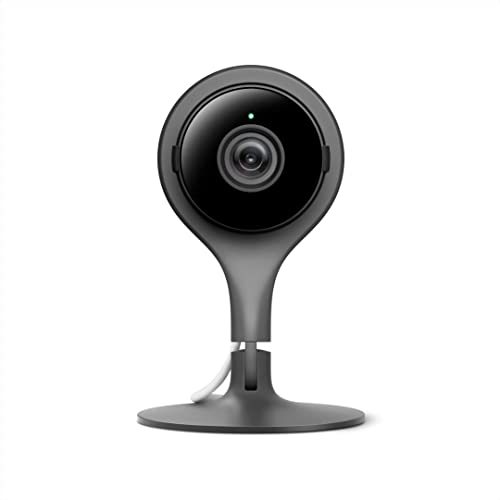
Google Nest Cam Indoor 1st Gen
Best for: Indoor wired security with 1080p video
- Video Resolution
- 1080p
- Power Source
- Wired
- Night Vision Type
- Infrared
- Kit Size
- 1 Count (Pack of 1)
- Use
- Indoor
- Dimensions
- 2.8 × 2.8 × 4.5 inches
This is the first-generation Google Nest Cam Indoor, a wired security camera designed for interior use. It records 1080p HD video and uses eight infrared LEDs for night vision. The unit measures 2.8 by 4.5 inches and weighs 7.2 ounces. You get two-way audio and mobile alerts via the Nest app. It connects to Wi-Fi and plugs into a wall outlet for continuous power.
- Records 1080p HD video over Wi-Fi
- Eight infrared LEDs for night vision
- Two-way audio for communication
- Compact 7.2-ounce build
- Requires a wired power connection
- Only includes 3-hour snapshot history without subscription
- Heavier and bulkier than the battery-powered 2nd Gen model
- You need a camera for indoor rooms with power outlets
- You want continuous 24/7 live streaming without battery changes
- You prefer a compact device that fits on shelves or walls
- You want a wireless camera that runs on batteries
- You need outdoor weatherproofing for exterior walls
- You require more than 3 hours of local video history without a paid plan
Verdict: Google Nest Cam Indoor 1st Gen Wired is a practical indoor camera for users who have power outlets available and want reliable 1080p recording. It fits well in homes where you want a permanent, wired solution rather than a portable battery unit.

Google Nest Cam Battery 2nd Gen Single
Best for: wire-free indoor and outdoor monitoring
- Power Source
- Battery
- Kit Size
- Single Camera
- Connectivity
- Wireless
- Use
- Outdoor, Indoor
- Weight
- 1.84 pounds
This is a single, wire-free Google Nest Cam that works indoors or outdoors. It runs on battery power and connects via Wi-Fi. The unit weighs 1.84 pounds and comes in Snow. You get a magnetic mount, wall anchors, and a charging adapter. It features a built-in speaker and mic for two-way talk. This camera suits you if you want flexible placement without wiring.
- Battery powered for wire-free installation
- Weather resistant for outdoor or indoor use
- Includes magnetic mount and wall anchors
- Built-in speaker and mic for two-way audio
- Single camera kit offers limited coverage area
- 1.84 pound weight is bulkier than smaller indoor units
- Battery power requires periodic recharging
- You need a camera for a spot without a power outlet
- You want a single unit for both indoor and outdoor monitoring
- You prefer magnetic mounting for easy installation
- You need a wired camera for continuous power
- You want multiple cameras in a single bundle
- You require a smaller, lighter indoor-only device
Verdict: Google Nest Cam Outdoor Indoor Battery is a solid choice for renters or homeowners who need flexible placement without wiring. It fits you well if you prioritize easy installation over continuous power sources.
Specifications side by side
| Spec | Google Nest Cam Indoor 1st Gen | Google Nest Cam Battery 2nd Gen Single |
|---|---|---|
| Video Resolution | 1080p | – |
| Power Source | Wired | Battery |
| Night Vision Type | Infrared | – |
| Kit Size | 1 Count (Pack of 1) | Single Camera |
| Connectivity | – | Wireless |
| Night Vision | Night Vision | – |
| Use | Indoor | Outdoor, Indoor |
| Dimensions | 2.8 × 2.8 × 4.5 inches | – |
| Weight | 7.2 ounces | 1.84 pounds |
| Size | 1 Count (Pack of 1) | – |
| Color | black | Snow |
| Model | NC1102ES | – |
Frequently asked questions
Can I use the Google Nest Cam Battery 2nd Gen outdoors?
Yes, you can use the Google Nest Cam Battery 2nd Gen outdoors. Its attributes list outdoor use as a supported application. This model is designed for flexible placement, allowing you to monitor exterior areas without needing a nearby power outlet. The battery power source supports this mobile installation style.
What is the size of the Google Nest Cam Indoor 1st Gen?
The Google Nest Cam Indoor 1st Gen measures 2.8 inches in width and length, with a height of 4.5 inches. It weighs 7.2 ounces. This compact form factor makes it suitable for discreet placement on shelves or corners inside your home, fitting well in spaces where a larger unit might be intrusive.
Does the Google Nest Cam Indoor require a battery?
No, the Google Nest Cam Indoor 1st Gen does not use a battery. It relies on a wired power source. You must plug it into a wall outlet to operate. This ensures continuous recording without the need to recharge or replace batteries, making it a permanent fixture for indoor security.
How heavy is the Google Nest Cam Battery 2nd Gen?
The Google Nest Cam Battery 2nd Gen weighs 1.84 pounds. This weight reflects its internal battery and robust build for both indoor and outdoor use. The heft provides stability when mounted, helping the camera remain steady in various weather conditions or indoor environments where it might otherwise be knocked over.
Is the Google Nest Cam Indoor 1st Gen wireless?
No, the Google Nest Cam Indoor 1st Gen is not wireless. It requires a wired connection to a power outlet for operation. While it connects to Wi-Fi for data transmission, its power source is not battery-based. This design choice ensures it does not suffer from battery drain during long-term monitoring sessions.
What colors are available for these Nest Cams?
The Google Nest Cam Indoor 1st Gen is available in black. The Google Nest Cam Battery 2nd Gen comes in Snow. These neutral colors help the devices blend into various interior and exterior decors. You can choose the color that best matches your home's aesthetic while maintaining a professional security presence.
Can I install the Nest Cam Battery without drilling?
The Google Nest Cam Battery 2nd Gen supports flexible installation due to its battery power source. While specific mounting hardware details are not listed, its design allows for placement without immediate wiring. This flexibility is ideal for renters or areas where you want to avoid permanent structural changes or complex electrical work.
Which camera is better for a home without power outlets nearby?
The Google Nest Cam Battery 2nd Gen is better for locations without power outlets. It uses a battery power source, allowing you to place it anywhere indoors or outdoors. The Google Nest Cam Indoor 1st Gen requires a wired connection, limiting its placement to areas near wall sockets. Choose the battery model for maximum flexibility.
See also
See this listing on Amazon We may earn a commission if you buy through this link.
More in Outdoor Security Cameras


The weekly shortlist
Specs worth reading, once a week
New teardowns, spec sheets and buying notes from across the desk.
This demo form is not connected to a mailing service.