Dell XPS 13 Plus (9320) Hardware Evaluation: Specs and Architecture
The Dell XPS 13 Plus represents an ambitious architectural reimagining of the traditional subnotebook, pairing Intel 12th-generation hybrid silicon with an ultra-minimalist chassis. Built around the 12-core Intel Core i7-1260P processor, a 13.4-inch 1920…

As Amazon Associates, we earn from qualifying purchases. This means we may receive a small commission at no extra cost to you if you click through and make a purchase.
The Dell XPS 13 Plus represents an ambitious architectural reimagining of the traditional subnotebook, pairing Intel 12th-generation hybrid silicon with an ultra-minimalist chassis. Built around the 12-core Intel Core i7-1260P processor, a 13.4-inch 1920 x 1200 InfinityEdge touchscreen, and an integrated capacitive interface, this machine prioritizes compute density and industrial aesthetics above all else. For technical professionals seeking a high-throughput ultraportable capable of crunching multi-threaded workloads on Windows 11 Pro, it delivers substantial processing power in an uncompromisingly streamlined form factor.
This notebook is purpose-built for mobile corporate operators, code reviewers, and data analysts who require rapid dodeca-core burst performance and biometric security within an executive-ready profile. However, power users who demand modular memory expansion, native legacy I/O, or extended continuous rendering without thermal mitigation will find the hardware compromises restrictive, making desktop-replacement chassis or workstations better suited to their requirements.
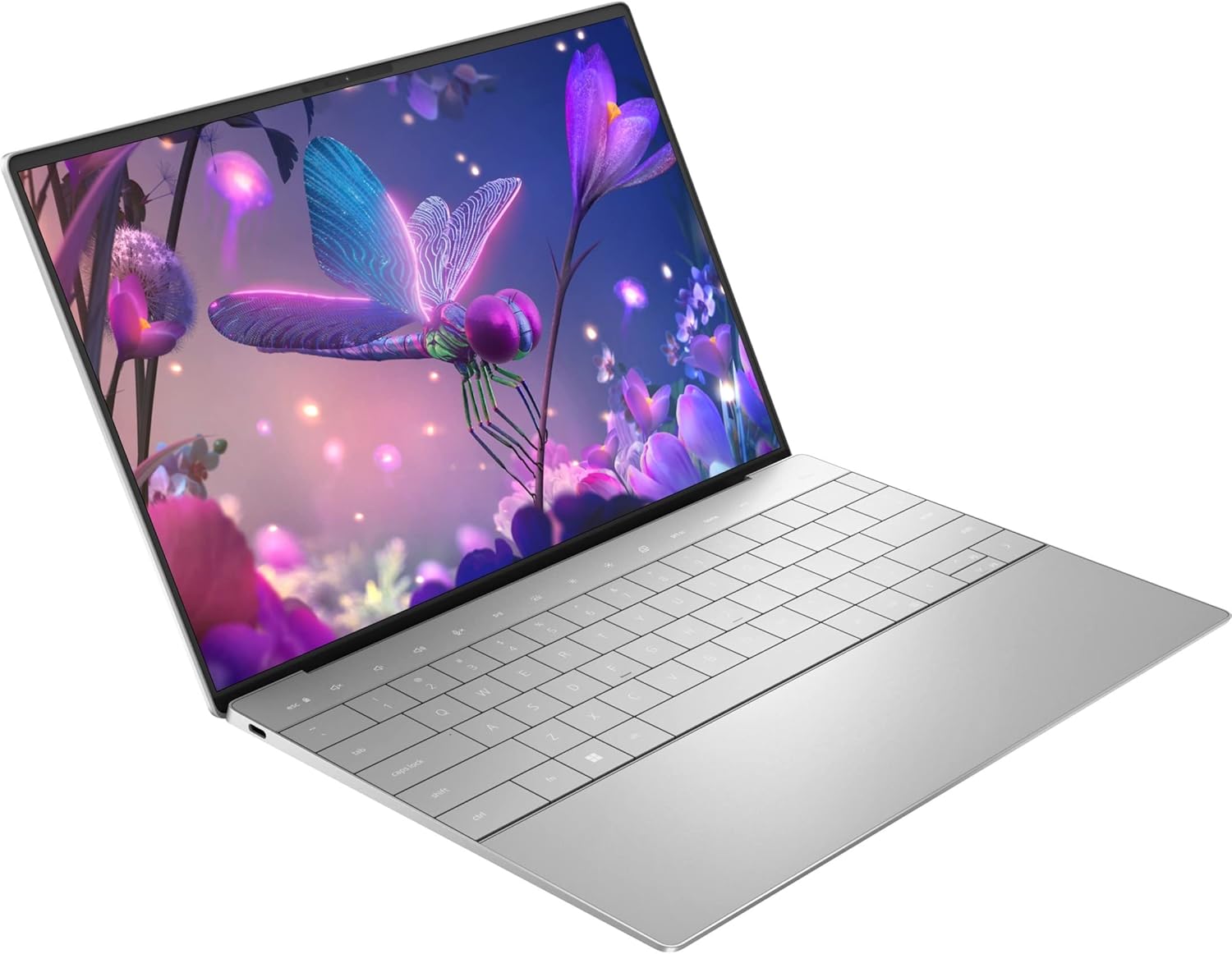
Spec sheet
Dell XPS 13 Plus 9320
- Processor Model
- Intel Core i7-1260P (12th Gen, 12-Core Dodeca-core)
- Platform Certification
- Intel Evo Platform
- System Memory
- 16 GB On-Board Memory (Shared Graphics Allocation)
- Internal Storage
- 512 GB Solid State Drive (SSD)
- Display Panel
- 13.4-inch Touchscreen (1920 x 1200 Full HD Plus)
- Display Features
- InfinityEdge Bezel, Anti-Glare Coating
- Graphics Hardware
- Intel Iris Xe Graphics Coprocessor
- Biometric Hardware
- Fingerprint Recognition Scanner
- Peripherals & Connectivity
- External Support via USB, Wi-Fi, Bluetooth
Figures as published by the manufacturer on the Amazon listing.
Core i7-1260P Processing Architecture and Computational Throughput
At the center of the dell xps 13 plus 9320 specs is Intel 12th-generation Core i7-1260P, a dodeca-core chip featuring a hybrid topology that balances Performance cores and Efficient cores. Rather than relying on traditional uniform architectures, the dodeca-core design offloads background operating system tasks and utility threads to lower-power micro-architectures while routing demanding compilation, arithmetic processing, and spreadsheet recalculations to high-frequency execution cores. This architectural shift ensures that the notebook responds instantly even when background cloud synchronizations, fleet-management agents, and enterprise telemetry suites operate concurrently under Windows 11 Pro.
Evaluating the platform against any realistic dell xps 13 plus i7 1260p benchmark scenario reveals that the processor excels at short-burst, high-concurrency tasks. The integrated Intel Evo Platform certification establishes baseline responsive thresholds, ensuring rapid resume cycles and steady throughput when cycling across enterprise applications. While prolonged multi-hour computational rendering inevitably encounters chassis heat limitations, the multi-threaded headroom provided by the 12-core silicon represents an immense upgrade over quad-core ultraportables of earlier generations. Users needing dual-screen setups during heavy data processing can augment their workspace by tethering hardware like the dell pro 14 plus portable monitor – p1425 to distribute computational windows cleanly.
The graphics processing responsibilities are assigned to the integrated Intel Iris Xe Graphics coprocessor, which draws dynamically from the system pool through shared graphics RAM. For technical professionals running vector diagrams, rendering high-resolution presentation decks, or executing multi-monitor output, the Iris Xe engine provides reliable hardware acceleration. It is not designed to replace high-wattage discrete GPUs found in bulky creative workstations, but it comfortably processes hardware-accelerated video decoding and enterprise graphical workloads without introducing auxiliary power draw.
Memory Subsystem and Storage Configuration
A crucial consideration for prospective buyers evaluating whether the dell xps 13 plus ram upgradeable question matters is the physical integration of the memory module. The system comes equipped with 16 GB of on-board memory configured directly on the mainboard. Because this system memory is permanently soldered, post-purchase capacity increases via SODIMM slots are impossible. For contemporary multi-tasking—enabling dozens of browser tabs, concurrent spreadsheet engines, communication clients, and localized database instances—the 16 GB capacity provides sufficient headroom to run many programs without losing execution speed. However, developers running extensive local virtual machines or deep containerized stacks must verify that their footprint never exceeds this fixed 16 GB boundary.
Primary storage is handled by a 512 GB solid state drive, providing rapid boot sequences, instantaneous file indexing, and swift data retrieval. The 512 GB SSD capacity is sufficient to store essential business documents, operating system system files, application packages, and core databases. Technical workflows involving massive raw media collections or multiple partitioned operating systems will require discipline, making cloud repositories or external storage devices necessary supplements. Those weighing fixed clamshell configurations against convertible alternatives might cross-reference systems such as the dell plus 14 2 in 1 to determine whether layout adaptability or pure ultrabook density is their top design priority.
Thermal Management and Chassis Dynamics
Housing a 12-core Core i7 processor within an ultra-thin 13.4-inch silver notebook introduces strict thermodynamic boundaries. The operational profile of dell xps 13 plus thermal throttling is directly tied to the compact internal volume, where cooling fans and vapor routing work continuously to exhaust thermal buildup away from the dodeca-core die. When executing sustained calculations or large code compilations, the chassis fans spool up aggressively to regulate internal temperatures. The machine aggressively optimizes for short-duration turbo bursts, settling into steady thermal baselines during continuous operation to prevent sustained heat saturation across the silver enclosure.
The physical interaction zone features a bold reimagining of mobile ergonomics, highlighted by the dell xps 13 plus capacitive function row. Replacing mechanical upper function keys with a flush capacitive touch strip modernizes the interior deck, letting users switch between standard function commands and media shortcuts instantly. The edge-to-edge keyboard layout maximizes surface area across the compact form factor, though users who rely on tactile key travel for critical control shortcuts should account for the flat capacitive response. Biometric security is integrated directly into the physical deck through a dedicated fingerprint recognition scanner, providing swift authentication to unlock the notebook without password exposure.
Display Quality, Ergonomics, and Port Constraints
The visual centerpiece is a 13.4-inch touchscreen panel operating at a native Full HD Plus resolution of 1920 x 1200. This 16:10 aspect ratio provides additional vertical workspace compared to standard 16:9 displays, reducing vertical scrolling when parsing dense lines of code, reading long PDF reports, or editing documents. Dell equips the panel with an InfinityEdge bezel design, virtually eliminating perimeter borders to deliver an immersive screen footprint. The inclusion of an anti-glare coating significantly dampens harsh overhead office lighting reflections, while the integrated touch digitizer allows for intuitive navigational inputs directly on the panel glass.
Evaluating the dell xps 13 plus port selection reveals an unapologetic commitment to minimalism. The listing identifies compatibility with external headsets, mice, keyboards, external displays, and storage devices via USB, Wi-Fi, or Bluetooth. However, the listing does not specify native legacy connectors such as USB Type-A, dedicated full-sized HDMI video outs, or an integrated audio jack. Users operating in traditional corporate environments will need to rely on multi-port dongles or desktop docking stations to interface with legacy workplace peripherals. For creators who demand expanded native ports and larger 4K displays out of the box, exploring alternatives like the dell xps 15 4k touch highlights the trade-offs of choosing ultra-compact 13-inch portability over larger workstation chassis.
Enterprise Readiness and Power Delivery Profiles
Configured out of the box with Windows 11 Pro, the machine is tailored specifically as a dell xps 13 plus for business deployment. Enterprise administrators gain native access to critical security features, including BitLocker drive encryption, client Hyper-V virtualization, Windows Information Protection, and seamless Active Directory or Azure domain integration. The integrated fingerprint recognition sensor establishes robust multi-factor biometric compliance, ensuring device security adheres to corporate IT standards while facilitating instant field sign-ins.
When analyzing the dell xps 13 plus battery life specs, prospective buyers must recognize the interplay between the 12-core Core i7-1260P processor and the 1920 x 1200 touchscreen. While the listing notes a 4-volt operational specification, it does not specify exact battery watt-hour ratings or running time benchmarks. Because the 12-core CPU prioritizes computational burst execution, heavy analytical multitasking will deplete operational reserves faster than standard lower-wattage ultrabooks. Users traveling for full-day field deployments should anticipate keeping a compatible USB power source close at hand to maintain full sustained productivity.
Dell XPS 13 Plus 9320 Pros and Cons
What works
- 12-core Intel Core i7-1260P dodeca-core processor
- Sharp 13.4-inch 1920 x 1200 InfinityEdge touchscreen
- Pre-installed Windows 11 Pro operating system
- Integrated fingerprint recognition biometric sensor
- Responsive 16 GB high-speed on-board memory
What to weigh up
- Non-upgradable soldered on-board RAM
- Listing does not specify legacy USB-A ports
- Modest 512 GB SSD internal storage baseline
Check Dell XPS 13 Plus 9320 on Amazon
Who Should Buy the Dell XPS 13 Plus 9320
Buy It If
- You need the computational multi-threaded density of an Intel 12th Gen Core i7 dodeca-core processor in a featherweight chassis.
- You require Windows 11 Pro out of the box for enterprise fleet deployment, domain joining, and native BitLocker hardware encryption.
- You value modern aesthetics, including the capacitive top touch row, InfinityEdge borders, and an anti-glare 1920 x 1200 touchscreen.
- Your peripheral ecosystem is modern, depending primarily on wireless Bluetooth accessories, Wi-Fi networking, and modern USB hardware.
Skip It If
- You require modular memory expansion down the road, as the 16 GB on-board memory is permanently soldered to the motherboard.
- Your workflow requires legacy I/O like direct USB Type-A or dedicated video ports without carrying external adapter hubs.
- You perform continuous, multi-hour graphics-heavy rendering that requires a dedicated workstation GPU rather than integrated Intel Iris Xe Graphics.
Final Verdict
7.4/10Our score
Answering whether is dell xps 13 plus worth it comes down to how closely your workflow aligns with its ultra-focused design philosophy. The combination of Intel 12th-generation dodeca-core computing, 16 GB of responsive on-board memory, and a bright 16:10 InfinityEdge touchscreen makes this silver ultraportable a formidable business productivity tool. It excels at fast execution, clean document management, and enterprise-grade multitasking within a chassis that sets modern industrial design benchmarks.
Conversely, the compromises are tangible and permanent. The lack of RAM expandability, reliance on external adapters for non-USB peripherals, and thermal throttling under long multi-threaded loads mean power users must evaluate their exact performance ceiling before buying. If you want a sleek, powerful, Windows 11 Pro ultraportable designed for modern digital workflows, the Dell XPS 13 Plus 9320 delivers high-tier mobility and sharp executive execution.
FAQ
Can you upgrade the RAM in the Dell XPS 13 Plus 9320 after purchase?
No, the listing specifies that the laptop features 16 GB of on-board memory. Because the RAM is soldered directly onto the system board, it cannot be removed, replaced, or expanded with aftermarket memory modules. Buyers must ensure that 16 GB matches their operational requirements for the lifetime of the notebook.
What operating system comes pre-installed on this model?
The Dell XPS 13 Plus 9320 ships configured with Windows 11 Pro. This operating system edition includes advanced business features, network domain management, remote desktop access, and hardware-level encryption management suitable for enterprise deployment.
Does the 13.4-inch display support touch functionality?
Yes, the display on this notebook is a 13.4-inch touchscreen featuring a Full HD Plus resolution of 1920 x 1200. It also incorporates an anti-glare coating to suppress room reflections and Dell InfinityEdge slim bezel construction to maximize screen area.
What graphics hardware is included inside this configuration?
This notebook utilizes integrated Intel Iris Xe Graphics, powered by the Intel video processor. The system utilizes shared graphics RAM drawing directly from the main 16 GB on-board memory subsystem rather than housing a discrete GPU.
Does the Dell XPS 13 Plus 9320 feature biometric security?
Yes, the device includes fingerprint recognition hardware for biometric authentication. This allows authorized users to log in securely without entering manual passwords, satisfying enterprise multi-factor authentication mandates.
See this listing on Amazon We may earn a commission if you buy through this link.
More in Computers & Laptops


The weekly shortlist
Specs worth reading, once a week
New teardowns, spec sheets and buying notes from across the desk.
This demo form is not connected to a mailing service.