Backbone Pro Architecture & iPhone USB-C Performance Analysis
The Backbone Pro represents an architectural shift for mobile handheld interfaces, migrating beyond entry-level tactile surfaces toward console-grade mechanical components and multi-point connectivity. Engineered around authentic full-size ALPS analog joysticks and a rigid, expandable…
By Maria Carver

As Amazon Associates, we earn from qualifying purchases. This means we may receive a small commission at no extra cost to you if you click through and make a purchase.
The Backbone Pro represents an architectural shift for mobile handheld interfaces, migrating beyond entry-level tactile surfaces toward console-grade mechanical components and multi-point connectivity. Engineered around authentic full-size ALPS analog joysticks and a rigid, expandable bridge framework, this gaming controller establishes a direct hardware bridge to USB-C host devices while maintaining an autonomous wireless telemetry path. For enthusiasts monitoring mobile input performance, the design prioritizes precision actuation, low-friction stick displacement, and deterministic hardware response curves.
This unit serves competitive mobile players, cloud streaming adopters, and multi-device operators who demand tactile consistency across smartphone, tablet, and PC platforms without redundant controller investments. Conversely, players who rely on legacy Lightning-equipped hardware or casual mobile users unwilling to manage peripheral adapters will find the architecture unsuited to their existing devices.
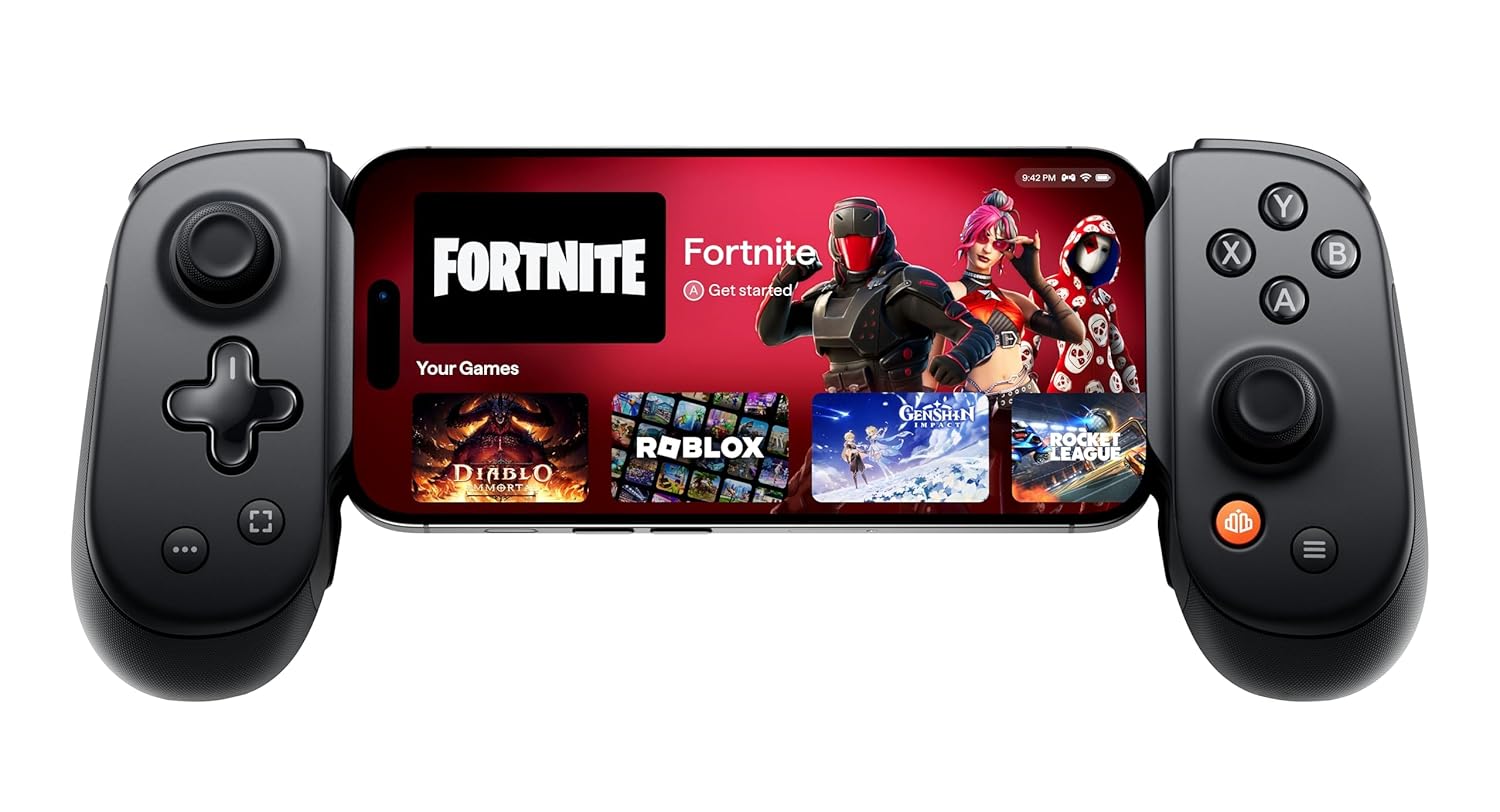
Spec sheet
Backbone Pro
- Brand and Model
- Backbone Pro (Model BB-02-P-BR)
- Physical Dimensions
- 2.6 x 5.51 x 8.39 inches
- Unit Weight
- 0.49 kg
- Input Configuration
- 12 buttons, precision D-pad, tactile face buttons, remappable rear buttons
- Analog Assemblies
- Full-size ALPS analog joysticks
- Primary Interface
- USB-C male connector (Docked Mode)
- Secondary Interfaces
- Bluetooth Low Energy (BLE) and USB-C Wired Mode
- Operational Battery Life
- Up to 40 hours in wireless BLE operation
- Host Hardware Support
- iPhone 15 series or later, compatible USB-C Android devices
- Console Ecosystems
- Sony PlayStation 5, Microsoft Xbox Series X
Figures as published by the manufacturer on the Amazon listing.
Hardware Architecture and Input Mechanics
Examining the core backbone pro iphone specs reveals a marked departure from sub-compact mobile controller ergonomics. The integration of full-size ALPS analog joysticks constitutes the primary engineering upgrade, providing substantial travel distance and proportional resistance comparable to first-party console gamepads. By employing full-scale potentiometers rather than low-profile miniature modules, the thumbsticks offer linear deflection gradients that allow fine tracking adjustments in competitive shooters. The 0.49 kg total package mass gives the controller an anchored, substantial in-hand feel, while the 2.6 x 5.51 x 8.39-inch chassis dimensions accommodate wider hand spreads to reduce wrist fatigue during extended gaming blocks.
The digital control surface utilizes a 12-button matrix highlighted by tactile face buttons and a precision directional pad engineered with distinct tactile actuation points. On the reverse side of the ergonomic grips, Backbone integrates programmable rear buttons that map to primary inputs. This rear input cluster allows players to execute jump, slide, or reload sequences without taking their thumbs off the ALPS sticks. When evaluating the backbone pro vs standard backbone, the tactile microswitch actuation feels noticeably crisper, offering distinct acoustic feedback and minimal pre-travel across the trigger assemblies and structural grip housings.
The telescopic structural bridge expands smoothly to clamp host devices, maintaining continuous lateral clamping force via internal tension springs. The grip contours provide palm engagement surfaces that distribute the combined mass of the peripheral and the docked phone evenly across both hands. This structural rigidity prevents torsional flex across the middle bridge during intense gameplay sessions, preserving physical alignment between the host port and the male connector.
Connectivity Tri-Modes and Bus Latency Dynamics
The controller features three distinct operational configurations: Docked mode, Wireless mode, and Wired mode. In Docked mode, the hardware seats directly into the phone connector, operating entirely over physical hardware channels where the phone battery powers the controller circuitry. Direct physical bus transmission eliminates wireless interference and packet loss, achieving the lowest possible backbone pro usb-c latency for local rendering environments. Frame-timed inputs execute instantly, which is vital for high-cadence inputs in competitive mobile titles.
When uncoupled from a phone chassis, backbone pro wireless mode engages an onboard Bluetooth Low Energy (BLE) transceiver. This secondary protocol decouples the physical grip mechanics from the display, enabling users to place a mobile terminal on a desk mount or pocket tripod pro for iphone hardware while driving gameplay wirelessly from a relaxed distance. While BLE naturally introduces protocol overhead compared to physical buses, the connection maintains stability across mixed-signal home environments without perceptible signal dropouts.
The third profile, Wired mode, activates via a standard USB-C cable run to secondary host hardware such as tablets, laptops, or external desktop displays. In wired deployment, the internal input processing unit defaults to direct USB gamepad protocols, offering plug-and-play input processing across PC and console environments. This triple-layer architecture ensures the hardware does not sit idle when you transition away from mobile handsets, operating instead as a functional desktop controller.
iPhone Compatibility and Magnetic Case Integration
The transition of Apple handhelds to standardized physical ports anchors the backbone pro iphone compatibility baseline. The hardware connects natively to the backbone pro iphone 15 series and later generations, leveraging the standardized bus for bidirectional signal delivery. Users planning migrations toward upcoming hardware such as the iphone 17pro max phone can expect continued physical alignment, as the chassis rails conform to standard chassis thickness envelopes.
A frequent failure point in mobile snap-on peripherals involves clearance conflicts with protective smartphone shells. To address this, the manufacturer developed a dedicated backbone pro case support architecture based around interchangeable magnetic adapters. These magnetic shims clip into the peripheral inner bezels, providing exact physical offsets that seat the device flush against the connector without exerting bending torque on the internal male plug. Consequently, users avoid having to strip protective cases off their phones before launching a session.
The structural bridge accommodates varied phone footprints, balancing device thickness against camera island protrusions. Because modern smartphone camera arrays project significantly from the rear glass panel, the cutouts along the Backbone Pro mounting rail allow camera modules to rest completely flat without contacting the backplate. This mechanical design maintains direct port alignment and prevents asymmetrical mechanical pressure on the phone frame.
Power Architecture and Remote Play Infrastructure
Power delivery varies based on the active connection pathway. When disconnected from direct docking, the internal cell delivers up to 40 hours of backbone pro battery life across sustained wireless BLE sessions. This extended standalone runtime ensures unhindered multi-session gameplay when used as an untethered controller. In docked mode, the controller foregoes internal battery draw, pulling current directly from the host device to run input scanning arrays and board logic. For prolonged desktop station play, pairing mobile hardware with dedicated power hubs like the belkin ultracharge pro 3-in-1 magnetic charging dock with qi2 25w keeps host batteries topped off during off-controller streaming intervals.
On the software tier, the backbone pro remote play iphone pipeline integrates directly with current-generation hardware ecosystems. The unit supports remote streaming pipelines for the Sony PlayStation 5 (iOS only) and Microsoft Xbox Series X platforms. System-level command protocols translate console inputs accurately, matching standard button schemes to avoid control remapping errors inside official streaming clients. The low-latency physical bus allows streaming feeds to run with minimal total input-to-display delay, constrained only by network bandwidth.
System utility functions funnel through the proprietary Backbone App, an optional application interface that acts as a centralized game discovery hub and firmware distribution client. Routine firmware upgrades optimize stick deadbands and peripheral response matrices. While the controller functions fully as a standard HID device without background software, an optional Backbone+ subscription unlocks enhanced cloud orchestration utilities and access to an integrated retro emulation launcher embedded within the software suite.
Backbone Pro Pros and Cons
What works
- Full-size ALPS analog joysticks
- Direct low-latency USB-C docked mode
- Up to 40 hours wireless battery life
- Includes magnetic adapters for case support
- Dual remappable rear tactical buttons
What to weigh up
- Incompatible with legacy Lightning iPhones
- Phone battery powers controller in docked mode
- Advanced software hub requires Backbone+ subscription
Who Should Buy the Backbone Pro
Buy It If
- You demand zero-latency physical USB-C input registration and full-size ALPS joysticks for precision tracking on an iPhone 15 or newer device.
- You want a hybrid controller that switches between docked mobile gaming, 40-hour wireless BLE play, and wired USB-C desktop gaming.
- You play with a protective phone case and require modular magnetic adapters to establish a secure, flush physical connection.
- You actively stream titles from a PlayStation 5 or Xbox Series X console to your mobile screen via local remote play pipelines.
Skip It If
- You use an older iPhone equipped with a legacy Lightning connector, which cannot interface with this USB-C controller.
- You prefer ultralight, collapsible micro-gamepads that fit inside a pocket rather than an ergonomic 0.49 kg controller chassis.
- You only play casual touch-based mobile titles that do not support hardware gamepad mapping.
Final Verdict
8.8/10Our score
Evaluating whether is backbone pro worth it comes down to how much you value input precision and cross-platform flexibility. The hardware successfully resolves common complaints found in mobile gaming gear by pairing console-spec ALPS analog sticks with reconfigurable rear paddles. Rather than locking users into a single handheld configuration, the tri-mode system architecture provides dependable utility whether you are clamped into an iPhone on the train or connected via wireless BLE to a tablet on a desk.
While the hardware does require an iPhone 15 or later for direct docking and relies on phone battery reserves during direct play, the overall engineering represents a refined evolution in mobile peripheral design. The included magnetic case adapters solve everyday clearance headaches, and the zero-latency bus gives competitive players an immediate hardware advantage. For dedicated mobile gamers and remote play enthusiasts, the Backbone Pro sets a capable benchmark for modern handheld control.
FAQ
Does the Backbone Pro work with older iPhone models that use Lightning ports?
No. The Backbone Pro is engineered exclusively with a USB-C interface and supports iPhone 15 series models or later, alongside compatible USB-C Android handsets. It cannot establish a physical docked connection with legacy Lightning-based iPhones.
How do the three different operating modes function?
Docked mode seats your phone directly onto the internal USB-C connector for ultra-low bus latency powered by your handset. Wireless mode utilizes Bluetooth Low Energy (BLE) and the internal 40-hour battery for untethered play. Wired mode allows connection to external host platforms via a USB-C cable.
Do I need to remove my phone case to use the Backbone Pro?
In most instances, no. The package includes magnetic case adapters designed to compensate for the added thickness of standard protective shells, ensuring a secure and stable interface without unseating the phone from its case.
Is a Backbone+ subscription required to play games on the controller?
No. The Backbone Pro operates as a standard hardware gamepad right out of the box without any subscription. The Backbone App is optional, and the paid Backbone+ subscription is only needed if you wish to use its advanced software hub features, cloud game launching, and built-in retro emulator.
Can I play PlayStation 5 and Xbox Series X games with this controller?
Yes. The hardware is compatible with remote play streaming from both PlayStation 5 (iOS only) and Xbox Series X consoles, passing standard controller mapping data directly through compatible remote streaming applications.
See this listing on Amazon We may earn a commission if you buy through this link.
More in Gaming


The weekly shortlist
Specs worth reading, once a week
New teardowns, spec sheets and buying notes from across the desk.
This demo form is not connected to a mailing service.