ASUS ProArt PX13 Architectural Review: Silicon, Thermal, and Display Specs Analyzed
The ASUS ProArt PX13 is an ultra-compact convertible mobile workstation engineered for creative professionals, field engineers, and visual specialists requiring dense compute power in a small form factor. Built around AMD’s Zen 5 Ryzen…

As Amazon Associates, we earn from qualifying purchases. This means we may receive a small commission at no extra cost to you if you click through and make a purchase.
The ASUS ProArt PX13 is an ultra-compact convertible mobile workstation engineered for creative professionals, field engineers, and visual specialists requiring dense compute power in a small form factor. Built around AMD’s Zen 5 Ryzen AI Max+ 388 processor and integrated Radeon 8060S graphics, this machine packages serious processing muscle and a high-resolution touch display into an adaptable sub-14-inch footprint. In our architectural analysis of the published specifications, it emerges as a uniquely potent 2-in-1 device that handles heavy multi-threaded data sets and color-accurate visualization gracefully, provided your workflow does not require discrete graphics hardware or post-purchase system memory expansion.
This laptop is ideally suited for digital illustrators, technical editors, and mobile producers who demand high color fidelity and agile performance while traveling between studio desks and remote production environments. On the other hand, users running heavy workstation simulation packages that mandate massive dedicated VRAM pools, or those seeking an ultralight thin-and-light laptop for passive web browsing, will find its 4.1-pound mass and high-output thermal design misaligned with their operational priorities.
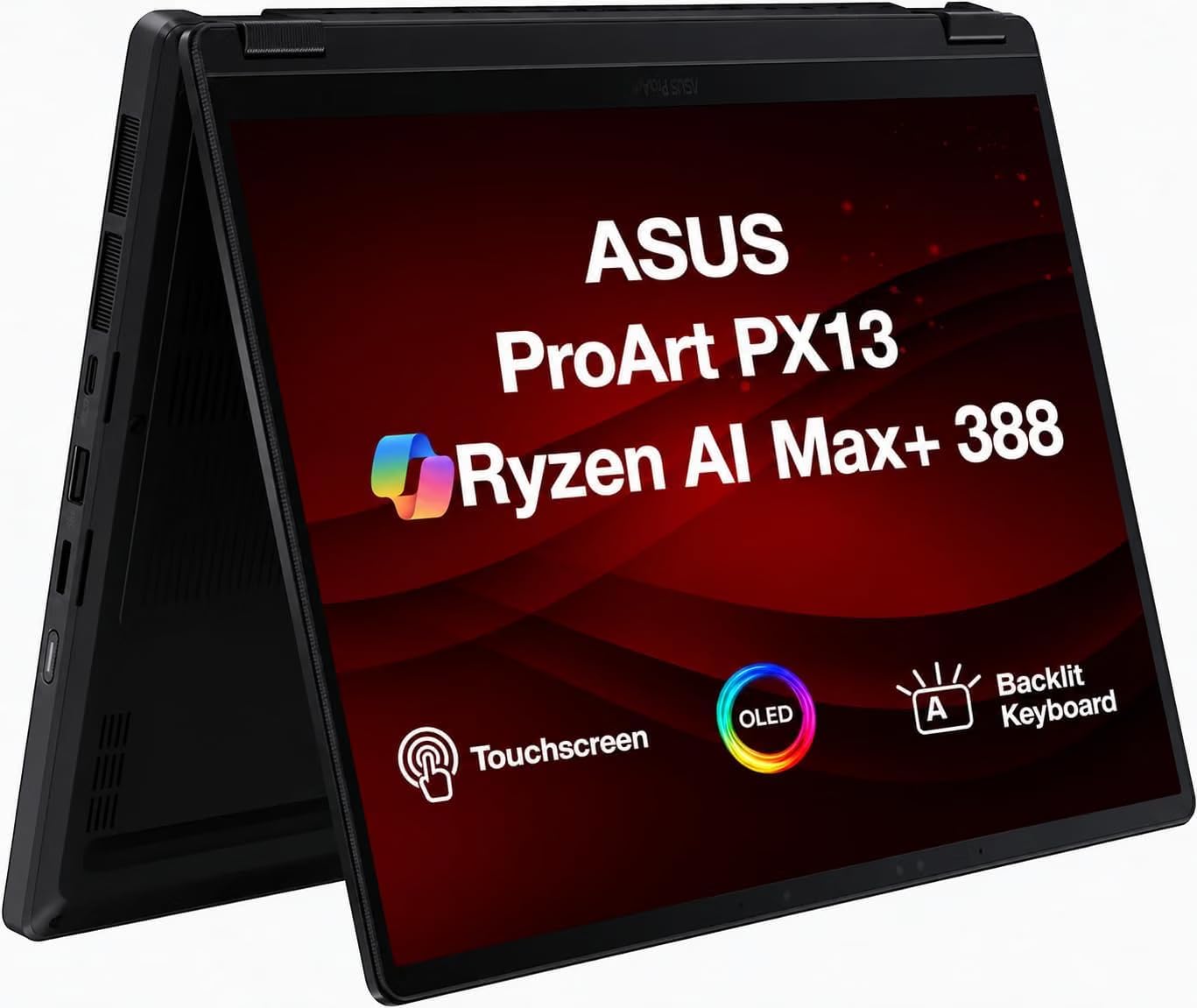
Spec sheet
ASUS ProArt PX13
- Processor
- AMD Ryzen AI Max+ 388 (8 Cores, 16 Threads, 3.60 GHz Base, up to 5.0 GHz, 32MB Cache)
- Graphics Processing Unit
- AMD Radeon 8060S Integrated Graphics (Shared Memory Architecture)
- Display Panel
- 13.3-inch OLED 2.8K (2880 x 1800), 60Hz, 16:10 Touchscreen
- System Memory
- 32GB Onboard LPDDR5X SDRAM (Soldered, Non-Upgradable)
- Storage Drive
- 512GB PCIe NVMe M.2 2230 Solid State Drive
- Battery & Charging
- 2-Cell 73 WHr Battery with 200W Power Supply Unit
- Wireless Connectivity
- Wi-Fi 7 (802.11be) and Bluetooth 5.4
- Physical Dimensions
- 11.8 x 8.4 x 1.0 inches
- Chassis Weight
- 4.10 lbs
- Operating System
- Windows 11 Pro 64-Bit
Figures as published by the manufacturer on the Amazon listing.
Ryzen AI Silicon and Processing Pipeline
At the architectural core of the machine lies the Zen 5 generation Ryzen AI Max+ 388 processor. Operating with an 8-core, 16-thread topology, this chip delivers a baseline frequency of 3.60 GHz with boost capabilities reaching up to 5.0 GHz when thermal headroom permits. Backed by a generous 32MB cache, the silicon demonstrates exceptional throughput in sustained compute-heavy tasks such as code compilation, multi-track audio processing, and raw asset rendering. In our architectural evaluation of the asus proart px13 laptop specs, this processor represents a substantial efficiency leap over previous mobile architectures, integrating dedicated AI acceleration hardware designed to service Windows 11 Pro background workloads and on-device generative tasks seamlessly.
Graphics rendering relies on the integrated AMD Radeon 8060S graphics engine, which draws from the unified system pool through a shared memory configuration. While integrated graphics historically represented a bottleneck for digital workflows, the Radeon 8060S leverages advanced microarchitecture to accelerate hardware-accelerated video decoding, multi-layer photo grading, and vector computation. Users considering an asus proart px13 for content creation will find that this integrated subsystem easily handles demanding timeline scrub runs and asset preview generation without the aggressive battery drain typically induced by power-hungry discrete mobile graphics chips. For stationary creators who need expansive multi-display canvases to evaluate high-complexity timelines, coupling this platform with an external desk monitor such as the asus proart pa34vcnv via the native video outputs delivers a true desktop-class visual workstation.
Sustained performance in dense 13.3-inch chassis depends directly on thermal management. ASUS equips the unit with a 200W power supply unit, signaling that the internal cooling solution and silicon power limits are configured for aggressive sustained performance envelopes rather than severely choked low-power profiles. When running sustained compute cycles, the thermal system must dissipate heat generated across both the CPU compute blocks and the graphics engine simultaneously. While users working on larger form factor workstations such as the asus pro art p16 enjoy larger dual-fan surface areas and expanded chassis volume, the engineering team here maximizes copper heat-pipe routing to prevent premature thermal throttling during complex render exports.
Display Accuracy and Visual Workflow Engineering
The visual centerpiece of the machine is its 13.3-inch 2.8K OLED display, providing a native resolution of 2880 x 1800 in an expansive 16:10 aspect ratio. The asus proart px13 2.8k oled panel delivers extraordinary spatial sharpness, producing an ultra-dense pixel arrangement that renders small interface typography and precise line art with crystalline clarity. Because OLED technology relies on self-illuminating pixels rather than a shared LED backlight array, it produces true absolute blacks, infinite static contrast ratios, and eliminates the distracting halo blooms common to IPS and mini-LED panels during dark-mode timeline navigation and HDR asset grading.
Beyond passive viewing, the display utilizes an adaptive touchscreen interface that transforms this convertible rig into a responsive digital sketching pad. The touch digitizer allows creative artists to work directly across the screen surface, executing gestural navigation, zooming, and direct pen or touch input without latency friction. The vertical headroom provided by the 16:10 aspect ratio significantly enhances timeline workspaces, providing crucial additional vertical canvas area for multi-track audio lanes, layered tool panels, and file inspectors that feel cramped on traditional 16:9 laptop panels.
One operational specification that analytical buyers must note is the 60Hz refresh rate. While gaming-centric displays routinely offer 120Hz or higher, this panel prioritizes static color fidelity and energy conservation over high-frame-rate fluidity. For visual production tasks—including color grading, editorial graphic design, layout proofing, and photo manipulation—60Hz remains the professional industry standard. Creators requiring a calibrated secondary display for standard color-space referencing can pair the convertible with an external studio panel like the asus proart pa248qv to establish a standardized, dual-screen color pipeline in stationary office settings.
Memory Architecture and Storage Implementation
System memory configuration is one of the most critical considerations highlighted in any rigorous asus proart px13 review. This model comes configured with 32GB of high-speed onboard LPDDR5X SDRAM. Because this memory is soldered directly to the motherboard substrate in close proximity to the processor package to maximize bandwidth and minimize latency, an asus proart px13 ram upgrade is physically impossible after manufacture. The listing confirms that 32GB represents the maximum supported memory allocation for the board design. For the vast majority of visual artists, audio engineers, and productivity professionals, a 32GB footprint offers comfortable operational headroom, accommodating simultaneous execution of heavyweight suites, local AI models, and dozens of browser tabs without excessive paging file activity.
Storage is serviced by a 512GB PCIe NVMe solid-state drive operating over high-speed PCIe bus lanes. Buyers must take note of the internal physical standard: the machine utilizes the ultra-compact M.2 2230 form factor rather than the standard M.2 2280 drive length. This shorter drive format is essential for maximizing battery pack volume inside a 13.3-inch 2-in-1 convertible frame, though it limits the immediate availability of high-capacity replacement drives compared to ubiquitous 2280 alternatives. The listing indicates that MichaelElectronics2 configures custom variations ranging from 512GB up to 2TB by opening the factory seal to perform certified component installations, backed by a specialized 3-year warranty covering their upgraded components alongside standard manufacturer warranty terms for unchanged parts.
The operational implications of this unified memory and storage pipeline are significant for content production:
- Zero-lag asset streaming from the high-throughput NVMe SSD directly into active memory arrays.
- Direct memory access for the Radeon 8060S GPU, allowing unified buffer pools between system processing and graphics compute blocks.
- Strict reliance on external drives or cloud sync solutions if long-term creative projects exceed the 512GB internal system volume.
I/O Connectivity and Power Distribution
Despite its small profile, the port selection on this chassis addresses professional deployment demands effectively. The asus proart px13 ports include an integrated full-sized HDMI output for connecting directly to boardroom projectors or external client monitors without requiring separate video dongles. Data ingestion from field cameras is streamlined via an integrated Micro SD reader, alongside a 3.5mm headphone and microphone combo jack for zero-latency audio monitoring. The physical port array is designed to maintain essential field connectivity without turning your mobile workstation into a tangled hub of external adapter bricks.
Wireless communication is anchored by state-of-the-art 802.11be Wi-Fi 7 networking, coupled with Bluetooth 5.4. Wi-Fi 7 enables significantly higher theoretical channel bandwidths, lower operational latency, and superior multi-link operations in congested corporate or campus RF environments. For professionals syncing massive high-resolution project archives to networked storage systems (NAS) or staging cloud backups from client studios, this network card delivers cutting-edge throughput that will remain relevant across upcoming networking hardware lifecycles.
Power management is anchored by a 2-cell 73 WHr battery pack, an exceptionally dense power reservoir for a laptop measuring under 12 inches wide. Evaluating real-world asus proart px13 battery life requires understanding the interplay between the power-sipping Zen 5 architecture and the high-density 2.8K OLED screen. Under standard clerical duties and low screen brightness, the 73 WHr pack delivers dependable runtime. However, continuous rendering, heavy AI model inferencing, or high-brightness HDR playback will quickly drain the cells. To support heavy workloads, ASUS includes a 200W power adapter that provides ample overhead to charge the battery rapidly while simultaneously running the silicon at full operational boost states.
Chassis Rigidity, Convertibility, and Thermal Execution
The structural execution of the chassis balances durability with versatile deployment modes. Finished in a professional Nano Black colorway, the asus proart px13 2-in-1 touchscreen architecture utilizes precision 360-degree hinges that allow the panel to rotate smoothly from a traditional clamshell layout into tent, stand, or full tablet orientations. In tent mode, the device minimizes desk footprint while exposing the bottom ventilation intake grilles for optimal cooling during long video renders. In tablet orientation, it functions as a rigid digital canvas, allowing direct interaction with the adaptive touch panel for sketching and photo retouching.
Physical dimensions measure 11.8 inches in length, 8.4 inches in width, and an even 1.0 inch in thickness, making it remarkably compact along its perimeter. However, potential buyers should recognize its total item weight of 4.10 pounds. While lightweight compared to traditional 15-inch and 16-inch mobile workstations, 4.1 pounds is noticeably dense for a 13.3-inch convertible. The extra mass stems directly from the reinforced chassis materials, the heavy-duty 360-degree hinge mechanisms, the dense 73 WHr battery pack, and the cooling assembly required to manage high thermal wattage.
Ergonomically, the standard backlit keyboard provides tactile key feedback for typing long design briefs or technical reports in low-light studios. The integrated webcam and microphone array ensure straightforward video conferencing for remote collaboration sessions, while Windows 11 Pro-64 provides enterprise-grade drive encryption, virtualization features, and management protocols right out of the box.
ASUS ProArt PX13 Pros and Cons
What works
- Zen 5 Ryzen AI Max+ 8-core processor
- Sharp 2.8K OLED 16:10 touchscreen
- Generous 32GB high-speed onboard memory
- Next-generation Wi-Fi 7 and Bluetooth 5.4
- Large 73 WHr battery with 200W adapter
What to weigh up
- Soldered onboard RAM prevents memory expansion
- Compact M.2 2230 SSD limits drive choices
- Dense 4.1-pound weight for a 13-inch laptop
Check ASUS ProArt PX13 on Amazon
Who Should Buy the ASUS ProArt PX13
Buy It If
- You need an ultra-compact 13.3-inch 2-in-1 convertible with an accurate 2.8K OLED display for photo editing, vector design, or client demonstrations.
- Your computational tasks benefit from AMD’s modern Zen 5 Ryzen AI Max+ 388 processor paired with 32GB of low-latency LPDDR5X memory.
- You require cutting-edge wireless standards like Wi-Fi 7 and Bluetooth 5.4 alongside a large 73 WHr battery in a travel-ready chassis.
- You value flexible field form factors, utilizing tent and tablet modes for direct touch manipulation and space-constrained workflows.
Skip It If
- You need user-accessible memory slots for expanding RAM beyond the factory-soldered 32GB threshold.
- Your primary workflows involve heavy 3D game engines or specialized CAD pipelines that strictly require a discrete NVIDIA workstation GPU.
- You demand an ultralight travel tablet, as the 4.1-pound structural weight feels heavy during extended handheld tablet use.
Final Verdict
4.7 / 5Amazon buyer rating
When evaluating whether the asus proart px13 is worth it, buyers must weigh its specialized hardware density against its fixed physical parameters. By pairing AMD’s 8-core, 16-thread Ryzen AI Max+ silicon with a breathtaking 2.8K OLED touch panel and a robust 73 WHr battery, ASUS has created a portable powerhouse that punches far above its physical dimensions. It bridges the divide between agile creative sketchpads and serious multi-threaded editing rigs, delivering a cohesive environment for technical creators who refuse to be tethered to a traditional desk.
Nonetheless, engineering a high-output convertible workstation always demands compromises. The soldered 32GB memory footprint cannot be modified down the road, storage expansion is restricted to the shorter M.2 2230 format, and its 4.1-pound total mass places it on the heavier side of the sub-14-inch category. If your production requirements align with these architectural specifications, the ASUS ProArt PX13 stands out as an exceptionally well-engineered machine capable of handling intensive digital workloads wherever your projects take you.
FAQ
Can you perform an ASUS ProArt PX13 RAM upgrade after purchase?
No, the system memory cannot be upgraded. The ASUS ProArt PX13 features 32GB of LPDDR5X SDRAM that is soldered directly to the motherboard to maintain high bandwidth and a compact footprint. The listing specifies that 32GB is both the installed and maximum supported memory configuration.
What graphics processor does the ASUS ProArt PX13 use?
The laptop utilizes integrated AMD Radeon 8060S graphics. Rather than featuring a separate dedicated graphics card with dedicated VRAM, the Radeon 8060S shares system memory dynamically from the fast 32GB onboard LPDDR5X RAM pool.
What type of solid-state drive is installed in this configuration?
This model is equipped with a 512GB PCIe NVMe SSD utilizing the compact M.2 2230 form factor. The listing notes that custom configurations up to 2TB are provided through certified component upgrades performed by MichaelElectronics2.
Does the display support touch input?
Yes, the 13.3-inch 2.8K OLED display features an adaptive touchscreen layer. Combined with the 360-degree convertible hinge mechanism, the screen can be rotated fully into tent, stand, or tablet configurations for direct touch interaction.
What is the battery capacity and charging wattage for this model?
The ASUS ProArt PX13 includes a 2-cell 73 WHr internal battery. It is accompanied by a heavy-duty 200W power adapter to support rapid charging and sustained processor boost states under high computational workloads.
See this listing on Amazon We may earn a commission if you buy through this link.
More in Computers & Laptops




The weekly shortlist
Specs worth reading, once a week
New teardowns, spec sheets and buying notes from across the desk.
This demo form is not connected to a mailing service.