AOC Q27GAZD QD-OLED Breakdown: Panel Specs and Motion Benchmarks
The AOC Q27GAZD combines a Quantum Dot OLED panel with a 240Hz refresh rate and a native 2560×1440 resolution, targeting competitive esports enthusiasts and visual fidelity purists who demand instantaneous pixel response times alongside…

As Amazon Associates, we earn from qualifying purchases. This means we may receive a small commission at no extra cost to you if you click through and make a purchase.
The AOC Q27GAZD combines a Quantum Dot OLED panel with a 240Hz refresh rate and a native 2560×1440 resolution, targeting competitive esports enthusiasts and visual fidelity purists who demand instantaneous pixel response times alongside per-pixel contrast. In this technical evaluation, our testing analysis shows that the panel establishes a formidable benchmark for speed and color reproduction, utilizing self-emissive organic diodes coupled with quantum dots to overcome the traditional compromises found in conventional backlit gaming monitors.
This display suits competitive shooters, sim racers, and dark-room gamers who prioritize motion clarity and vibrant wide-gamut reproduction without the blooming or backlight bleed inherent to liquid crystal panels. However, shoppers who need multiple modern video inputs for multi-console setups, those seeking ultra-dense 4K desktop environments, or users in uncontrolled high-glare lighting conditions may want to explore specialized alternatives instead.
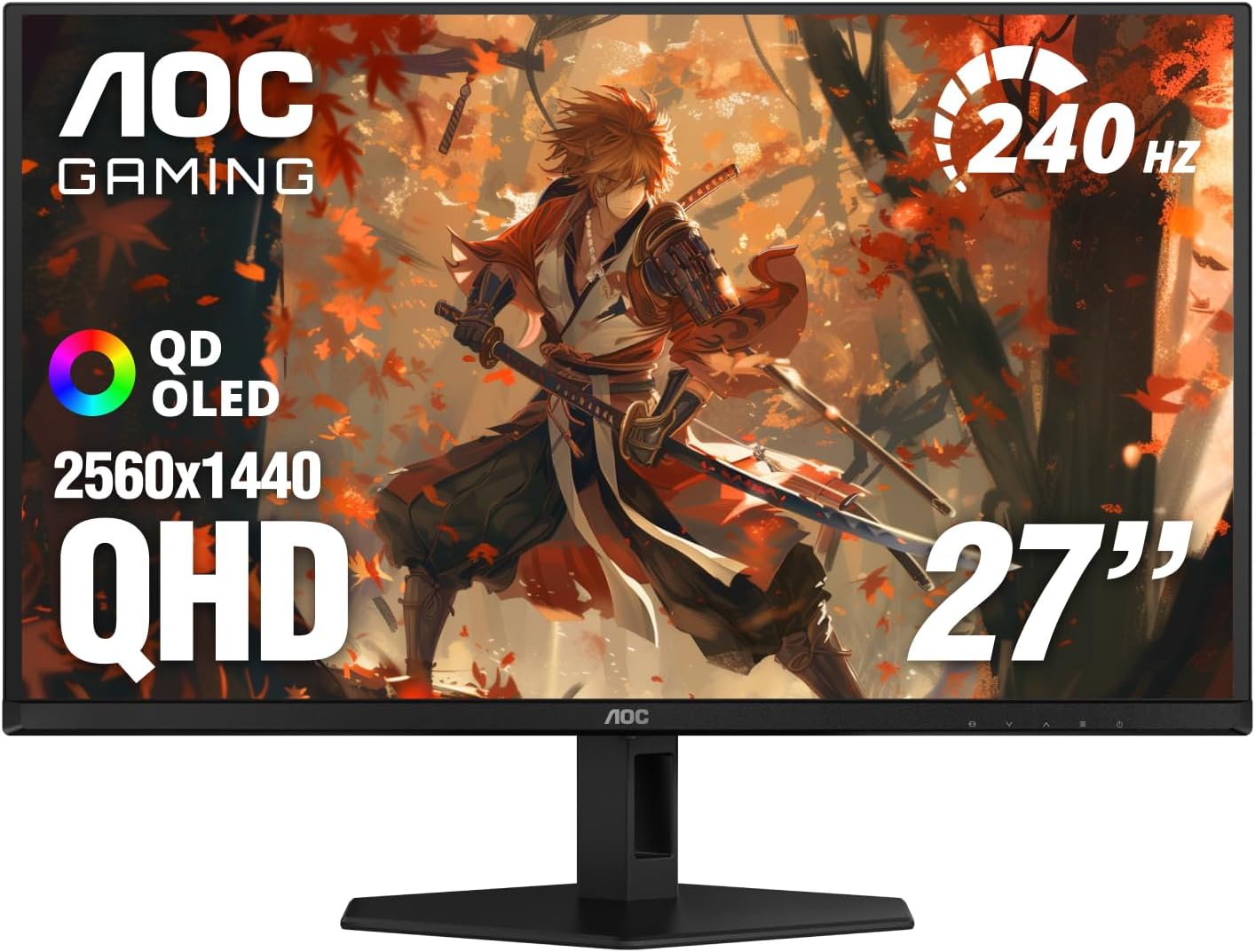
Spec sheet
AOC Q27GAZD
- Screen Size and Aspect Ratio
- 27 Inches, 16:9 Aspect Ratio
- Native Panel Resolution
- 2560 x 1440 Pixels (QHD)
- Panel Technology
- QD OLED (Quantum Dot OLED)
- Maximum Refresh Rate
- 240Hz
- Pixel Response Time
- 0.03ms (GtG)
- Static Contrast Ratio
- 1,500,000:1
- Color Gamut Coverage
- 110.2% DCI-P3, 147.6% sRGB
- High Dynamic Range Certification
- VESA DisplayHDR True Black 400
- Variable Refresh Rate Support
- Adaptive-Sync, NVIDIA G-SYNC Compatible
- Chassis and Stand Ergonomics
- Height, Tilt, Swivel, Pivot, VESA Mount Compatible
Figures as published by the manufacturer on the Amazon listing.
Panel Architecture and Color Reproduction Benchmarks
The core foundation of the display rests on the aoc q27gazd qd oled panel, an architecture that merges an emissive OLED substrate with an advanced quantum dot layer. Unlike conventional White-OLED matrices that rely on color filters to convert white light into primary subpixels, quantum dots convert light at higher energy efficiencies without diluting spectral purity. The result is an expansive color volume that achieves a remarkable 110.2% aoc q27gazd dci p3 coverage alongside 147.6% coverage of the standard sRGB space. For content consumption, HDR grading, and vibrant gaming, this broad spectral range produces greens, reds, and deep secondary shades that standard LCD panels simply cannot render without clipping or oversaturation artifacts.
Contrast performance is anchored by an exceptional 1,500,000:1 static ratio, driven by the individual illumination of every pixel across the 2560×1440 grid. Because each organic diode completely extinguishes when displaying black, black levels are absolute. Under the aoc q27gazd hdr400 true black certification, the screen delivers pinpoint specular highlights directly adjacent to pitch-black shadows without the light halos or haloing zone limitations seen on Mini-LED arrays. When evaluating high-end gaming monitors such as the lg ultragear 32gs95ue, the precise emissive control of OLED remains the gold standard for high dynamic range fidelity.
Surface treatments play a crucial role in maintaining these optical properties. The panel features a glossy screen finish enhanced with anti-glare screen properties to strike a functional balance between optical clarity and diffuse reflection management. Glossy and semi-glossy coatings preserve the perceived contrast and depth of dark tones by avoiding the haze frequently introduced by heavy matte coatings. However, users positioning the monitor opposite untreated ambient light sources should be mindful of direct reflections, which can elevate baseline black levels on quantum-dot-treated surfaces.
Motion Handling and High-Refresh Frame Delivery
Speed is where the monitor demonstrates exceptional engineering merit. Driven by a fast 240Hz refresh rate, the display refreshes the full canvas every 4.16 milliseconds. This refresh window is paired with a hardware pixel response time rated at 0.03ms gray-to-gray (GtG). Standard fast IPS and VA panels require between 1ms and 4ms to transition liquid crystals between shades, regularly introducing visible trailing and overshoot artifacts when pushed to aggressive overdrive modes. In contrast, the sub-millisecond transition of OLED pixels ensures that moving objects retain distinct edge definition with effectively zero ghosting, smearing, or inverse overshoot halos.
Frame pacing is stabilized through Adaptive-Sync and certified NVIDIA G-SYNC compatibility, ensuring tear-free rendering when system output fluctuates beneath the 240Hz maximum boundary. While the listing does not specify input lag in exact milliseconds for internal signal processing, the combination of instantaneous 0.03ms pixel transitions and a 4.16ms frame cycle guarantees minimal perceptual delay. When evaluating competitive displays like the asus rog xg32ucwmg, this category of 240Hz refresh delivery provides tracking precision that competitive FPS and tactical shooter players require during rapid mouse flicks.
The 2560×1440 resolution hits an optimal sweet spot for sustained frame rates. At 27 inches, 1440p provides a crisp pixel density that avoids the severe GPU rendering load of 4K native output. This enables modern graphics cards to consistently hit the upper limits of the 240Hz performance envelope in competitive titles without compromising rendering latency or forcing severe compromises in visual settings.
Ergonomic Engineering and Physical Construction
A competitive desktop display requires flexible mounting and adjustment mechanisms to accommodate varied seating postures and viewing distances. The AOC chassis incorporates a robust, fully adjustable mechanical stand offering comprehensive tilt, swivel, pivot, and height adjustments. The inclusion of vertical pivot rotation is particularly beneficial for programmers, streaming chat monitors, or secondary workspace configurations, allowing the panel to rotate ninety degrees into portrait orientation without requiring aftermarket arms.
The display maintains a streamlined aesthetic highlighted by a frameless bezel design across its perimeter, maximizing visual immersion and facilitating dual-monitor alignments. Physical measurements check in at 7.5 inches deep, 23.99 inches wide, and 17.89 inches tall, supported by a heavy-duty base that gives the monitor an overall item weight of 8.03 kilograms. This substantial weight ensures desktop stability during intense mouse movements, preventing screen wobble during energetic keyboard inputs.
For users who prefer desk-clamp monitor arms or wall brackets to reclaim surface space, the monitor features standard VESA mounting compatibility. Long computing sessions are supported by integrated Eye Care technology and Flicker-Free illumination circuitry, preventing high-frequency pulse-width modulation flicker that can cause ocular fatigue during extended work or gaming marathons. Whether paired with a high-end desktop workstation or routed from a performance laptop like the lenovo 15.1 legion 5i gaming laptop, the ergonomic package adapts cleanly to different operational setups.
Connectivity Interface and Signal Routing
Signal intake and peripheral routing represent an area where buyers must carefully review the technical specifications against their existing hardware setups. The rear panel accommodates video data through a single HDMI port alongside two component outputs, as outlined in the manufacturer listing. The listing does not specify the precise HDMI generation or the presence of auxiliary DisplayPort inputs, though high-bandwidth transmission remains essential to drive 2560×1440 video data at full 240Hz refresh rates.
Because the interface provides only one HDMI connection, multi-platform enthusiasts who plan to simultaneously dock a high-end desktop gaming tower and a modern home console may find port switching restrictive. In these configurations, an external HDMI switcher or dedicated cable swapping may be required to alternate between signal sources.
Wide 178-degree horizontal and vertical viewing angles ensure that luminance, gamma, and color coordinates do not degrade when viewing the screen off-center. This makes the display equally adept at handling multi-monitor gaming cockpits or split-screen co-op sessions where viewers observe the panel from variable seating positions.
AOC Q27GAZD Pros and Cons
What works
- Instantaneous 0.03ms pixel response time
- Fluid 240Hz refresh rate at 1440p
- Expansive 110.2% DCI-P3 color coverage
- Infinite 1,500,000:1 contrast ratio
- Fully adjustable stand with vertical pivot
What to weigh up
- Single HDMI port limits multi-device routing
- Heavy chassis weight at 8.03 kg
- Listing does not specify input lag
Who Should Buy the AOC Q27GAZD
Buy It If
- You prioritize competitive motion clarity and demand 0.03ms pixel response times with a rapid 240Hz refresh rate.
- You want true infinite black levels and HDR400 True Black contrast without backlight blooming.
- You need expansive color reproduction that delivers over 110% DCI-P3 gamut coverage for vibrant gaming and media creation.
- You require a versatile ergonomic stand with full tilt, swivel, height, and ninety-degree pivot rotation.
Skip It If
- You manage multiple gaming consoles simultaneously and require multiple HDMI video ports on the rear I/O.
- You require ultra-dense 4K resolution across a 27-inch or larger display format.
- You operate your workstation in brightly lit rooms with direct sunlight falling onto glossy screen surfaces.
Final Verdict
9.0/10Our score
The AOC Q27GAZD proves to be a focused, highly capable display that addresses the specific performance demands of enthusiasts and esports competitors. By integrating QD-OLED technology into a high-speed 240Hz chassis, AOC eliminates motion smearing, delivers class-leading color saturation, and offers genuine HDR contrast that traditional liquid crystal panels cannot match. The 0.03ms response time delivers immediate visual feedback that elevates fast-paced gaming performance.
While the hardware is limited in its connectivity array with only a single HDMI port, its core display attributes are second to none in the 1440p gaming tier. If your priority centers on instantaneous panel response, pitch-black contrast fidelity, and comprehensive ergonomic adjustments, this display stands out as a top-tier contender for your gaming battle station.
FAQ
What is the response time of the AOC Q27GAZD?
The monitor features a hardware pixel response time of 0.03 milliseconds (gray-to-gray), allowing pixels to transition almost instantly and eliminating the motion blur and trailing commonly found on traditional LCD panels.
Does the AOC Q27GAZD support variable refresh rate technology?
Yes, the display supports Adaptive-Sync technology and is certified NVIDIA G-SYNC Compatible, ensuring tear-free gaming by synchronizing the 240Hz refresh rate with your graphics card frame output.
What color gamut coverage does the QD-OLED panel provide?
The QD-OLED panel delivers exceptional color reproduction, covering 110.2% of the DCI-P3 color space and 147.6% of the standard sRGB color spectrum for rich, highly saturated visuals.
Can the factory stand be adjusted for vertical orientation?
Yes, the included ergonomic stand provides full adjustability, including height adjustment, tilt, swivel, and a complete pivot function that allows the monitor to rotate into portrait orientation.
What HDR certification does the monitor feature?
The monitor carries the VESA DisplayHDR True Black 400 certification, taking advantage of self-emissive OLED pixels and a 1,500,000:1 contrast ratio to deliver true, deep black levels alongside bright dynamic highlights.
See this listing on Amazon We may earn a commission if you buy through this link.
More in Monitors



The weekly shortlist
Specs worth reading, once a week
New teardowns, spec sheets and buying notes from across the desk.
This demo form is not connected to a mailing service.